
APPS
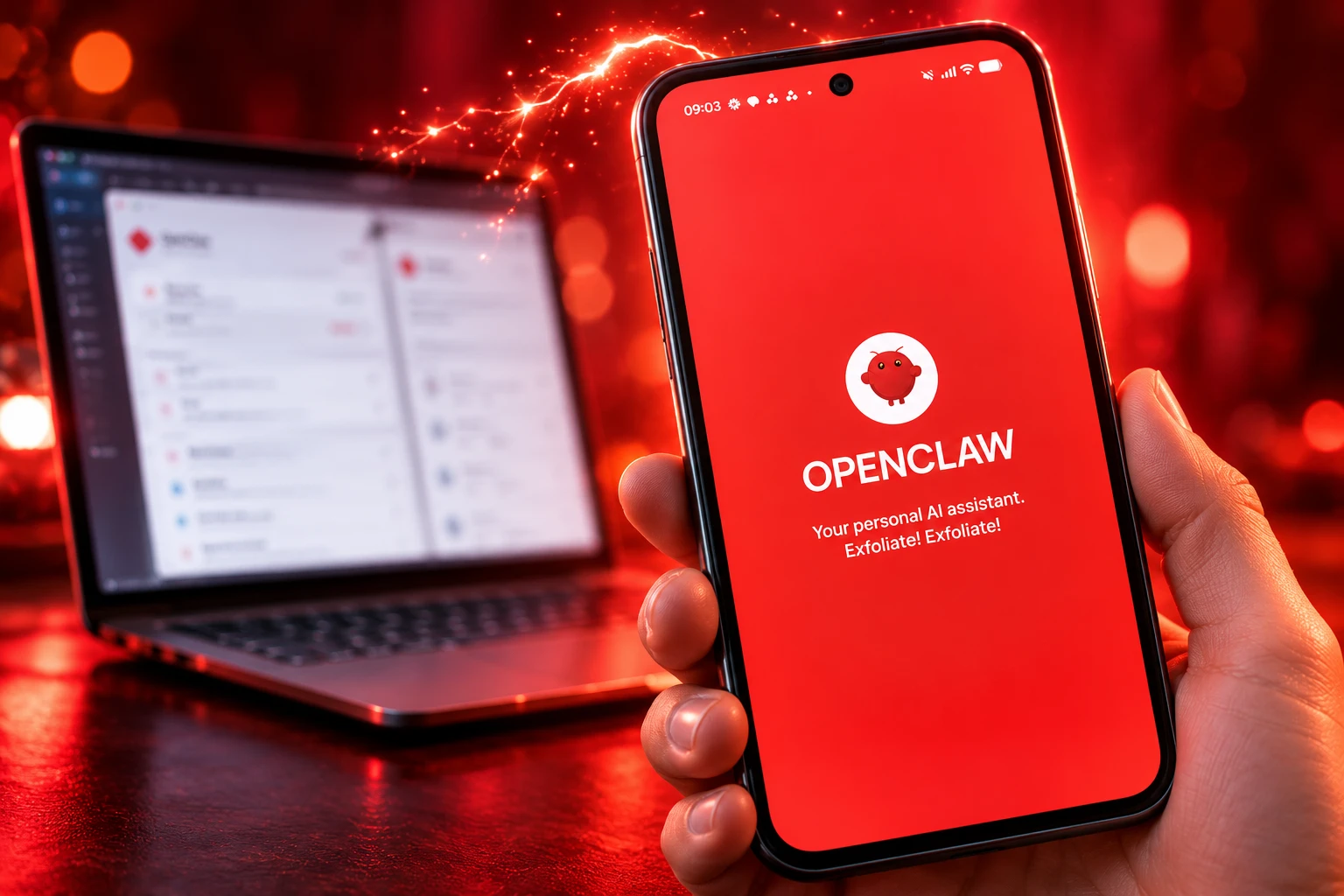
OpenClaw’s Phone Apps Still Need a Running Gateway
OpenClaw’s official iOS and Android apps still pair to a Gateway you host, and a 4.0 Play rating shows how that handshake lands.

OpenClaw’s official Android app holds a 4.0 rating on Google Play, with 100K+ downloads, and it still pairs to a Gateway you run yourself. Apple put the iOS build on the App Store on June 24, 2026, and the project announced both apps on June 29.
The pitch is a native pocket client for a self-hosted agent. The product you install is a node. Chat, Talk mode, and action approvals only work while that host stays reachable.
The Phone App Talks to a Gateway
OpenClaw is an open-source agent that lives on your hardware and meets you in apps you already use, including Telegram, WhatsApp, Discord, Slack, and iMessage. Creator Peter Steinberger first wired a phone to a coding agent on a Mac in November 2025 because he wanted to check that work away from the desk.
The store apps complete that loop on paper. The Play listing from the OpenClaw Foundation tells you to pair the Android package ai.openclaw.app with a private Gateway, then use chat, realtime Talk with push-to-talk, action approvals, and optional camera, screen, location, and notification access. Device access uses the phone’s normal permission prompts. Keys, config, and model routing stay on the Gateway.
iOS follows the same split. The App Store listing for iPhone also covers iPad and Apple Watch, with a share sheet, an Activity widget, and Watch controls on top of chat and Talk. Neither build runs the agent on the handset. A laptop that sleeps, or a home server with no public URL, leaves the new icon idle.
That is local-first AI still showing its limits in the one place a consumer app is judged: a phone that cannot host the Gateway. Play’s data-safety form says no data is shared with third parties, that the app may collect app activity, and that data is encrypted in transit. The catch lives one hop away, on the machine you already had to set up.
Pairing Begins on the Machine You Already Run
Official docs treat pairing as an owner-approval step, not a login. Nodes join with role: node. The Gateway then creates a device request you have to allow from the host. A setup code is a short-lived payload with the WebSocket URL (ws:// or wss://) and a bootstrapToken. Docs say to treat that code like a password while it is valid.
The default listen port is 18789. Guides tell you to run the Gateway on macOS, Linux, or Windows through WSL2, then point the phone at a LAN address, a Tailscale mesh, or a manual URL. Same-LAN discovery can find a Gateway over Bonjour. Remote use usually needs TLS. Android keeps the socket alive with a foreground service and a persistent notification.
THE HOST-SIDE PAIRING STEPS
- Start the Gateway: Bring the host process up on a Mac, a Linux box, or Windows via WSL2 before you open the phone app.
- Mint a code: Generate a QR or setup code that carries the WebSocket URL and a single-use bootstrapToken.
- Scan or paste: In the app, use Setup Code or Manual mode; if discovery fails, enter host and port by hand.
- Approve on the host: You still have to approve the node device request with openclaw devices list and openclaw devices approve.
- Optional Telegram path: Docs recommend iOS users message /pair to a bot, paste the code in Settings, then send /pair approve.
GitHub issues from spring and early summer show where that handshake breaks. One Android build read a token field while the Gateway emitted bootstrapToken, so pairing died with token_missing. Another treated ws:// as a hostname and resolved http://ws:18789. Play Store build v2026.4.5 was reported as speaking an older protocol than Gateway 2026.5.12 and later. On June 30, a /pair qr run was reported to flip gateway.bind and knock Tailscale Serve webchat into HTTP 502.
What Google Play Says the App Can Do
The listing is honest about the split, if you read past the store-hero language. Every phone feature is a window into a process that is not on the phone.
WHERE EACH FEATURE ACTUALLY RUNS
| Feature in the store copy | What has to be running |
|---|---|
| Chat with history | Gateway reachable over a WebSocket |
| Realtime Talk and push-to-talk | Gateway plus microphone access on the phone |
| Review and approve Gateway actions | A paired node plus the host still online |
| Camera, screen, location, alerts | OS permission on the phone, execution on the Gateway |
| Push wakes and node status | A live node session against that same host |
| Memory, skills, and model calls | The host only; the handset does not infer |
iOS adds sharing from the system share sheet, plus Watch and widget surfaces. Android setup notes talk about a Connect tab, chat, voice, and a Screen path for device-aware work. None of that replaces onboard. If this is a new install, you still finish openclaw onboard on the computer first.
A 4.0 Rating After 100K Downloads
The Android package shows 100K+ downloads on Google Play and a 4.0 rating from 241 reviews. That is a passing consumer score for a companion that cannot do anything until a server you maintain answers on 18789.
THE PLAY STORE SNAPSHOT
- Rating: 4.0 from 241 reviews on the Play ratings widget.
- Install base: 100K+ downloads for package ai.openclaw.app.
- Last store update: July 30, 2026, with a Settings repair assistant in the notes.
- Publisher: OpenClaw Foundation, the same seller on the iOS listing.
Reviews that landed after launch still orbit the host. One late-August note said the app and Gateway were out of step, so provider lists, usage, wake-word listening, and dictation setup failed, and the reviewer could not run a shell from the phone. Another user connected, then found the agent could talk and read notifications but could not act. A third had to plug in a Bluetooth keyboard because the first screen would not scroll and hid Continue, a miss they only spotted after installing on a tablet.
Those are not taste complaints about a lobster palette. They are what a store review looks like when a node client and a fast-moving Gateway drift apart.
Steinberger Called the Apps a Start
Steinberger built the first prototype in about an hour so he could prompt agents from a phone. By February 2026 he was working at OpenAI, and the code moved under an independent 501(c)(3) OpenClaw Foundation. The June 29 store drop therefore arrived with a halo the Discord volunteer build never had.
The next morning he quoted a designer who had called the iOS screens an abomination, then answered the pile-on in public.
Is the app great yet? No. It’s a start. It was built by the community. Getting the iOS and Android apps working with secure pairing and push notifications took a surprising amount of work.
Peter Steinberger, OpenClaw creator, on X, June 30, 2026
He wrote that OpenClaw is an independent Foundation project, that OpenAI sponsors token usage, and that the designer’s post was one of about 30 he woke up to. Colin, a volunteer who did much of the iOS UI, asked people to roast the work in Discord instead of treating a maintainer as a studio. Designers posted redraws the same week. The fight was never only about rounded corners. Shipping through App Review, with Microsoft demoing OpenClaw on Windows and OpenAI paying inference, made a volunteer v1 look like a funded product.
The MIT-licensed OpenClaw source repository is the other half of that mismatch. GitHub shows 390k stars on openclaw/openclaw, native apps for macOS, iOS, Android, Windows, and Linux, and a desktop build already on v2026.9.4. The phone clients sit in apps/ios and apps/android of the same tree. Store review is slower than git.
Play Store Still Ships a July Build
The Foundation did answer the timeline. It did not answer it in the one place Android users pull updates.
THE STORE AND GATEWAY CALENDAR
- June 24, 2026: Apple lists the iOS app, five days before the public announce.
- June 29, 2026: @openclaw posts that native iOS and Android apps are live.
- June 30, 2026: Steinberger calls the apps a start after a night of design attacks.
- July 6, 2026: The project account says it listened, citing an iOS redesign, Android localization,.local Gateways, and better QR, TLS, and auth recovery.
- July 14, 2026: v2026.7.1 ships with 3,063 contributions from 532 people and “major iOS, Android and MacOS app work,” plus a note that the iOS experience had been bumped.
- July 30, 2026: Play’s last listed update adds inline audio and video, session dashboards, chat rewind and fork, a Settings repair assistant, Wear instant Talk, and fixes for reconnect state, Talk transcripts, manual Gateway ports, large-text onboarding, and Wear pairing.
- September 11, 2026: The Gateway and desktop line move to v2026.9.4 while the Play listing is still dated July 30.
A repair assistant and manual-port fixes are the changelog admitting setup is the product. They do not close a gap where the host is already two version families ahead of the binary Google will install. Sideloading a signed OpenClaw-Android.apk from a GitHub Release is the escape hatch for people who read checksums. It is not how a 100K+ listing behaves for everyone else.
The June 29 post is still the canonical store pointer:
OpenClaw is now on iOS + Android 🦞
📱 Native mobile apps, finally
💬 Agents in your pocket
🔔 Channels, tasks, replies on the goRun agents from wherever your thumbs are.
iOS: https://t.co/7LHHc9htgM
Android: https://t.co/X0Wuh2uA8w— OpenClaw🦞 (@openclaw) June 29, 2026
Indie Clients Took the Pocket Job
OpenClaw already had a mobile interface before these binaries. Channels put the agent in Telegram and WhatsApp, which is how most people first talked to it on a phone. The native apps had to be better than those threads. Pairing friction and version skew mean many sessions never leave the chat app that needed no QR.
Replacement iOS clients now advertise Tailscale-only routes and a three-step setup code because the official app still drops connections and feels rough in daily use. Other operators are moving agents onto mobile-first shells that are not the Foundation’s store listing. A third path, voice companions that scan a QR to a desktop helper, treats OpenClaw as a backend and skips the official UI altogether.
That market only exists because the official node did not close the original job. Steinberger wanted a phone that could reach the agent. The stores now have an OpenClaw icon. The agent still lives on a host that must be awake, paired, and close enough in version that Talk mode, provider lists, and approvals do not go blank.
Google Play still shows a July 30, 2026 update for the Android app. The Gateway line is on v2026.9.4. Until a store build matches the host people actually run, a lot of them will keep talking to the same lobster inside Telegram.

OpenAI’s 372 Math Results Force Departments to Rethink Hiring

Instagram Plus Tests a Read-Only Mode That Cuts Stories

Altman Asks the Public to Accept Some AI Harm

Google Freezes OSS VRP Product Reports After AI Flood

AI Agents Make Payment Rails the Scarce Prize

Fable 5 Came Back Under a Commerce On-Off Switch

Google’s SpaceX GPU Lease Has a Sept. 30 Deadline

Plasma One’s XPL Locks Face a 1.81 Billion Cliff

DGO’s Rs 549 World Cup Pass Cost Fans Sleep and Data

Moonshot AI’s $30 Billion Ask Became a $35 Billion Close
-
 AI4 months ago
Fable 5 Came Back Under a Commerce On-Off Switch
-
 AI5 months ago
Google’s SpaceX GPU Lease Has a Sept. 30 Deadline
-
 CRYPTO5 months ago
Plasma One’s XPL Locks Face a 1.81 Billion Cliff
-
 APPS5 months ago
DGO’s Rs 549 World Cup Pass Cost Fans Sleep and Data
-
 AI5 months ago
Moonshot AI’s $30 Billion Ask Became a $35 Billion Close
-
 NEWS5 months ago
ColorOS 17 Device List Spans Oppo, OnePlus and Realme
-
 GAMING4 months ago
The RTX 4050 Under Rs 70,000 Hides a Wattage Gap
-
 AI4 months ago
Boris Cherny’s Loops Still Demand a Higher Production Bar