
GADGETS
Flipper’s Busy Bar Is a $199 Open Display Node
Flipper’s Busy Bar sells for $199 as an open HTTP API desk node with Matter and GPLv2 firmware, far above a $50 USB busy light.

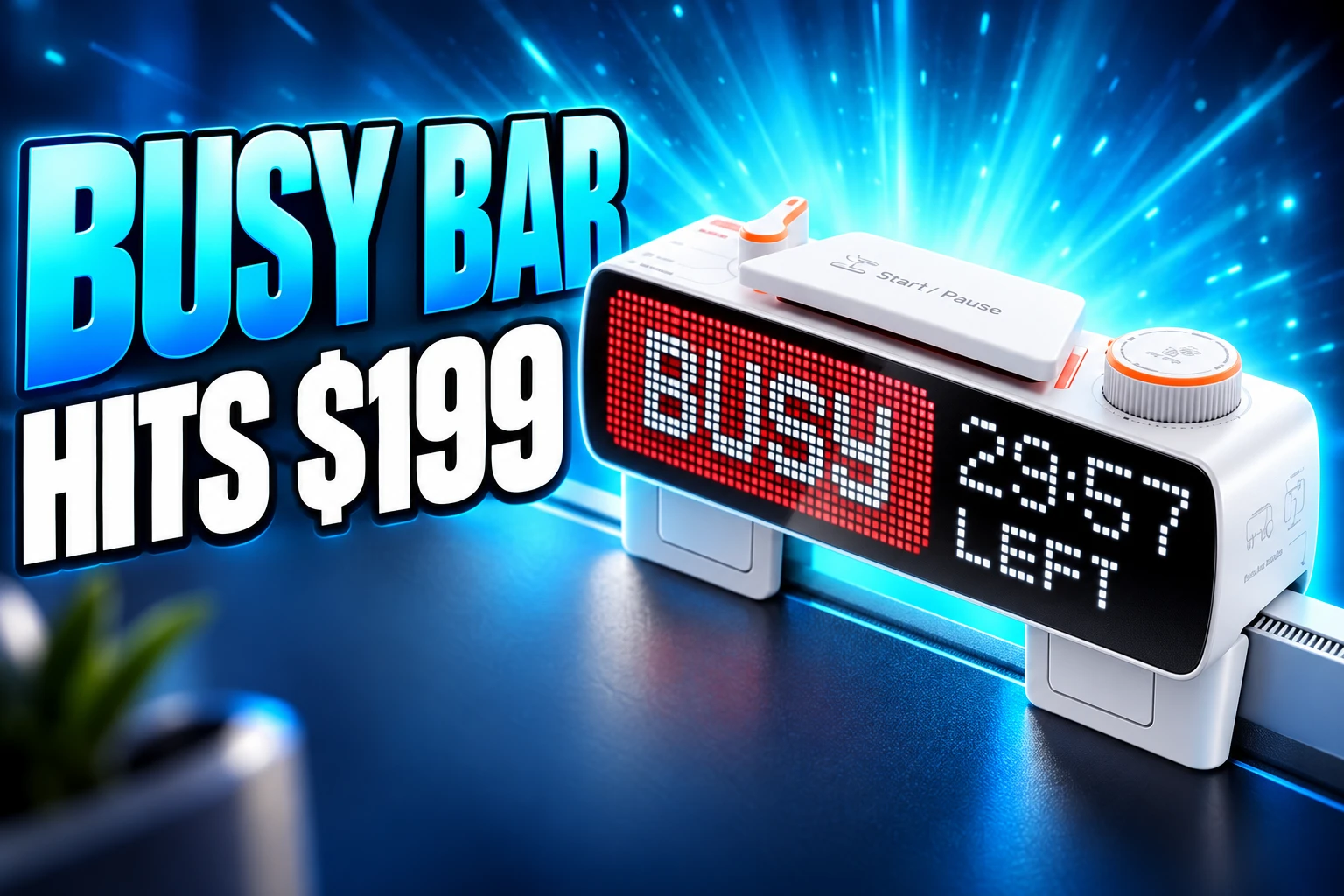
Flipper Devices sells the Busy Bar for $199, $50 below its $249 list, as a dual-screen desk gadget that defaults to a red BUSY sign. The store page still prints the higher number, then cuts it by the labelled 20 percent, and ships from Los Angeles in about 1-3 business days.
That sign is stock firmware. Under it sits a local HTTP server, a Matter on/off endpoint, and a 72×16 RGB matrix that already runs things Flipper never put in the box.
Flipper Priced a Status Light Like a Computer
Pavel Zhovner, Flipper’s co-founder and CEO, framed the product in April 2025 as a way to cut interruptions after context switching had burned him in his own office. Flipper said then that Flipper Zero had sold more than 500,000 units and brought in more than $100 million since 2020. Amazon had pulled Zero listings in 2023 after treating the NFC reader as a card skimmer, and the Busy Bar is the first Flipper device that does not speak radio.
We aim to create a fun, customizable, and practical tool that helps you maintain deep focus.
Pavel Zhovner, co-founder and CEO, Flipper Devices
The hardware is closer to a small computer than to a USB lamp. The front is a 6.35-inch 72×16 RGB LED matrix at 800 nits and 60 Hz. The back is a 1.54-inch monochrome OLED at 160×80 with 16 gray shades, so you can still read the timer when the matrix faces the room. An STM32U5 Cortex-M33 at 160 MHz owns the UI, with 2 MB of flash, 2.5 MB of SRAM, and 8 GB of eMMC. A Silicon Labs SiWG917 runs 2.4 GHz Wi-Fi 6 with WPA3 and Bluetooth Low Energy 5.4. A 3250 mAh 18650 is rated for 8 hours of active status and 2 weeks on standby. The whole brick is 168.6 x 55.2 x 40.8 mm and 250 g, and it clips onto monitors up to 21 mm thick.
WHAT THE BAR SHIPS
- Front matrix: 6.35-inch 72×16 RGB panel, 16 million colors, 800 nits, auto brightness from a light sensor.
- Back panel: 1.54-inch OLED that mirrors the front and shows battery, Wi-Fi, Bluetooth, and USB state.
- Controls: five-position mode selector, Kailh Choc V2 start/pause, scroll wheel, back button, two RGB status lamps, 0.8 W speaker.
- In the box: the bar and a USB-C cable; the charger is sold separately, and extra mounts start at $10.
A five-position switch picks BUSY, CUSTOM, sleep, a clock app, and settings. BUSY and CUSTOM are the same timer with different defaults. The official focus loop is a 25-minute work block and a 5-minute break. Companion software on Android, iOS, Windows, and macOS can mute notifications and block chosen apps, and the bar can flip to an on-call face when a computer mic or camera wakes up.
Plug In USB and the Bar Becomes a Server
Plug the USB-C port into a computer and the bar appears as a virtual Ethernet gadget at a fixed 10.0.4.20, printed on the back of the unit. The web UI is at that address, the live OpenAPI 3.1 reference is at /docs, and every control the UI has also lives under /api. No token is required on USB. Wi-Fi access starts off and needs a 4-10 digit numeric key, sent in an X-API-Token header over plain HTTP on the LAN. Flipper’s cloud path at api.busy.app wants a bearer token.
A power call is enough to see the shape of the interface. curl -s http://10.0.4.20/api/status/power returns JSON with battery charge, millivolts, and milliamps, so you can graph the cell without extra probes. Drawing is a POST of text and image elements tagged with an application_name; a first script that writes BUILDING in the small font at x=2, y=4 is a complete app. The official Python client for the HTTP API maps those paths onto method names, ships a converter for images and audio, and discovers bars on mDNS as _busybar._tcp. TypeScript is first-party as well. Units leave the factory on firmware 1.0.2, which speaks API 24.3.0; the Python client targets API 27.5.0 on firmware 1.2.3, so the setup wizard’s first job is an update.
Flipper opened sales with Matter support and an offline HTTP API already in firmware, which is the part of the pitch that survives if you never install the phone app. MQTT is documented, official Kotlin libraries joined the public GitHub org in late September, and the same HTTP surface is what Home Assistant talks to when Matter’s on/off stub is not enough.
Why a Luxafor Flag Still Wins Some Desks
Office busy lights already exist, and they cost office-light money. A Luxafor Flag 2 is $49.99. A Kuando Busylight UC Omega is $44.49. Both are USB RGB lamps that track Teams, Zoom, or a softphone and need no 18650. The Busy Bar’s $249 list is five times the Flag 2. Even at the sale price, you are buying a matrix, an OLED, Wi-Fi 6, and a documented server, not a nicer red LED.
STATUS LIGHTS AT THE DESK
| Device | Street price | Display | Local control | Matter |
|---|---|---|---|---|
| Flipper Busy Bar | $199 ($249 list) | 72×16 RGB plus 1.54-inch OLED | HTTP on USB and Wi-Fi | Certified on/off endpoint |
| Luxafor Flag 2 | $49.99 | 6 RGB LEDs | Desktop app, webhooks, Stream Deck | No |
| Kuando Busylight UC Omega | $44.49 | 360° RGB dome | UC presence software | No |
If the job is “turn red on a call,” the Flag 2 is the rational SKU. The Busy Bar only makes sense if you want the matrix to show a countdown, pixel art, a CI status, or a Home Assistant payload, and if you will actually write or install that extra layer. Flipper currently sells the bar for $199 with 30-day returns, which lowers the dare without changing the category.
One Matter Switch for a Dual Display
The Connectivity Standards Alliance issued a Matter certificate dated February 17, 2026, to Flipper FZCO as certificate CSA260HLMAT50041-24, Matter 1.4.1 over Wi-Fi, vendor ID 0x158A, product ID 0xBB01, primary device type 0x0100. In a hub it shows up as a single on/off endpoint. Turn it on and the BUSY timer starts. Turn it off and the timer ends. State reporting back into Matter is a separate toggle under Settings, Smart home. Pairing is a QR code on the rear OLED, and the bar can join more than one fabric at once.
BUSY Bar is now Matter® certified!
This guarantees compatibility and proper operation with most smart home systems (Apple Home, Google Home, Home Assistant and more). pic.twitter.com/NG8dpIRCjQ— BUSY – Advanced Focus Timer (@BusyFocusApp) February 23, 2026
That is enough to dim lights, pause a speaker, or lock a door when a session begins, which is the demo Flipper keeps using. It is not enough to push a washing-machine notice or a calendar title onto the 72×16 panel. For that, Home Assistant uses REST against /api/display/draw after you enable the LAN API over USB. A native Home Assistant integration has been described as on the way and is not what ships. Matter is the compatibility sticker. The display bus is still HTTP.
Doom Fits on 72 Pixels, Barely
The stock apps are a focus timer, a clock, and a draw tool. The interesting catalog is unofficial, because the firmware is the same FBT tree Flipper uses on the Zero, with FreeRTOS, lwIP, TinyUSB, Mongoose, LVGL, and JerryScript already linked. Custom JS loaders are still thinly documented, so most of the extra software talks to the bar from a laptop.
WHAT OUTSIDERS ALREADY RUN
- LiveSplit: speedrun split times on the matrix, driven by a small helper that treats the bar as a stage clock.
- Two-screen Doom: a port that paints the 72×16 face and the 160×80 OLED at once, which only makes sense if you think of the hardware as a canvas.
- BarPilot: a single HTML file that claims all 53 documented endpoints, plus playlists and pixel stamps, because the official Windows surface is still thin.
- REST in Home Assistant: custom text on the matrix when a washer, a CI job, or a calendar fires, using the same draw payload the Python client sends.
Those projects are the second product. A reviewer who built a Spotify face against the local API made the same point without calling it a strategy: once the HTTP server is up, the BUSY legend is one application_name among many. The phone app, by contrast, mostly mirrors the timer and posts a lock-screen countdown through Flipper’s cloud, and that layer is where the finish still looks rushed next to the clicky hardware.
Pull Eight Clips and the Cell Comes Out
Flipper put the GPLv2 firmware you can build yourself on GitHub, flashable over the same USB Ethernet interface with./fbt flash_usb. It also published an official iFixit disassembly guide. The back cover is eight clips and a plastic card. Five PH1 screws follow. The 18650 sits on a press-latch 4-pin connector and is meant to come off before any display flex. Nothing is glued. For a 2026 desk gadget, that is the same repair stance as the Zero, minus the radio board that got Flipper in trouble.
HOW THE BAR GOT TO DESKS
- April 10, 2025: Flipper announces the Busy Bar at a $249 target and talks up a later Kickstarter that never becomes the main storefront.
- February 17, 2026: the Alliance certifies the bar for Matter 1.4.1 over Wi-Fi.
- June 29, 2026: Flipper sets a July 14 sale, $179 for the waitlist, $199 for the first 3,000 units, and $249 after that.
- July 14, 2026: shipping starts to the United States, the EU, the United Kingdom, and Canada.
The LAN API’s numeric PIN is a short keyspace on unencrypted HTTP, and the schema even allows an enabled-with-no-key mode, so a shared office network is a bad place to leave draw access open. Battery life is an official 8-hour active rating, which is a workday if the matrix stays on, and a reason to keep USB-C in the desk. Those are the limits. The store still quotes 1-3 day dispatch from Los Angeles, and the 72×16 panel is already showing faces Flipper did not ship.
Frequently Asked Questions
Does the Busy Bar Work Without Wi-Fi or a Cloud Account?
Yes. Over USB it answers at 10.0.4.20 with no token, and the same OpenAPI document the firmware serves at /docs is the full control surface. Wi-Fi access is off until you enable it in the local UI, and Flipper’s internet path at api.busy.app is a separate bearer-token proxy you can ignore.
What Matter Device Type Does the Busy Bar Use?
The Alliance listing uses primary device type 0x0100 on Matter 1.4.1, hardware version 4.F22.B7.C2 and firmware version 3, which hubs treat as a simple on/off endpoint. It does not expose the LED matrix as a Matter display cluster, so custom text still goes through HTTP.
Can You Replace the Busy Bar 18650 Yourself?
Yes. The cell is a standard 18650 on an A2007-H04 4-pin latch with overcharge and temperature cuts, and Flipper’s iFixit guide tells you to disconnect that latch before you free the display cable. Replacement cells are ordinary shop parts.
Which Languages Have Official Busy Bar Libraries?
Flipper publishes Python and TypeScript clients, and the company’s GitHub org added Kotlin libraries by September 30, 2026. Independent clients already exist for Go, Zig, and.NET, all speaking the same HTTP API.
How Do You Turn On the HTTP API Over Wi-Fi?
Connect USB, open http://10.0.4.20, go to Network, HTTP API, and set a 4-10 digit key, which is the only charset the schema allows. Skip the no-key enabled mode on a shared LAN, because draw calls then become an unauthenticated POST from anyone on the segment.

Instagram Plus Tests a Read-Only Mode That Cuts Stories

Altman Asks the Public to Accept Some AI Harm

Google Freezes OSS VRP Product Reports After AI Flood

AI Agents Make Payment Rails the Scarce Prize

Turkey’s Crypto Boom Now Runs Through Three Banks

Fable 5 Came Back Under a Commerce On-Off Switch

Google’s SpaceX GPU Lease Has a Sept. 30 Deadline

Plasma One’s XPL Locks Face a 1.81 Billion Cliff

DGO’s Rs 549 World Cup Pass Cost Fans Sleep and Data

Moonshot AI’s $30 Billion Ask Became a $35 Billion Close
-
 AI4 months ago
Fable 5 Came Back Under a Commerce On-Off Switch
-
 AI4 months ago
Google’s SpaceX GPU Lease Has a Sept. 30 Deadline
-
 CRYPTO4 months ago
Plasma One’s XPL Locks Face a 1.81 Billion Cliff
-
 APPS4 months ago
DGO’s Rs 549 World Cup Pass Cost Fans Sleep and Data
-
 AI4 months ago
Moonshot AI’s $30 Billion Ask Became a $35 Billion Close
-

 NEWS4 months ago
ColorOS 17 Device List Spans Oppo, OnePlus and Realme
-

 GAMING4 months ago
Xbox Cuts 3,200 Jobs After Five Years of Thin Returns
-

 GAMING4 months ago
The RTX 4050 Under Rs 70,000 Hides a Wattage Gap