
NEWS
One UI 9.5 App Lock Ends Years of Samsung Delays
Samsung’s long-delayed App Lock appears in One UI 9.5 firmware, reusing device unlock and hiding notifications after years of Secure Folder as the only option.

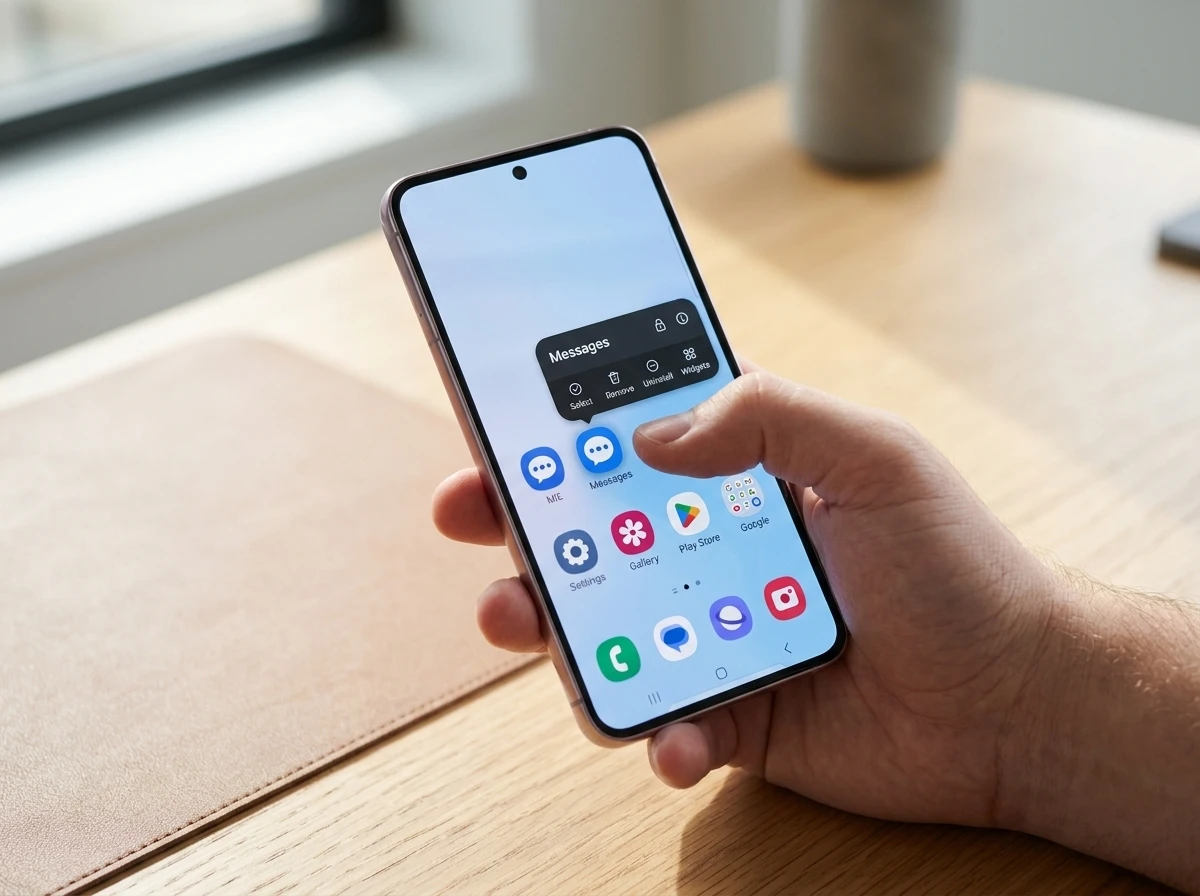
Tipster Fahad Ali Javed spotted a fully working App Lock inside a One UI 9.5 firmware build on a Galaxy S26. Long-press any app or game icon, tap the lock glyph, and the phone now guards it with the same biometrics, PIN, pattern or password already used to unlock the screen.
The feature was expected years earlier. Its arrival in an Android 17-based internal build finally closes a gap that left Galaxy users relying on Secure Folder or third-party tools while other Android skins offered simple locks as standard.
The leak matters because it turns a long-running request into something concrete. Users can see the control, try the flow, and judge whether the design matches what they asked for across earlier One UI cycles.
Hold an Icon and the Lock Appears
On the leaked CZH9 build the interaction is direct. Press and hold an icon on the home screen or in the app drawer. A lock-shaped control sits in the top-right of the pop-up menu. Tap it and the app is secured.
Unlocking requires no separate code. The system simply asks for the same credential that opens the phone. Fahad wrote on X: “AppLock is finally coming to Samsung:) Works nicely currently.” The post drew strong engagement from users who had waited through multiple software generations.
- Widgets and shortcuts tied to the locked app disappear from the home screen.
- Notification content from that app is hidden until it is unlocked.
- Photos, videos, contacts and other data remain reachable by any app that already holds permission.
- The lock applies equally to games and everyday tools from either the home screen or drawer.
That combination keeps the barrier low while still blocking casual access when someone picks up an unlocked phone.
The long-press path also means there is no separate settings hunt for the first lock. A user who already knows how to remove or share an app icon can find the new control in the same menu. That lowers the chance the feature stays buried after install day.
Because the lock covers both the home screen and the drawer, an app cannot be opened from one place after it was secured from the other. The rule is consistent wherever the icon appears.
The Feature That Kept Missing Its Window
Galaxy owners have asked for a lightweight app lock for years. A 2024 SamMobile report based on tipster Tarun Vats pointed to an App Lock entry under Advanced Features in early One UI 7 builds. It never shipped in the stable release.
Community threads and Samsung suggestion boards repeated the request through One UI 7 and into One UI 8. Reports later suggested a version would appear in China with One UI 8.5 while global builds stayed without it. One UI 9 builds still lacked the option even as Android 17 code showed Google working on a native implementation of its own.
- 2024, Screenshots and tipster reports place App Lock under Advanced Features for One UI 7; it is absent from the public release.
- 2025, Further leaks talk of a China-only App Lock path with One UI 8.5 and renewed hope for One UI 9.
- Early 2026, One UI 9 betas and stable starts still omit the simple lock; users note Chinese variants already offered it.
- August 2026, Functional App Lock surfaces in One UI 9.5 internal firmware on a Galaxy S26.
The pattern is consistent. Samsung treated the request as optional while competitors treated it as table stakes.
Each missed window left the same workaround advice in forums: use Secure Folder, install a third-party locker, or live without the control. The CZH9 build is the first public sign that the company has a working path on current flagship hardware rather than another teaser that vanishes before release.
Secure Folder Filled the Gap With Extra Steps
Samsung’s answer for years has been Secure Folder, a Knox-backed encrypted container. It lets users create a second copy of an app, store files inside a locked space, hide the folder itself, and choose a separate PIN or biometric. The official Secure Folder setup steps walk through account sign-in, lock-type selection and the option to move media in or out.
That power comes with friction. Users must decide which apps to duplicate, manage a second environment, and remember another credential if they choose one. For many people who simply wanted to stop a child or colleague from opening Messages, Gallery or a banking app, the container felt like overkill.
| Aspect | App Lock (One UI 9.5 leak) | Secure Folder |
|---|---|---|
| Setup | Long-press icon, tap lock | Full container setup plus app copies |
| Credential | Same as device unlock | Separate or shared lock type |
| App instances | Locks the existing app | Usually creates a second copy |
| Notifications | Content hidden | Configurable, can stay private |
| Best for | Quick privacy on shared phones | Deep isolation and dual accounts |
App Lock does not replace Secure Folder. It simply gives the light option users have requested while the heavier tool remains available for higher-stakes needs.
The two features solve different moments. Secure Folder still fits someone who wants a hidden gallery, a second messaging identity, or Knox-level isolation. App Lock fits the shorter moment when a phone leaves a pocket and the owner wants Messages or a bank app to demand a check before it opens.
Keeping both on the same device means users no longer have to stretch the heavy tool to cover light cases. That split is what the comparison table above makes plain in a single glance.
Android 17 and the Broader Privacy Catch-Up
Google has been developing a native App Lock path inside Android 17. Teardowns of canary and QPR builds showed strings for multi-app locking and biometrics-only modes, plus the ability to hide notification content. The feature has not fully landed for Pixel users either, yet the platform direction is clear.
Chinese OEMs such as Xiaomi, Oppo and OnePlus have shipped simple app locks for years. Global Galaxy software lagged even as Samsung expanded other security tools. The One UI 9.5 implementation that reuses the existing screen unlock looks like Samsung closing that gap on its own schedule rather than waiting for a pure AOSP solution.
The same software generation already carries other privacy work. One UI 9 runtime phishing app blocks stop certain malicious packages at launch. Together the moves show Samsung treating everyday privacy as a checklist item that can no longer slip another cycle.
Reusing the screen unlock credential also keeps the mental model simple. A person who already unlocks the phone with a fingerprint or PIN does not learn a second secret just to open one app. That design choice matches the light-touch goal that Secure Folder never tried to meet.
Which Galaxy Devices Stand to Receive It
One UI 9.5 is expected to debut with the Galaxy S27 series in the first quarter of 2027. A beta program for select high-end models could open in the fourth quarter of 2026. Older eligible phones and tablets would then receive the stable build through the first half of 2027.
SamMobile’s tracking list already names a broad set of candidates that typically receive multi-year major updates:
- Galaxy S24, S25 and S26 series including FE and Edge variants
- Galaxy Z Flip and Fold models from the 6-series onward plus the TriFold and Ultra variants
- Recent A-series, F-series, M-series and XCover devices plus multiple Tab S generations
Internal testing has already reached mid-range hardware. The Galaxy A07 One UI 9 internal testing path shows how far down the lineup Samsung sometimes pushes early software. Whether every listed device ultimately receives the App Lock toggle will depend on the final One UI 9.5 scope, yet the historical pattern favors wide availability once the feature is polished.
Flagship-first testing on the Galaxy S26 fits Samsung’s usual order. Mid-range and foldable lines tend to follow once the build stabilizes. Owners on the SamMobile candidate list still need the final One UI 9.5 scope to confirm the toggle ships on every model named above.
What the Lock Protects and What It Leaves Open
The leaked behavior draws a clear line between the app surface and the data layer. Locking an icon blocks casual launches and hides notification content. It does not revoke permissions other apps already hold.
That means a locked Gallery icon still leaves photos available to any app that was granted access before the lock. Contacts and similar data follow the same rule. Users who need stronger isolation still turn to Secure Folder rather than expecting App Lock to wall off every path.
- Launch path: blocked until the shared device credential succeeds.
- Home screen clutter: widgets and shortcuts for the locked app are removed from view.
- Notification shade: content stays hidden while the app remains locked.
- Cross-app data: existing permissions continue to work as before.
The design favors speed over depth. Someone who wants a one-tap guard on Messages or a game gets it without building a second environment. Someone who wants dual accounts or a hidden media vault keeps Secure Folder as the stronger tool.
Reading the limits up front avoids the false hope that a long-press lock equals full container security. The feature does the job users asked for across years of suggestion threads. It does not try to absorb every Knox use case into a single glyph.
Global Builds Trail Chinese Variants Once Again
Reports through the One UI 8.5 period already pointed to a China-only App Lock path while global builds stayed bare. Early 2026 notes again showed Chinese variants ahead as One UI 9 betas and stable starts still omitted the simple lock worldwide.
That regional split is familiar. Chinese OEMs such as Xiaomi, Oppo and OnePlus treated basic app locks as standard for years. Samsung’s global software took longer even while the company poured effort into other security layers.
The One UI 9.5 CZH9 build on a Galaxy S26 suggests the wait for a global path is finally ending. The company is closing the gap on its own half-step schedule instead of holding out for a finished AOSP App Lock from Android 17.
| Track | App Lock status in the story so far |
|---|---|
| China One UI 8.5 path | Reports suggested a regional version while global stayed without it |
| Global One UI 7 to 9 | Teased or requested, then absent from stable releases |
| One UI 9.5 internal (CZH9) | Fully working lock on Galaxy S26 firmware |
| Android 17 AOSP work | Strings for multi-app lock and hidden notifications; not fully landed on Pixel |
Side by side, the table shows why August 2026 feels like a turning point. Earlier cycles promised or partially shipped the idea. This internal build shows a complete interaction users can describe in plain steps.
Daily Privacy Habits Shift Once the Simple Toggle Exists
Handing a phone to a child, letting a friend navigate, or leaving a device unlocked on a desk becomes less risky when sensitive apps demand the same check as the lock screen. Users who never bothered with Secure Folder for casual cases now have a one-tap option.
Third-party app lock utilities lose some of their reason to exist on Galaxy hardware. At the same time Secure Folder keeps its role for dual messaging accounts, hidden galleries and Knox-level isolation. The two tools sit at different points on the spectrum rather than competing head-on.
One UI 9 test builds across 28 devices already demonstrated how quickly Samsung can spread a major platform version. App Lock arriving inside the next half-step update continues that cadence and finally answers a request that survived multiple missed windows.
Everyday sharing habits change first. A parent can lock Gallery and Messages before passing the phone across a table. A colleague can check a map without opening a banking app that shares the same home screen.
Store listings for third-party lockers will still exist for users who want extra options. On stock Galaxy software the built-in glyph removes the need to grant those apps accessibility or device-admin rights just to hide a single icon.
The lock icon on a long-press menu is a small UI change. After years of workarounds it is also the one many Galaxy owners will notice every day.


Sony’s 10 Percent Disc Drop Leaves the 2028 Cutoff Intact

Chip Allocation Sidelines the Base iPhone 18 This Fall

Miami-Dade Fights the Vice City Brand It Already Wears

IFA 2026 Awards Put Tecno Ahead of Flagship Phones

USB-C Gadgets Made the Junk Drawer Rechargeable

Pixel 11 Pro Asks $1,099 for a Light Google Locked

The iPhone Ultra Sells Two Retired Minis as One Foldable

Google Opens Gmail to Voice and Gates Docs Live

Lenovo Prices the IdeaPad Vibe Against Apple’s $699 Neo

Xbox Caps Game Pass Cloud Gaming at 15 Hours

Oracle Cuts 21,000 Jobs in a Year, Cites AI in 10-K Filing

Fable 5 and Mythos 5 Return as US Lifts Anthropic Export Controls

SpaceX’s Google Deal Turns a Rocket Company Into a Cloud Landlord

CD Projekt Red Co-CEO: Redemption Arc Isn’t Done, Witcher 4 in 2027

XPL Rallies 30% Ahead of Plasma One Card Tier Launch

Google Search Profiles Build a Follow Graph Inside Discover

DGO App Brings Rs 549 Mobile Pass for FIFA World Cup 2026 in Nepal

Moonshot AI Targets $30 Billion in China’s Fastest AI Funding Sprint

Oppo’s ColorOS 17 Eligibility List Leaves A-Series Buyers Behind

Microsoft Xbox Layoffs Start in July as Sharma Slams 3% Margin
-
 AI2 months ago
Oracle Cuts 21,000 Jobs in a Year, Cites AI in 10-K Filing
-
 AI2 months ago
Fable 5 and Mythos 5 Return as US Lifts Anthropic Export Controls
-
 AI3 months ago
SpaceX’s Google Deal Turns a Rocket Company Into a Cloud Landlord
-
 GAMING3 months ago
CD Projekt Red Co-CEO: Redemption Arc Isn’t Done, Witcher 4 in 2027
-
 CRYPTO3 months ago
XPL Rallies 30% Ahead of Plasma One Card Tier Launch
-
 NEWS3 months ago
Google Search Profiles Build a Follow Graph Inside Discover
-
 APPS3 months ago
DGO App Brings Rs 549 Mobile Pass for FIFA World Cup 2026 in Nepal
-
 AI3 months ago
Moonshot AI Targets $30 Billion in China’s Fastest AI Funding Sprint