
GADGETS
Elgato Stream Deck Neo Puts LCD Keys on Ordinary Desks
Elgato priced Stream Deck Neo at $99.99 for everyday tasks, while Logitech launched a $99.99 MX Keypad for AI coding on September 8.

Elgato now sells Stream Deck Neo for $99.99, an eight-key LCD pad Zoom has certified for meetings. Logitech put a nine-key LCD pad on sale September 8 at the same list price, aimed at AI coding tools rather than live video.
The Stream Deck still shows up in capture-card bundles and on creator desks. The software, the Zoom badge, and that $99.99 sticker now point at people who never go live.
The $99 Neo for Everyday Tasks
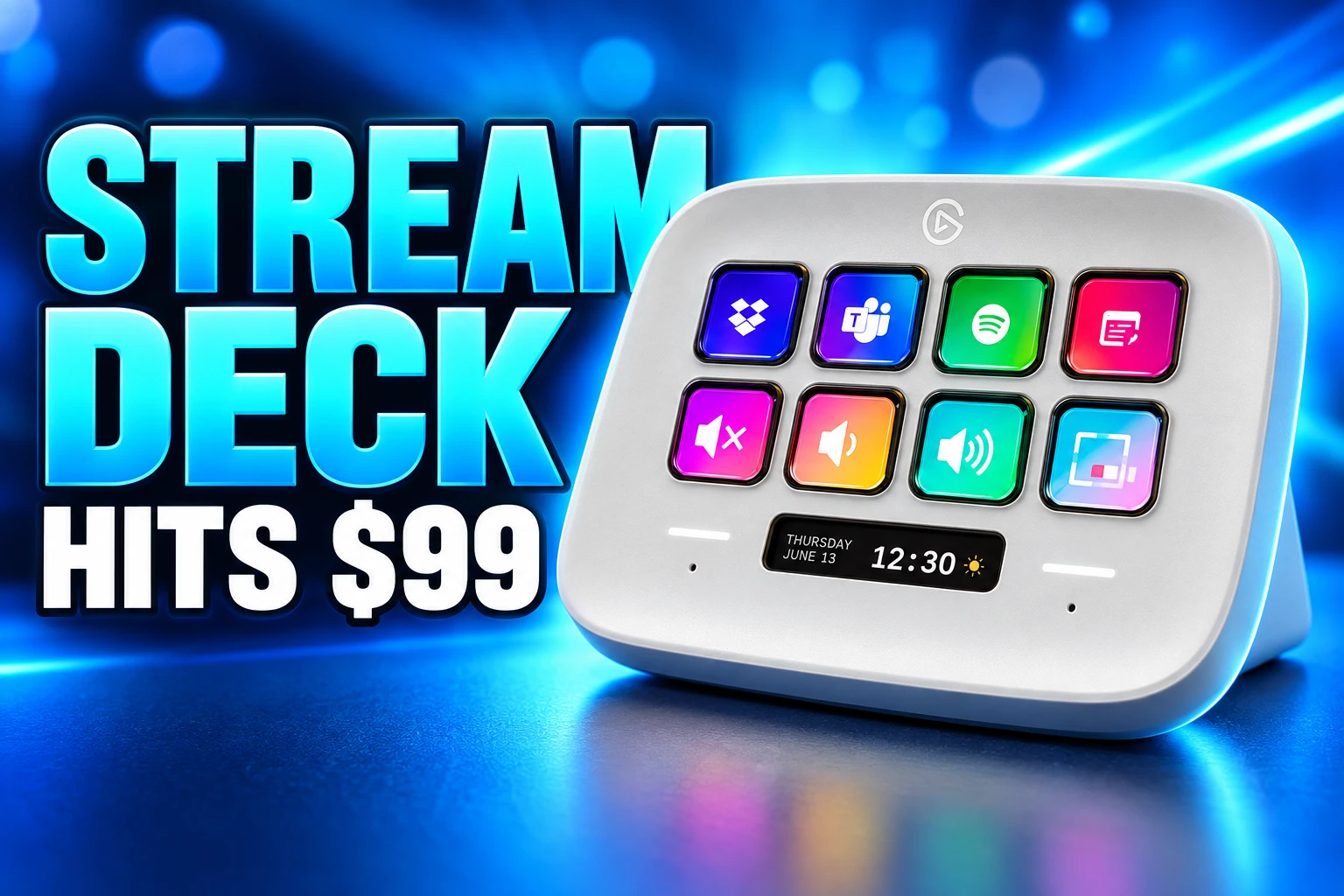
Elgato’s own Neo page does not lead with Twitch. It sells eight customizable LCD keys plus an Infobar and two Touch Points for flipping layouts, and it says everyday stuff becomes fast and fun. Zoom Certified sits in the awards row next to the cart button.
THE NEO AT A GLANCE
- List price: $99.99 on Elgato’s U.S. store.
- The keys: 8 LCD buttons, each able to show its own icon.
- The extras: a custom Infobar between 2 Touch Points for paging layouts.
- The build: 210 g, 107 x 26 x 78 mm, USB-C, macOS 13 or later and Windows 11 or later.
That Windows 11 floor is stricter than some older Stream Deck units, so a leftover Windows 10 tower is the wrong host. The pad is a USB device that only gets smart once the free Stream Deck app is running, which is also how every other model in the family works.
A mute key you can see without hunting a floating toolbar is the meeting use Elgato is willing to stamp. The same grid can launch mail, a browser, Slack, or a folder, then swap the whole page when you tap a Touch Point. That is a $99.99 desk habit, and it is the pitch Neo makes in plain language.
Logitech Prices Nine LCD Keys at $99.99
Logitech’s MX Keypad went on sale September 8 at $99.99 in Graphite, with Pale Grey also listed, and the product line under the name is “AI control keys for developers.” The store page puts nine LCD keys for $99.99 next to GitHub Copilot, Claude Code, VS Code, IntelliJ, Zoom, and Figma, and it throws in three months of GitHub Copilot Pro+ through Logi Options+.
The keypad is app-aware, so the faces change when you jump from a code editor to Slack or Figma. Logitech also opened the Logi Actions SDK and a Logi Marketplace, which is the same plugin idea Elgato has been feeding since Stream Deck software 4.0. Matching Neo’s $99.99 tag is the tell: LCD keys are now a Master Series desk add-on, sold beside mice, not a booth gadget for a Saturday stream.
Elgato still talks like a creator company. Its Japan account opened a Tokyo Game Show giveaway on September 13 that runs through September 16 and puts Stream Deck Scissor Keys in a kit with a 4K capture card, a mic arm, and a Wave:3 MK.2. The hardware family can wear both costumes in the same week.
Which Stream Deck Fits a Work Desk?
Elgato’s comparison guide, last updated April 10, 2026, is the clean map of key counts across every model. All of them share the Stream Deck app, Smart Profiles, Multi Actions, and Marketplace plugins. The split is how many faces you can see at once, and whether you also want dials.
THE CURRENT U.S. LIST
| Model | LCD keys | Extra controls | U.S. list price |
|---|---|---|---|
| Stream Deck Neo | 8 | Infobar, 2 Touch Points | $99.99 |
| Stream Deck MK.2 | 15 | Swappable faceplates, USB-C | $149.99 |
| Stream Deck + | 8 | 4 dials, touch strip | $199.99 |
| Stream Deck XL | 32 | Magnetic stand | $249.99 |
| Stream Deck + XL | 36 | 6 dials, touch strip | $349.99 |
| Stream Deck Studio | 32 | 2 dials, PoE or USB-C | $899.99 |
MK.2 is the 15-key middle, $50 above Neo, with a removable faceplate Elgato still sells as a $14.99 extra and a 45-degree stand. Stream Deck Scissor Keys is the same $149.99 for a low-profile 15-key feel. Plus is the audio and timeline machine: eight keys, four knobs you can turn or press, and a strip for meters. XL trades knobs for a 32-key grid you can read without folders. + XL, shown in Elgato’s WaveNext launch on March 3, 2026, is the ceiling at 36 keys and six dials for $349.99.
Studio is the rack unit for rooms that already think in Ethernet. A Mini with 6 keys and a Pedal with 3 foot switches sit under that table and use the same actions. GALLEON 100 SD is the odd one out, a Corsair mechanical keyboard with 12 Stream Deck keys and 2 dials where a numpad would be, split between Corsair Web Hub and the Stream Deck app.
Hundreds of Plugins, One Software App
The pad is a display. The product is the plugin list. Elgato says Stream Deck Marketplace features hundreds of plugins, most of them from other brands and from people using a free SDK, and that the old Stream Deck Store closed in April 2024. Software 6.4 or newer is the gate; older installs keep what they already have and stop getting new assets.
Stream Deck Marketplace features hundreds of plugins. Elgato creates some, but most are made by community members and brands who want to integrate their products and ideas with Stream Deck.
Elgato, Stream Deck plugin guide
That store is also where icon packs, profiles, and sound clips live, which Elgato groups as thousands of digital assets. A key can fire a hotkey, open an app, or talk to a plugin that knows Zoom, Teams, Discord, or a volume mixer. Multi Actions string those steps, so one press can open mail, a browser, and chat. Smart Profiles watch the frontmost app and swap the whole grid when you tab.
OFFICE KEYS WORTH MAPPING FIRST
- Meeting mute: Zoom’s official plugin exposes mute, video, and related call actions on the LCD, and Stream Deck Neo carries Zoom’s certified badge.
- Teams presence: Elgato general manager Julian Fest said the official Microsoft Teams plugin was rolling out in February 2023, which put a work chat on the same hardware as OBS.
- App launch: Built-in actions open programs, folders, and URLs, which is the weekday layout people actually keep.
- Per-app volume: Elgato shipped a Volume Controller plugin with Stream Deck 6.0, useful when a browser tab fights a call.
- Morning stack: Multi Actions can open the three apps you touch before 9 a.m., then close them on the way out.
The dependency cuts both ways. A Stream Deck with a stalled third-party plugin is a blank grid until that vendor ships a fix, which is the tax for putting another company’s UI on a USB pad. Stream Deck 7.0, released August 12, 2025, added Virtual Stream Deck so some of that layout can live on a screen when the plastic box is not plugged in, plus system shortcut improvements and a weather plugin.
March 2017 Hardware Still Runs Current Software
Elgato’s support docs date the original 15-key Stream Deck to March 23, 2017 and MK.2 to July 15, 2021. The first unit used USB-A and a fixed shell; MK.2 added USB-C, a detachable cable, swappable faceplates, a detachable stand, and animated screensavers. Both still receive current Windows and macOS software. That is nine years of the same 15-key idea, which is long for a plastic USB gadget.
Corsair announced an agreement to acquire Elgato Gaming on June 27, 2018, and said the German maker would continue as a separate brand. The dollar figure was not disclosed. Elgato Eve split off as Eve Systems. Capture cards and Stream Deck stayed under the Elgato name inside Corsair, which is why a 2026 Corsair keyboard can grow Stream Deck keys out of the numpad.
NINE YEARS OF LCD KEYS
- March 23, 2017: Elgato ships the original 15-key Stream Deck.
- June 27, 2018: Corsair announces it will buy Elgato Gaming and keep the brand.
- July 15, 2021: Stream Deck MK.2 arrives with USB-C and swappable faceplates.
- April 2024: The Stream Deck Store closes and Elgato Marketplace takes over on software 6.4.
- August 12, 2025: Stream Deck 7.0 adds Virtual Stream Deck.
- March 3, 2026: Elgato introduces Stream Deck + XL in its WaveNext audio launch.
- September 8, 2026: Logitech puts MX Keypad on sale at $99.99.
Programmable pads existed long before that 2017 ship date. P.I. Engineering’s X-keys line stores macros on the device in hardware mode, so the pad can act like a USB keyboard on machines that never install extra software. Stream Deck went the other way: pretty faces, a store, and an app that has to be running. The LCD is why a mute key can look like a mute key, and why the same 15 holes can be a video editor on Tuesday and a call board on Wednesday.
A Keyboard That Swallowed the Numpad
GALLEON 100 SD is Corsair and Elgato admitting the pad wants to live in the keyboard’s footprint. Twelve LCD keys and two rotary dials sit beside MLX Pulse mechanical switches, with a built-in LCD split into quadrants for dial actions. Keyboard lighting and polling live in Corsair Web Hub; the Stream Deck half still needs Elgato’s app. That split is clumsy, and it is also the logical end of a product that started as a box you parked to the left of the keys.
Julian Fest’s 2023 Teams post is the quieter tell. The company’s GM was not demoing a BRB scene. He was putting Microsoft’s work chat on the same LCD grid.
Rolling out this month – the official Microsoft Teams plugin for Stream Deck 👏🎉 pic.twitter.com/GFL7jRwFnW
— Julian (@JFest) February 1, 2023
Elgato still knows how to sell a streamer kit, and the TGS bundle is proof. The $99.99 Neo, the Zoom badge, the Teams plugin, and Logitech’s nine-key Copilot pad are the other proof. Two companies now sell LCD keys at the same list price for jobs that happen on a weekday desktop, and the older of those products has been taking new software for nine years.
Frequently Asked Questions
Can You Try Stream Deck Without Buying Hardware?
Stream Deck Mobile is a free iOS and Android app with 6 virtual keys, and a subscription raises that cap to 64 keys, using the same desktop Stream Deck app and the same Marketplace plugins as the plastic models, which makes it the cheapest way to test profiles before spending $99.99.
Is Plugin Development Free on Elgato’s SDK?
Elgato says making a plugin is one hundred percent free, the SDK talks to Stream Deck over a WebSocket and is language agnostic, and the Stream Deck CLI includes streamdeck create, streamdeck validate, and streamdeck pack, with docs and samples at maker.elgato.com plus a Maker Console for listing on Marketplace.
What Does Stream Deck’s Network Dock Add?
Network Dock puts a Stream Deck on Ethernet so cable length stops being the limit, with power over PoE or USB, and Elgato lists it for Neo, MK.2, XL, Stream Deck +, Stream Deck + XL, and Pedal on DHCP only, with setup done on the Stream Deck screen itself.
Do Zoom Controls Work Before You Join a Meeting?
Elgato’s Zoom plugin guide says you need Zoom Workspace 6.4 or later, and that dragged-on actions stay dark until you join a meeting, after which they light up, so a pre-call layout can look empty even when the plugin is installed correctly.

Instagram Plus Tests a Read-Only Mode That Cuts Stories

Altman Asks the Public to Accept Some AI Harm

Google Freezes OSS VRP Product Reports After AI Flood

AI Agents Make Payment Rails the Scarce Prize

Turkey’s Crypto Boom Now Runs Through Three Banks

Fable 5 Came Back Under a Commerce On-Off Switch

Google’s SpaceX GPU Lease Has a Sept. 30 Deadline

Plasma One’s XPL Locks Face a 1.81 Billion Cliff

DGO’s Rs 549 World Cup Pass Cost Fans Sleep and Data

Moonshot AI’s $30 Billion Ask Became a $35 Billion Close
-
 AI4 months ago
Fable 5 Came Back Under a Commerce On-Off Switch
-
 AI4 months ago
Google’s SpaceX GPU Lease Has a Sept. 30 Deadline
-
 CRYPTO4 months ago
Plasma One’s XPL Locks Face a 1.81 Billion Cliff
-
 APPS4 months ago
DGO’s Rs 549 World Cup Pass Cost Fans Sleep and Data
-
 AI4 months ago
Moonshot AI’s $30 Billion Ask Became a $35 Billion Close
-

 NEWS4 months ago
ColorOS 17 Device List Spans Oppo, OnePlus and Realme
-

 GAMING4 months ago
Xbox Cuts 3,200 Jobs After Five Years of Thin Returns
-

 GAMING4 months ago
The RTX 4050 Under Rs 70,000 Hides a Wattage Gap