
AI
Google Spreads Contextual Suggestions Beyond Pixel Through Play Services
Google is spreading Contextual Suggestions to Snapdragon flagships through Play services, a lighter on-device habit AI than Pixel Magic Cue.

Google is spreading Contextual Suggestions, its on-device habit AI, to flagship phones that will never run Magic Cue. The toggle rides in Google Play services, which is how Pixel 10a, the Galaxy S25 Ultra, and the OnePlus 15 got it without waiting for a new Android version.
Google did not put this on the I/O-week stage. Android Help still files the switch under Developer features, and early hands-on checks found the setting with no prompts firing yet.
Play Services Delivered What the OS Update Did Not
Contextual Suggestions is not a Pixel Drop extra and it is not tied to Android 17. It showed up on Pixel 10-series phones running Android 16 once stable Google Play services 26.18 landed, then jumped to other flagships the same way Google has long pushed Maps, Pay, and Play features past OEM skins.
May builds put Contextual Suggestions on stable Pixel 10, ahead of the I/O-week Android show. The help page path still runs through the Play services app, which is the tell. Google can ship a next-tap layer to a Galaxy or a OnePlus without asking Samsung or OnePlus to redesign the launcher.
That is a different path from an Android drop that splits features by version, and it is why a Snapdragon phone can get the toggle without waiting for One UI to catch up. The cost of that speed is obscurity. Most people will never open Apps, All apps, Google Play services, All services, then Developer features.
GOOGLE’S LONG BET ON THE NEXT TAP
- 2012: Google Now presents weather, traffic, and flight cards before you ask.
- May 28, 2015: Now on Tap, shown at Google I/O, reads the screen on Android 6.0 and overlays answers.
- 2018: App Actions in Android Pie pin a predicted shortcut at the top of the app drawer, and Assistant brings predictive cards back as Visual Snapshot.
- August 2025: Magic Cue ships on Pixel 10 with Tensor G5, reading Gmail, Calendar, Keep, Messages, and screenshots.
- December 2025: Contextual Suggestions appears in a Play services beta as a lighter habit engine for more phones.
- May 13, 2026: The setting reaches stable Pixel 10-series builds, including Pixel 10a, on Google Play services 26.18.
- May 26, 2026: The same toggle appears on Galaxy S25 Ultra and OnePlus 15.
Each earlier bet faded, got folded into Assistant, or died when the guesses were wrong. This one is quieter, and that may be the point. Google is not selling a new assistant. It is leaving a habit model running under Play services and letting apps spend the prediction.
The Pixel 10a Gap With Magic Cue
Magic Cue is the product Google actually advertised. It is built to pull a flight number out of Gmail while you are on the phone with an airline, drop a reservation into a chat, and find last weekend’s photos when someone asks. Google says that work runs on Tensor G5 and Gemini Nano.
Google still markets Magic Cue as exclusively on Pixel 10 series phones. Pixel 10a is the hole in that line. It does not run Magic Cue, and it does run Contextual Suggestions. So does a Snapdragon 8 Elite Galaxy. The lite feature is the one that can travel.
The flagship version also has a messier privacy story. Google’s store copy now says Magic Cue processes information in a secure, isolated environment on the device and in the cloud. Contextual Suggestions is described more tightly: learning stays on the phone, and the data is not shared with Google. After I/O 2026, Google engineers also talked about showing Magic Cue inside other apps, including Snapchat threads. The expensive product is getting richer. The Play services product is the one other flagships can actually receive.
Hands-on tests have already caught Magic Cue offering the wrong flight details on a call. A feature that inserts a confirmation number into a live conversation cannot afford that miss. A gym-playlist prompt can. That is why the version leaving Pixel is smaller, and why Google still will not name the model behind Contextual Suggestions.
MAGIC CUE VERSUS CONTEXTUAL SUGGESTIONS
| Piece | Magic Cue | Contextual Suggestions |
|---|---|---|
| Phones seen so far | Pixel 10, 10 Pro, 10 Pro XL, 10 Pro Fold | Pixel 10 series including Pixel 10a, Galaxy S25 Ultra, OnePlus 15 |
| Hardware hook | Tensor G5 with Gemini Nano | On-device learning; first non-Pixel hits are Snapdragon 8 Elite flagships |
| What it reads | Gmail, Calendar, Keep, Messages, screenshots | Routine activity and location from apps and services |
| Where data goes | Google describes a secure environment on the device and in the cloud | Google says the data never leaves the device and is not shared with Google |
| How it ships | Pixel software | Google Play services, including stable 26.18 on the first Pixel sightings |
The table is the product split in one view. Magic Cue wants your inbox. Contextual Suggestions wants your gym schedule. Only one of those can live on a phone that never got Tensor G5.
The Gym Playlist Is Still Google’s Demo
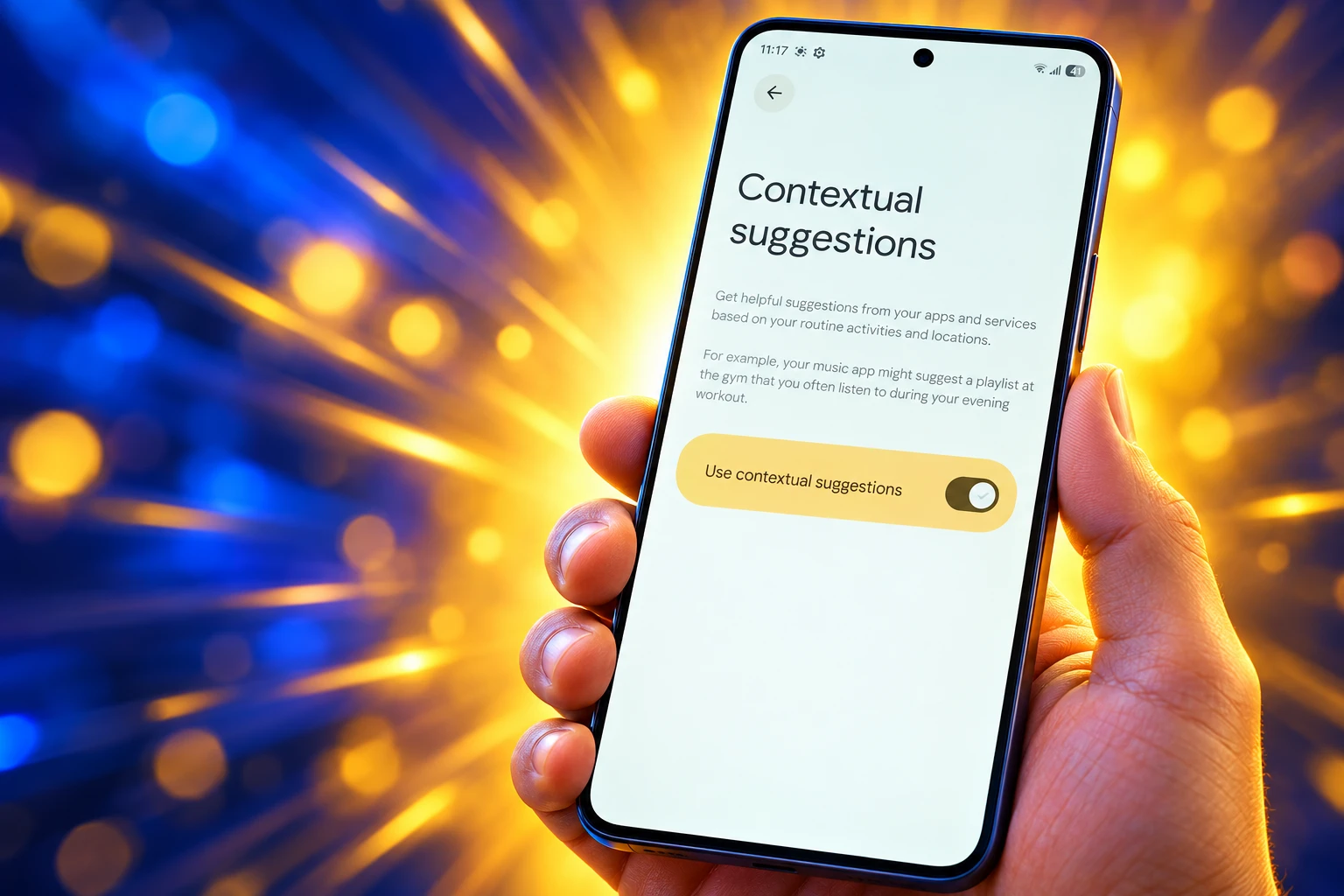
Google’s own copy is modest, and it has barely moved since the December 2025 beta. The feature offers suggestions from your apps and services based on routine activities and locations. AI learns from device activity and location data, then makes predictions about what might help.
Android Help’s example is a music app suggesting a playlist you often play at a specific time and place. The in-settings copy adds a Saturday sports habit: if you often cast games to the living-room TV, the phone can suggest casting at the right time. That is the entire public demo. There is no published gallery of the prompt itself, and Google has not shown a notification design.
WHAT GOOGLE SAYS IT WILL SUGGEST
- Gym music: A music app can suggest the playlist you keep playing at that place and time.
- Saturday sports: If you often cast games to the living-room TV on Saturdays, the device can suggest casting then.
- Location off: Turn off Use device location and the feature stays on, using time and routine without maps.
That is App Actions with a location clock glued on. Android Pie already learned that headphones meant music, or that a commute meant Maps. The new layer is supposed to combine cues across apps instead of pinning one shortcut to one title. Until prompts actually appear, that is a claim on a settings screen, not a change in how people open apps.
Stored Data Wipes After 60 Days
The privacy write-up is clearer than the product demo, and it is the one Google put on an official help page. Before the first use, a notice points you at settings. If you cast audio or video, you need Android 14 or up, and the notice can appear when you start a media session on Wi-Fi and cast to another device.
The data never leaves your device, isn’t shared with Google, and is used only for on-device learning.
Android Help, Google
Google’s data never leaves your device line is the whole pitch. Apps do not get the underlying activity log. You can shut the feature off, or leave it on and disable Use device location. Manage your data lets you delete everything stored for it, and stored data is deleted after 60 days even if you never touch that button.
Canonical steps, from Android Help: Settings, Apps, All apps, Google Play services, All services, Developer features, Contextual Suggestions. On a Pixel, the same Google services list is also behind the profile picture at the top of Settings. Where the setting has appeared, Use contextual suggestions is on by default. That default is doing real work, because a switch filed under Developer features will not get many voluntary opt-ins.
The help page still does not name a model. On-device learning is not the same sentence as on-device inference, and Google does not say whether a local copy of Gemini Nano is involved. For a habit engine that only needs time, place, and a music app, it may not need one.
Galaxy S25 Ultra and OnePlus 15 Have the Toggle
Two weeks after the Pixel 10-series sightings, the same setting showed up on Galaxy S25 Ultra and OnePlus 15. Both phones use Snapdragon 8 Elite. A Galaxy A57 in the same window did not get it, which is the hardware fence. If learning has to stay on the device, midrange chips are the first cut.
Older Pixels did not show the setting on May 13, 2026, and neither did Android 17 beta builds that week. Play services can ignore OS version and still care about silicon. Pixel 10a is the awkward case in Google’s own lineup: new enough for the lite feature, not enough for Magic Cue.
WHAT WE KNOW
- Confirmed toggles: Pixel 10 series including Pixel 10a, Galaxy S25 Ultra, and OnePlus 15 have shown the setting.
- Chip fence: Non-Pixel hits so far are Snapdragon 8 Elite flagships; Galaxy A57 did not get it.
- Default and memory: Where it appears, the feature is on by default, and stored data is deleted after 60 days.
- Casting floor: Android 14 or up is required if you cast audio or video with it.
WHAT IS UNCONFIRMED
- Visible prompts: Early hands-on checks found the switch and no suggestions firing yet.
- Midrange timing: Google has not said whether A-series phones will get on-device learning later.
- The model: No public note names the network Contextual Suggestions uses.
A buried default on a flagship is still a distribution channel. If the prompts ever start landing, the music app that wins the gym slot will get opens it did not have to earn from the home screen. That is the part of this rollout that outlives a settings screenshot.
Skip App Actions and You Miss the Next Tap
Google already told developers how to stand in line for a predicted shortcut. App Actions map in-app tasks to built-in intents in shortcuts.xml, then Assistant can suggest those Android shortcuts at relevant times. A fitness app declares START_EXERCISE. A search screen declares GET_THING. Static shortcuts go up with a Play release. Dynamic ones can be pushed through the Google Shortcuts Integration library after a user finishes a task.
Contextual Suggestions is the system-side consumer of that work. It does not scrape every APK on the phone and invent a deep link. It needs apps that already expose a capability Google knows how to fire. Music, casting, Home, Maps, and fitness are the obvious verticals because those built-in intents have existed for years. A boutique workout app that never filed shortcuts.xml will watch Spotify get the gym prompt.
App Actions also have to pass a separate Google review after the APK is on Play, and they are not supported in a work profile on Managed Google Play. That keeps the new habit layer inside the consumer Play universe, which matches a feature that already refuses work accounts for Magic Cue unless Workspace smart features are on. The next tap is a ranking surface. Developers who treat shortcuts.xml as leftover Assistant paperwork will not be on it.
Now Nudge Shows Up in One UI 9
Samsung is not waiting for Play services to become the only habit engine on Galaxy. One UI 9 notes from September 2026 describe Now Nudge as reading the screen and recommending an action through Samsung Keyboard, such as photos from a trip when a message asks for them. That is Magic Cue’s job, done in the skin, on phones that already have Google’s lite toggle.
A Galaxy S25 Ultra can therefore carry two guessers at once: Google’s Play services habit model, and Samsung’s on-screen nudge. OnePlus has no equivalent skin story in public. Pixel 10 keeps the expensive product. Pixel 10a keeps the lite one. The midrange phone that lacked Snapdragon 8 Elite in May still has neither.
The May rollout never turned into a real argument about habit AI. Public posts around it stayed thin, and the loud adjacent Pixel complaint that month was battery drain, which is a bad fit for a feature that had not even drawn a prompt. Google shipped a default-on switch under Developer features, promised a gym playlist and a Saturday cast, and let Play services carry it onto phones Magic Cue cannot touch. The next thing worth measuring is not another settings screenshot. It is whether a playlist actually starts when someone walks into the gym.

Instagram Plus Tests a Read-Only Mode That Cuts Stories

Altman Asks the Public to Accept Some AI Harm

Google Freezes OSS VRP Product Reports After AI Flood

AI Agents Make Payment Rails the Scarce Prize

Turkey’s Crypto Boom Now Runs Through Three Banks

Fable 5 Came Back Under a Commerce On-Off Switch

Google’s SpaceX GPU Lease Has a Sept. 30 Deadline

Plasma One’s XPL Locks Face a 1.81 Billion Cliff

DGO’s Rs 549 World Cup Pass Cost Fans Sleep and Data

Moonshot AI’s $30 Billion Ask Became a $35 Billion Close
-
 AI4 months ago
Fable 5 Came Back Under a Commerce On-Off Switch
-
 AI5 months ago
Google’s SpaceX GPU Lease Has a Sept. 30 Deadline
-
 CRYPTO4 months ago
Plasma One’s XPL Locks Face a 1.81 Billion Cliff
-
 APPS4 months ago
DGO’s Rs 549 World Cup Pass Cost Fans Sleep and Data
-
 AI5 months ago
Moonshot AI’s $30 Billion Ask Became a $35 Billion Close
-
 NEWS5 months ago
ColorOS 17 Device List Spans Oppo, OnePlus and Realme
-

 GAMING4 months ago
Xbox Cuts 3,200 Jobs After Five Years of Thin Returns
-

 GAMING4 months ago
The RTX 4050 Under Rs 70,000 Hides a Wattage Gap