
GADGETS
Nokia WiFi Beacon 2 Still Ships Only Through ISPs
Nokia still lists the WiFi Beacon 2 as an AX1800 mesh node sold only through ISPs, with firmware and pairing locked to the provider that issued it.

Nokia still lists the WiFi Beacon 2 as a dual-band AX1800 mesh node, and the product page states who may buy it. The cylinder is sold exclusively through internet service providers.
That is a different object from the retail mesh kits shoppers compare on a store shelf. The operator that brands the app, signs the firmware, and takes the helpdesk call is the party with money on the table.
An ISP Cylinder That Still Ships in 2026
Nokia’s Home Wi-Fi catalog now leads with Wi-Fi 7 gateways, yet the Beacon 2 page remains live under in-home connectivity, with a sales form aimed at carriers rather than households. The same page ends with a single line: sold exclusively through internet service providers.
THE BEACON 2 ON THE CALENDAR
- 2021: Nokia Design in San Francisco finishes the cylinder after 13 to 24 months of work, and the unit launches as a Wi-Fi 6 mesh node.
- 6 May 2022: Nokia names the Beacon 2 among its iF-winning broadband products, beside the WiFi app and the FastMile 5G Gateway 3.0.
- 2 October 2024: Nokia launches the Beacon 19 Wi-Fi 7 gateway for multi-gigabit operator homes.
- 27 January 2025: The Nokia WiFi Help Center states Beacons can be bought only from an ISP or CSP, and that used units from another provider will not join the mesh.
- 10 July 2026: A help article on adding a node says that if the root device is a 5G gateway, only Beacon 2 can extend that network.
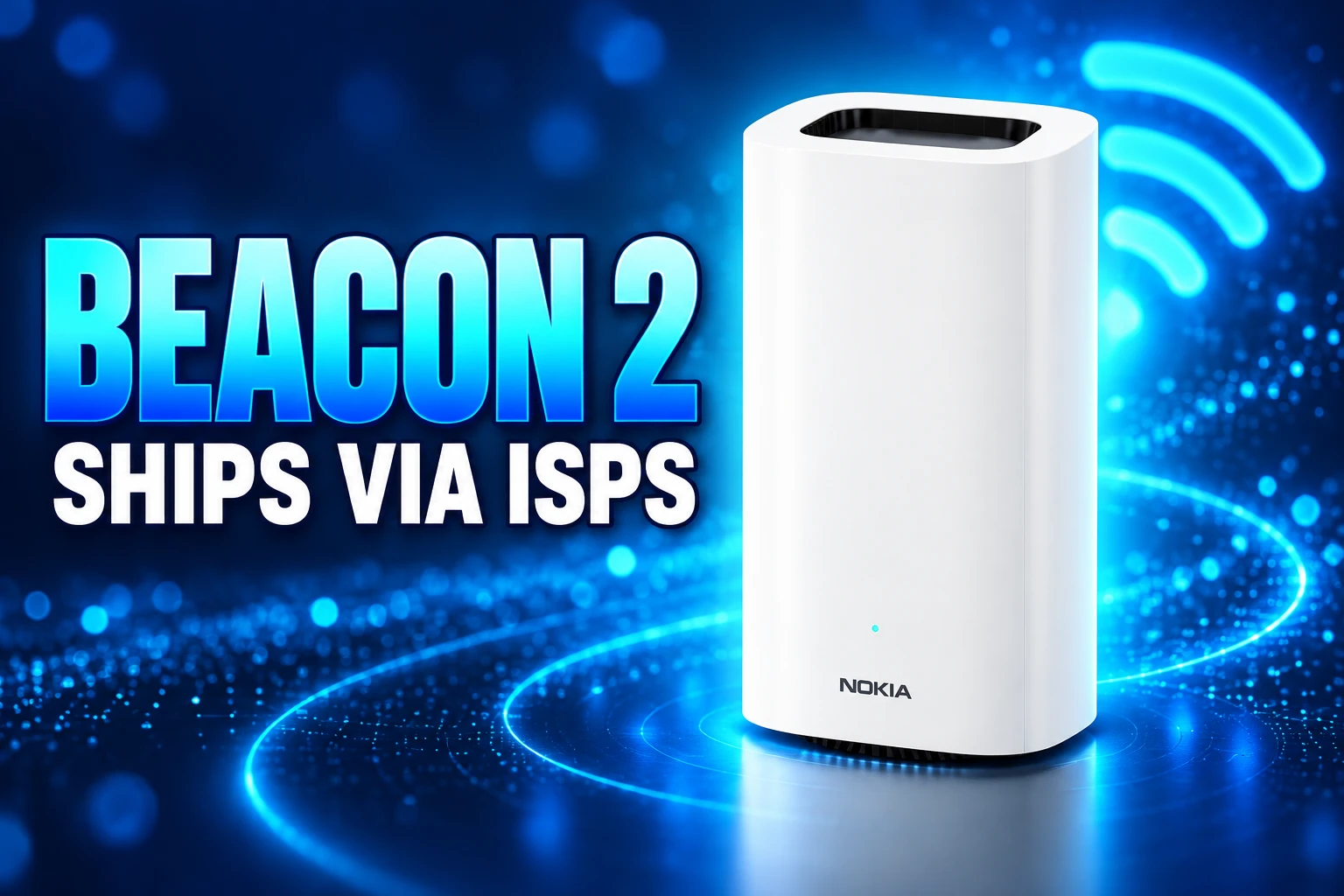
The industrial design is the part that leaks into lifestyle write-ups. The housing is a white cylinder, 168 mm tall and 96 mm across, on a rubber foot, at 0.45 kg, with no external antennas. Nokia Design took an iF Design Award for Beacon 2 in 2022 for that shape. The award copy describes a node that picks channels on its own and an app that adds parental controls. Those traits matter to a carrier that wants a box a subscriber will leave on a sideboard instead of hiding in a cupboard.
Extra Nodes Have to Come From the Same Provider
Nokia’s own help center is plainer than any spec sheet. Beacons are customized for the internet provider that issued them. A second node has to come from that same provider.
THE PROVIDER LOCK
- Purchase path: Nokia says WiFi Beacons can only be bought through an ISP or CSP, and asks customers to request that their provider carry the line.
- Mix and match: Two Beacons from StarHub plus one from Lazada will not form one network; the shop unit is the one that fails.
- Used market: A Beacon bought second-hand from another carrier’s customers is treated as a foreign node, even if the plastic looks identical.
- Firmware: Updates are automatic and carry the build approved by that CSP, with a default window of 3 a.m. local time that the app can shift.
That lock is the product. EasyMesh is on the box, which in theory lets nodes from different vendors talk, but the software image is still the operator’s. Grey-market listings that bundle a FastMile radio with a Beacon 2 show up where mobile operators issue the kit as home broadband. Those listings do not create a retail channel Nokia will support. When a plan fails to come up, the complaint attaches to the carrier, because the cylinder is the carrier’s modem in the living room.
What the Beacon 2 Can Do
The Beacon 2 is a dual-band Wi-Fi 6 mesh node with 2×2 MIMO on 2.4 GHz and 5 GHz, two gigabit Ethernet jacks, and enough radio for 4K streams and games on a typical fiber or fixed-wireless line. It can run as the router when no other Nokia gateway is present, or as a satellite beside a compatible Nokia ONT. Setup is a QR scan in the Nokia WiFi app, which Nokia also offers as a white-label build so the operator’s name sits on the home screen.
BEACON 2 RADIO AND PORTS
| Item | Nokia’s figure |
|---|---|
| Wi-Fi class | Dual-band Wi-Fi 6, AX1800 (up to 574 Mb/s on 2.4 GHz plus 1200 Mb/s on 5 GHz) |
| Radios | 2×2 MIMO on 2.4 GHz and 2×2 MIMO on 5 GHz, MU-MIMO and MU-OFDMA |
| Coverage, one unit | Up to 140 m2 (1500 sq. ft) |
| Mesh size | Up to 6 units on one network |
| Ethernet | One 10/100/1000 WAN, one 10/100/1000 LAN |
| Backhaul | Ethernet cable or Wi-Fi, with reroute in as little as 500 ms |
| Security and extras | WPA3, guest SSIDs, profile-based parental controls, EasyMesh |
| Size and mass | 168 x 96 x 96 mm, 0.45 kg |
Nokia rates that radio as AX1800 for typical Wi-Fi usage and says the node is EasyMesh compliant, so it can sit as router or satellite next to compatible Nokia ONTs. The September 2025 quick reference lists standby draw at 5.6 W and typical draw at 5.8 W. A product guide caps power at 12.8 W with both Ethernet ports and Wi-Fi up. The LED ring can sit dark, or show solid blue-green when the uplink is healthy in router or bridge mode. Those hardware notes on the Beacon 2 match the quiet-speaker look that made the lifestyle copy easy to write. The radios and the two copper ports are the part an ISP actually buys.
The AX1800 Class Matches Ordinary Fiber Plans
AX1800 is a mid-tier Wi-Fi 6 class, not a multi-gigabit radio. Combined PHY around 1774 Mb/s, rounded to the AX1800 name, is plenty for a 200, 300, or even 500 Mb/s fiber package once real-world overhead is in. It is the wrong tool if the wall jack is a 2.5 Gbps or 10 Gbps ONT and the household wants that rate in the back bedroom.
Nokia still describes the Beacon 2 as premium performance without the price tag, which is carrier language for a node that can be issued in volume. Intelligent channel selection, band steering, and client steering run on the box so a truck roll is not required every time a neighbour’s access point lands on the same channel. Dynamic backhaul management can move the link between Ethernet, 5 GHz, and 2.4 GHz when a path dies. For flats and medium houses on ordinary fiber, that is the job. Sprawling homes, dense apartment stacks full of 6 GHz clients, and multi-gig plans sit on higher Beacons.
There is no voice assistant and no speaker. The product is a network node that happens to look like a small appliance, which is the point for an operator that already lost arguments about ugly plastic gateways on kitchen counters.
Corteca Puts the Operator in the Living Room
The hardware is the visible half. Nokia powers the Beacon 2 with Corteca, the same software layer that sits on newer Beacons, fiber ONTs, and FastMile 5G gateways. Corteca is how a helpdesk sees inside the home, pushes a containerized app, and changes radio policy without a visit.
WHAT THE OPERATOR GETS ON THE BOX
- Home Controller: Cloud tools for channel, transmit power, and client steering, including a view of neighbouring managed and unmanaged Wi-Fi in dense streets.
- Care portal: A console for customer-care staff, plus a subscriber app for self-care, guest Wi-Fi, and parental schedules.
- White-label app: The same Nokia WiFi app, with the provider’s brand, so the household never has to learn a third-party mesh name.
- Standards: TR-369 (USP) and TR-181 for remote management, TR-069 on older images, plus EasyMesh and Data Elements.
- Apps: Linux containers for extras such as security or parental packs, sold back to the subscriber as a line item.
That stack is why a dual-band Wi-Fi 6 cylinder still earns a catalog page next to Wi-Fi 7 flagships. The radio generation is one SKU decision. The management plane is the product the carrier keeps paying for after the truck has left. Justin Doucette, head of Wi-Fi for Fixed Networks at Nokia, put the same logic on the Beacon 19 launch, aimed at service providers rather than at people browsing a shop.
The Beacon 19 Wi-Fi 7 gateway is designed to help service providers make sure multi-gigabit speeds reach every corner of the house.
Justin Doucette, Head of Wi-Fi, Fixed Networks at Nokia
On the Beacon 2 the speeds are lower, but the buyer is the same person in the same operations centre.
The Wi-Fi 7 Gap on Nokia’s Own Shelf
Nokia’s current Home Wi-Fi overview leads with “Wi-Fi 7 in every home” and says that generation is 3.75 times faster than Wi-Fi 6. The Beacon 2 does not appear in that showcase strip. The cards there run from Beacon 19 down through Beacon 9, 4, 10, G6.2, G6, 6, G3.1, 3.1, and 1.1. The Beacon 2 still has its own URL, which is how an older SKU survives when it still matches a large slice of issued broadband.
THREE NOKIA BEACONS, THREE JOBS
| Model | Generation | Class | One-unit coverage | WAN |
|---|---|---|---|---|
| Beacon 2 | Wi-Fi 6, dual-band | AX1800 | Up to 140 m2 | 1 gigabit |
| Beacon 6 | Wi-Fi 6, tri-band | AX4200 | Up to 185 m2 | Gigabit-class home node |
| Beacon 19 | Wi-Fi 7, tri-band 4×4 | BE19000, up to 19 Gbps | Up to 300 m2 | 10 Gbps |
Nokia’s October 2024 launch of the Beacon 19 put up to 19 Gbps of Wi-Fi capacity on a tri-band 4×4 radio with 320 MHz on 6 GHz, 4K QAM, and multi-link operation. Beacon 4 is the dual-band Wi-Fi 7 step (BE3600, about 250 m2). Beacon 9 is the mid tri-band Wi-Fi 7 step (BE9400, about 280 m2, 2.5 Gbps). Those SKUs exist so an operator can map a tariff to a box. The Beacon 2 remains the cheap coverage puck for plans that never needed 6 GHz.
FastMile Gateways Still Need This Extender
The cleanest reason the AX1800 cylinder has not been deleted is fixed wireless. Nokia’s help text on adding a Wi-Fi point says that if the root device is a 5G gateway, only Beacon 2 can be used to extend that network. That single clause keeps a Wi-Fi 6 puck in the bag when the household’s broadband is a FastMile radio on the window, not a fiber jack on the wall.
Spark in New Zealand publishes a customer page on pairing a Beacon with a FastMile gateway, including the FastMile 5G Gateway 7, which is the same operator pattern in a different market. Hardware compatibility notes for the Nokia WiFi app list FastMile 5G Receiver models 5G14-B, 5G19-A, and 5G26-A beside Nokia Beacons and some CSP-provided ONTs. Support still depends on the CSP and the firmware build. The mesh is not a generic retail kit you drop onto any modem and forget.
So the Beacon 2 sits in 2026 as a quiet, award-winning cylinder whose radios look modest next to Beacon 19, and whose buyer never was the person with a credit card on a gadget site. It is the node a fiber or 5G home operator can issue, see in Corteca, and replace from its own warehouse. Extra plastic from another logo will not join, and that is the design.
Frequently Asked Questions
Does the Nokia WiFi Beacon 2 Replace the ISP Modem?
No. Nokia’s help center says you still need the internet connection from the provider’s modem or gateway, and you connect the first Beacon, the root, to that box with Ethernet so the mesh can reach the internet. In some operator kits the Beacon itself is the routed gateway; in others it sits in bridge mode behind a Nokia ONT or a FastMile 5G radio.
How Many Clients Can One Beacon 2 Hold?
The product guide lists 128 Wi-Fi clients per radio and 128 per device, with IPv4 LAN addresses from 192.168.0.2 through 192.168.0.254 and no IPv6 count limit. That cap is per node, not a promise that 128 phones will stream 4K at once on an AX1800 radio.
When Does Beacon 2 Firmware Update?
You do not push it yourself. Nokia says firmware updates are automatic and always the version approved by your CSP, defaulting to 3 a.m. local time, a window you can change in the Nokia WiFi app settings. That is also why a used Beacon from another provider is a bad bet: it is waiting for a different operator’s image.
What Are the Power and Temperature Limits?
The September 2025 quick reference lists 5.6 W in standby and 5.8 W in typical use. The product guide lists a 12.8 W maximum with both 10/100/1000 Ethernet ports and Wi-Fi active, from a 12 V DC brick. Operating range is -5 C to 45 C (23 F to 113 F) and 5% to 95% relative humidity, non-condensing, on a desk mount only.
Is Beacon 2 Still the Right Mesh If I Have Multi-Gigabit Fiber?
Not if you want the wall rate in every room. The node’s WAN port is gigabit, the radios are dual-band AX1800, and Nokia’s own shelf now holds Beacon 4, 9, and 19 for Wi-Fi 7 and multi-gig plans. Beacon 2 still fits ordinary fiber packages and FastMile 5G roots that are limited to this extender.

Google Says AI Agents Now Compress Thefts Into Hours

Average People Feel AI First on the Power Bill

Suno Turns the Warner Settlement Into Licensed v6 Models

Lunit Turns Routine H&E Slides Into a Lung Pre-Screen

Meta’s Muse Agent Wants Your Inbox and Your Card

Fable 5 Came Back Under a Commerce On-Off Switch

Google’s SpaceX GPU Lease Has a Sept. 30 Deadline

Plasma One’s XPL Locks Face a 1.81 Billion Cliff

DGO’s Rs 549 World Cup Pass Cost Fans Sleep and Data

Moonshot AI’s $30 Billion Ask Became a $35 Billion Close
-
 AI3 months ago
Fable 5 Came Back Under a Commerce On-Off Switch
-
 AI4 months ago
Google’s SpaceX GPU Lease Has a Sept. 30 Deadline
-
 CRYPTO4 months ago
Plasma One’s XPL Locks Face a 1.81 Billion Cliff
-
 APPS4 months ago
DGO’s Rs 549 World Cup Pass Cost Fans Sleep and Data
-
 AI4 months ago
Moonshot AI’s $30 Billion Ask Became a $35 Billion Close
-

 NEWS4 months ago
ColorOS 17 Device List Spans Oppo, OnePlus and Realme
-

 GAMING4 months ago
Xbox Cuts 3,200 Jobs After Five Years of Thin Returns
-

 GAMING3 months ago
The RTX 4050 Under Rs 70,000 Hides a Wattage Gap