
NEWS
Microsoft Teams Now Routes External Bots to the Lobby
Microsoft Teams now routes external bots to the meeting lobby by default, requires organizer approval, and retires the CAPTCHA policy by late August 2026.

Microsoft Teams now identifies external meeting bots by default, places each one in the meeting lobby, and asks the organizer to admit it by hand. The new admin policy, Manage external bots and their access to meetings, is rolling out across Windows, Mac, Linux, iOS, and Android clients. Detection ships enabled for every tenant, so most organizations inherit the new lobby behavior the moment their client updates.
External meeting bots, the transcription and note-taking assistants built around generative AI, can record meetings and store data in third-party systems outside an organization’s compliance boundaries. Microsoft’s documentation lists recording, storing, and silent joining as the risks the new policy was built to stop. The same documentation describes a parallel registration tier where independent software vendors can apply to the Teams Bot Identification Program and embed a self-identification marker in their bots’ join requests. When Teams sees the marker, the bot arrives in the lobby under a known-and-compliant label rather than a suspected-threat label. The approval step still runs through whoever admits attendees from the lobby in that specific meeting.
How the New Lobby Handles External Bots
The new setting, Manage external bots and their access to meetings, lives inside the Teams Admin Center under Meeting Join and Lobby in the meeting policies area, per the Manage external bots policy documentation. Admins assign it the same way they assign any other meeting policy: at the tenant level through the default org-wide meeting policy, or to a specific user group or individual user through a targeted meeting policy. PowerShell admins use the Set-CsTeamsMeetingPolicy cmdlet to script changes, paired with the ExternalBotAccessMode attribute. Default for every tenant is the detection-and-approval behavior, so the lobby change is already active for most organizations that have not customized their meeting policies.
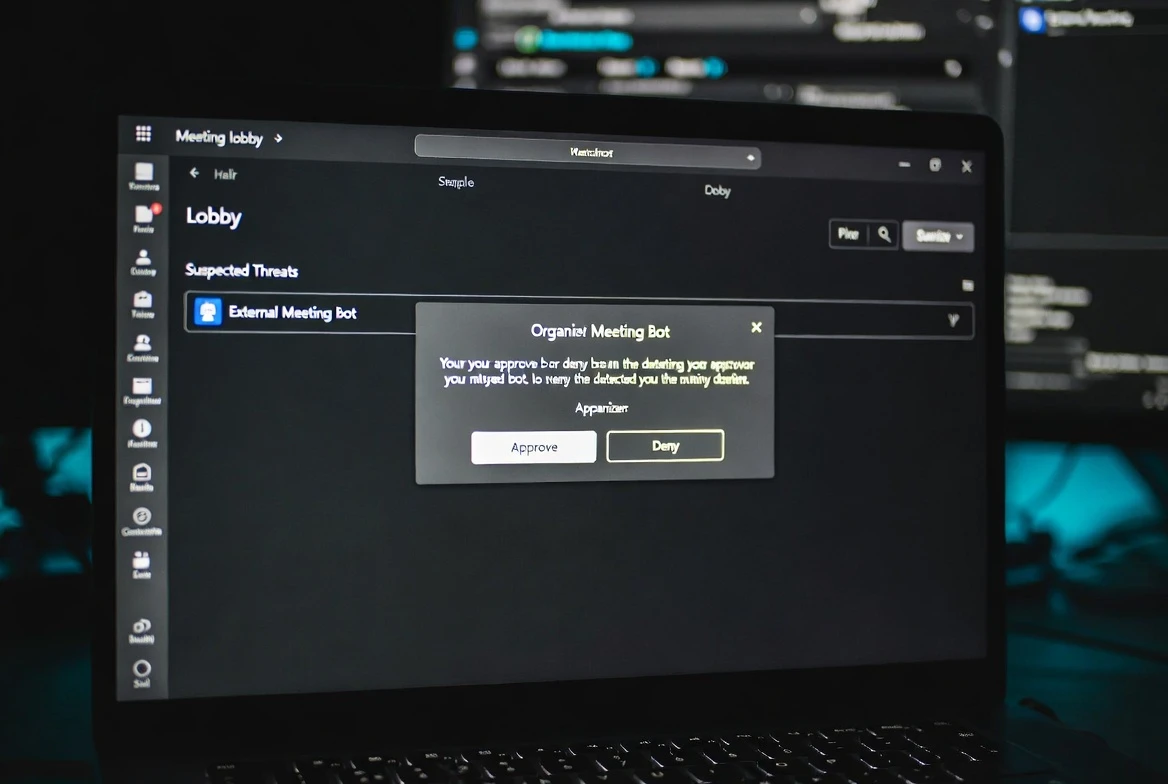
When detection fires on a bot attempting to join, the bot lands in the meeting lobby regardless of how the lobby is normally configured. The lobby interface now sorts those waiters into two queues an organizer can scan at a glance: a Waiting pool that contains verified human participants and registered bots, and a Suspected Threats pool that holds bots without a verified identity. Admitting from the queue is no longer a one-click action for any identified bot. The organizer sees a confirmation prompt before each identified bot enters, and choosing Admit all produces a separate warning dialog if bots are in the batch. The friction is intentional, and Microsoft spelled it out in its rollout material.
The Detection Layer Behind the Scenes
Detection runs during the meeting join process and pulls from both infrastructural and behavioral signals. Microsoft’s documentation frames the combination as the path to high accuracy levels and broad detection coverage. Teams then tags the participant as a bot and applies the configured policy setting, which is what places them in the lobby.
The Teams Bot Identification Program is the registration layer that runs alongside detection. Independent software vendors that build meeting-bot experiences for Teams can apply through the intake page Microsoft describes in the ISV registration path for meeting bots. Once accepted, vendors include a self-identification marker in the bot’s join request. When Teams recognizes the marker, the bot arrives in the lobby under the Waiting queue rather than the Suspected Threats queue. The visible split between registered and unregistered bots is the message the program sends to every meeting organizer who runs a session with third-party tools attached.
The detection system is not a perfect classifier. Microsoft’s documentation lists two known limitations side by side: some external bots will not be detected, and the system will occasionally flag a real human participant as a bot. The first means there is no completeness guarantee. The second has a workaround built into the lobby interface, where an organizer can mark the misclassified participant with a This is not a bot option that converts the entry to a standard human for that specific meeting and sends signal data back to Microsoft.
- 37 percent of internet traffic now comes from bots, per a Thales report relayed in coverage of the Microsoft 365 Roadmap entry
- Late August 2026 is when Microsoft plans to fully remove the legacy CAPTCHA control from the Teams Admin Center
- Mid-June 2026 was when the bot detection capability reached general availability globally, with GCC environments on the same schedule
- Two lobby queues organize waiters: a Waiting pool for verified humans and registered bots, and a Suspected Threats pool for unverified or system-flagged bots
The Friction Microsoft Built Into the Lobby
Removing the one-click Admit option on identified bots is the most visible friction in the new lobby. The redesign also adds a confirmation prompt any time the queue an organizer approves contains a bot, and a separate warning if Admit all is selected with bots still in the batch. Each step adds one extra click, and the click is meant to make the organizer pause.
Microsoft tied the new friction to a separate meeting-level setting that controls who gets to admit from the lobby at all. The documentation recommends setting Who can admit from the lobby to organizers and co-organizers only. The reasoning is to stop a presenter in the meeting, often a junior participant, from inadvertently admitting an external bot during a packed call. Microsoft states the recommendation on the same documentation page that describes the bot policy itself, which means the company treats the two settings as a pair.
This is the part of the rollout that changes the meeting host’s day. Hosts who never thought about lobby controls now have a default flow that asks them to type or click through three gates before a bot can hear anything. The friction scales with the number of third-party tools the meeting pulls in, and most enterprise meetings carry at least one.
The same lobby redesign retires the older Require verification by participants (CAPTCHA) meeting policy, which previously asked every joining participant to solve a visual puzzle before admission. The new system replaces that blanket check with something more targeted: only identified bots get a hard gate, and registered bots get a softer one. The transition runs in parallel with the lobby feature rollout, not as a step after it. Per the rollout timeline and CAPTCHA retirement window, Microsoft plans to fully remove the CAPTCHA control from the Teams Admin Center by late August 2026 and leaves it selectable until that date.
Why Microsoft Made This Push Now
The trigger is part security research, part platform economics. Thales reported that the growing accessibility of AI tools is enabling cybercriminals to create and deploy malicious bots responsible for 37 percent of all internet traffic, per the 37 percent figure on AI-built bot traffic relayed in March 2026. That number is the headline statistic Microsoft has been quoting since the policy entered the Microsoft 365 Roadmap that same month. The same Roadmap entry describes the bot identification work as protection against criminals who abuse meetings to compromise communications, hijack conversations, and steal company data.
Microsoft’s framing has stayed consistent across the rollout. The company told Help Net Security in March 2026 that organizers will be required to explicitly and separately admit these bots into the meeting, if really required. The repeated phrase is the one the company wants meeting organizers to remember.
The clearest statement of intent is in the language Microsoft used when the feature entered the Roadmap.
During Teams meetings, if there is an external 3P bot trying to join the meeting, organizers will be able to see a clear representation of the bots while they wait in the lobby. Organizers will be required to explicitly and separately admit these bots into the meeting, if really required. This approach will ensure that no one inadvertently accepts the external bots into the meeting, ensuring that the organizers have full control over the presence of these bots.
Microsoft, in the Roadmap entry relayed to Help Net Security in March 2026. The phrasing is the company’s own product framing, not a researcher’s gloss. That phrasing reads less like a security policy than a product design choice, because every external bot is now its own micro-decision scoped to a single meeting by a single organizer. The framing also answers a quieter anxiety inside IT, where a bot from an internal tool that joins every call forever can become a compliance liability even if it was well-intentioned at install.
Microsoft’s Roadmap Beyond the Lobby Check
Microsoft has signaled a long list of follow-on controls that have not yet landed in the Teams Admin Center. The next batch includes allowlists for pre-approved bots, organization-wide policies that block every external bot without an approval workflow, and admin reports and audit logs that capture bot detection events and lobby queues. The same roadmap is expected to expose more granular controls aligned to different security postures, which means a regulated finance tenant may eventually be able to apply a different defaults profile than a research group. None of those controls has shipped yet, and Microsoft has not committed to a release date for any of them. Admins who want to stay ahead of the curve should expect at least one quarterly feature drop through the rest of 2026. The list is a signal that Microsoft sees the bot policy as the start of a longer controls program.
The parallel change is the retirement of the older CAPTCHA policy. Microsoft plans to remove the Require verification by participants (CAPTCHA) control from the Teams Admin Center by late August 2026. Tenants that have not switched their default policy from CAPTCHA to the new bot handling should plan to do so before the older control disappears.
Day-One Setup Admins Should Run
Most tenants inherit the new behavior with no admin action, because detection is enabled by default and the default option is Require approval when detected. Admins who want to confirm their exposure can pull meeting policies from the Teams Admin Center and look for the new bot handling setting under Meeting Join and Lobby. The full configuration map lives on the Microsoft Learn page that documents the policy, including the Set-CsTeamsMeetingPolicy cmdlet and the ExternalBotAccessMode attribute tenants need to script changes across many meeting policies at once. Tenants who want a stronger floor should set Who can admit from the lobby to organizers and co-organizers only, which the same Microsoft Learn page recommends. The full change set fits inside a single admin session for any tenant that has not already customized its lobby settings.
The default policy rejects bots and lets the organizer in. The optional alternative turns detection off entirely, and the PowerShell attribute for that fallback is AllowBots, which sets ExternalBotAccessMode to a state where bots appear as any other external participant in meetings. Microsoft’s best-practices list on the same documentation page recommends keeping the default Require approval setting and not disabling detection unless a specific business scenario demands it. The audit logs that exist today already show useful entries, which means security teams can search lobby entries that flagged bots in the last 30 days even before the dedicated admin reports ship.
The two policy states, summarized:
| Admin setting | PowerShell value | Behavior |
|---|---|---|
| Do not detect bots | AllowBots | Bots are not detected or labeled. They appear as any other external participant in the meeting. |
| Require approval when detected (default) | RequireApprovalWhenDetected | Bots are placed in the lobby and require explicit organizer admission. Identified bots run through the Waiting or Suspected Threats queue and trigger confirmation prompts before admission. |
The table compresses both states into one frame. Beyond choosing a state, admins should brief helpdesk staff on the new lobby prompt and what users should do when they see it. A separate Teams protection layer, the Brand Impersonation Protection rollout from May 2026, runs in parallel for inbound calls and surfaces its own red banner during suspicious rings, per how Teams flags brand impersonation calls. Admins who look only at the lobby setting will see a bot filter; admins who look at the larger pattern will see a meeting-and-call identity layer taking shape around AI agents.
Frequently Asked Questions
Is bot detection on by default, or do admins need to enable it?
Detection ships on by default for every tenant. The default value for the new policy is Require approval when detected, and the documentation recommends keeping that setting unless a specific business need requires disabling detection. Tenants that have not changed their meeting policies will see the lobby behavior the moment their Teams client updates.
When does Microsoft retire the CAPTCHA verification policy?
Microsoft plans to remove the legacy CAPTCHA control from the Teams Admin Center by late August 2026. The retirement is tied to the rollout of the bot policy, and the older control is the first to disappear.
What happens when a legitimate human gets flagged as a bot?
The Microsoft Learn documentation describes detection occasionally misclassifying humans as bots. The lobby interface offers a This is not a bot option that converts the entry to a standard human for that meeting and sends signal data back to Microsoft for tuning. The organizer still has to admit the misclassified participant manually.
Can admins pre-approve specific vendors so their bots pass the lobby?
Allowlists for pre-approved bots are on the announced roadmap but have not shipped to the Teams Admin Center. Today, the only path for smoother admission is for vendors to register through the Teams Bot Identification Program, which lets them include a self-identification marker in their join request. Registered bots then land in the Waiting queue rather than the Suspected Threats queue.
Does this affect external users joining from outside the tenant?
This policy covers external bots, not external humans. External users continue to follow whatever lobby and join rules the organization has configured. The bot policy is an additional layer on top of those existing controls, not a replacement.


Pixel 11 Trails Galaxy Phones That Last as Long

OpenAI’s Research Intern Arrives With a Warning Attached

Robinhood Prices XRP Into a Two-Cent 9 a.m. Bet

Sony’s 10 Percent Disc Drop Leaves the 2028 Cutoff Intact

Chip Allocation Sidelines the Base iPhone 18 This Fall

Miami-Dade Fights the Vice City Brand It Already Wears

IFA 2026 Awards Put Tecno Ahead of Flagship Phones

USB-C Gadgets Made the Junk Drawer Rechargeable

Pixel 11 Pro Asks $1,099 for a Light Google Locked

The iPhone Ultra Sells Two Retired Minis as One Foldable

Oracle Cuts 21,000 Jobs in a Year, Cites AI in 10-K Filing

Fable 5 and Mythos 5 Return as US Lifts Anthropic Export Controls

SpaceX’s Google Deal Turns a Rocket Company Into a Cloud Landlord

CD Projekt Red Co-CEO: Redemption Arc Isn’t Done, Witcher 4 in 2027

XPL Rallies 30% Ahead of Plasma One Card Tier Launch

Google Search Profiles Build a Follow Graph Inside Discover

DGO App Brings Rs 549 Mobile Pass for FIFA World Cup 2026 in Nepal

Moonshot AI Targets $30 Billion in China’s Fastest AI Funding Sprint

Oppo’s ColorOS 17 Eligibility List Leaves A-Series Buyers Behind

Microsoft Xbox Layoffs Start in July as Sharma Slams 3% Margin
-
 AI3 months ago
Oracle Cuts 21,000 Jobs in a Year, Cites AI in 10-K Filing
-
 AI2 months ago
Fable 5 and Mythos 5 Return as US Lifts Anthropic Export Controls
-
 AI3 months ago
SpaceX’s Google Deal Turns a Rocket Company Into a Cloud Landlord
-
 GAMING3 months ago
CD Projekt Red Co-CEO: Redemption Arc Isn’t Done, Witcher 4 in 2027
-
 CRYPTO3 months ago
XPL Rallies 30% Ahead of Plasma One Card Tier Launch
-
 NEWS3 months ago
Google Search Profiles Build a Follow Graph Inside Discover
-
 APPS3 months ago
DGO App Brings Rs 549 Mobile Pass for FIFA World Cup 2026 in Nepal
-
 AI3 months ago
Moonshot AI Targets $30 Billion in China’s Fastest AI Funding Sprint