
APPS
My cTrader Turns the Mobile App Into a Storefront
cTrader Mobile 5.9 puts copy strategies, invite links and live account stats on the bottom bar, then Spotware takes 30% of copy-provider fees.

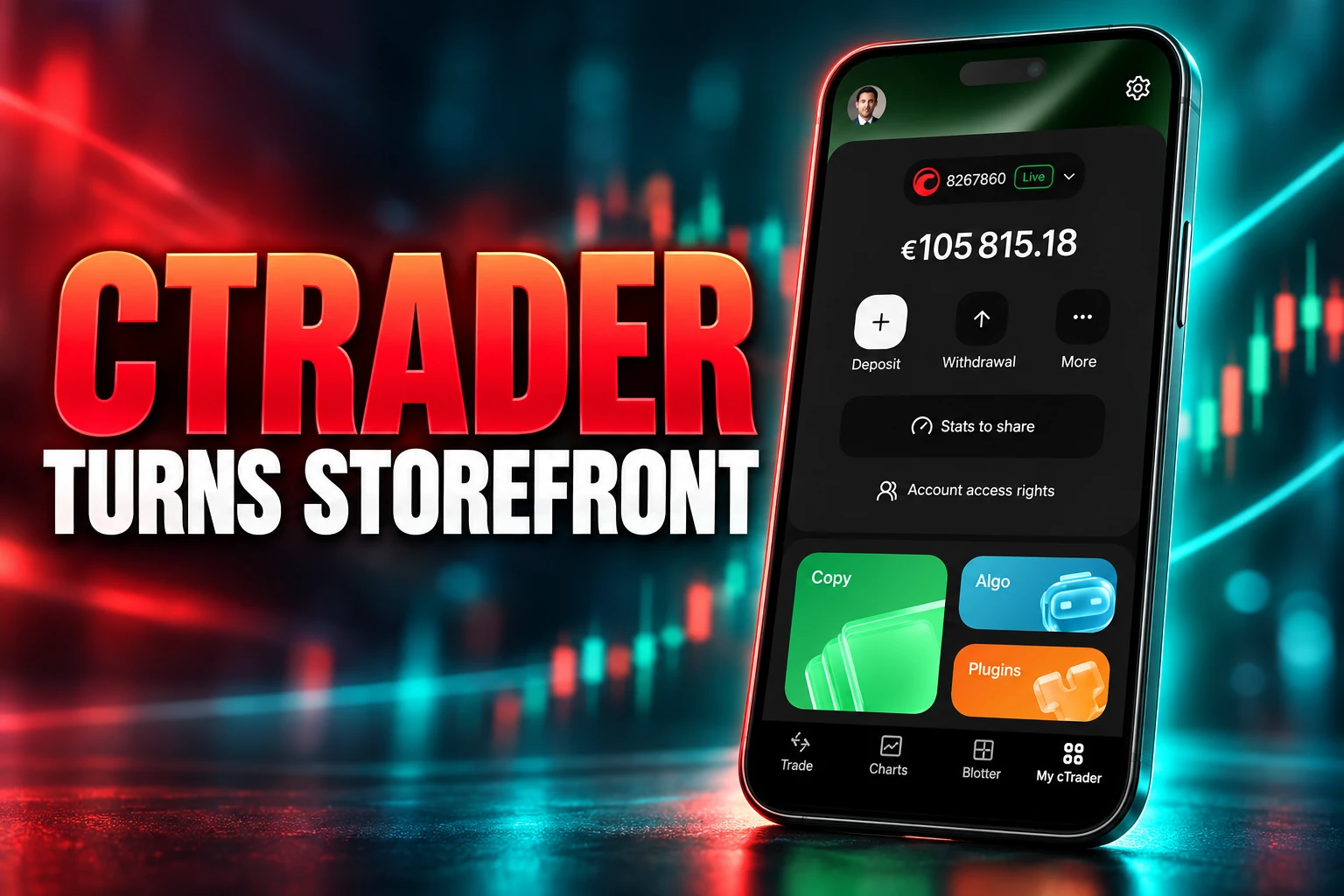
cTrader Mobile 5.9 puts copy strategies, invite links and live account stats on the same bottom bar as charts. Spotware shipped the iOS build on 26 May 2026, and an Android 5.9.170 package was circulating by 30 June. My cTrader is the new tab that holds funding, support and the company’s product shelf.
Spotware’s official post followed on 2 July. Two days later, on 4 July 2026, cTrader began taking 30% of the fees strategy providers earn on Copy. Store subscriptions arrived on 5 August. The hub is a shop window with a till behind it.
A Bottom-Bar Storefront for Copy and Invite
Spotware, which has built cTrader since 2010, describes My cTrader as the section that puts funding, products and support in one place. From that tab a trader can switch, create, rename or hide accounts, manage access rights, move money, read bonuses and history, and open Copy, Algo, plugins and Invite. Broker chat, social links and the Help Centre sit in the same stack.
Sergey Borisov, product manager of cTrader Mobile at Spotware, tied the work to the company’s Traders First line.
Our Traders First™ approach means improving every part of the trading experience to ensure that it meets the demands of modern traders.
Sergey Borisov, Product Manager of cTrader Mobile, Spotware
He said the company wanted one personal space that feels organised and easy to find. The layout does that for everyday account chores. It also puts every paid and social product Spotware sells on the same four-icon bar as Trade and the blotter.
The company posted the same pitch on its own account, with Copy, Algo, plugins and Invite listed above support.
My cTrader – your trading life under one roof
We released My cTrader – a new section in cTrader Mobile 5.9 where account management, funding, platform products and support all come together in one place.
✅ Switch between accounts, create new ones, rename or hide them, manage… pic.twitter.com/HFShJLULvD
— cTrader (@cTrader) July 2, 2026
That mix is the point of the release for brokers as much as for traders. Spotware has told broker clients that one-tap charts, a personalised section and in-app products help keep people inside branded apps and raise trading activity. Around 60% of retail traders already work on phones, Spotware has said, which is why the same firm wired AppsFlyer into those branded builds so brokers can buy installs and watch what happens after the tap.
CTRADER IN 2026
- Traders: More than 11 million people use cTrader, per Spotware’s product pages.
- Firms: More than 300 brokers and prop firms run on the stack.
- Mobile share: Spotware puts about 60% of retail flow on phones.
- Copy take: From 4 July 2026 the platform keeps 30% of provider fees.
cTrader still sells itself on native charts and free cloud bots. My cTrader is how those extras stop living three menus deep.
Public Stats Links Expose Drawdown and Open Trades
The trust tool in the tab is a real-time account statistics public link. In My cTrader, on the selected account, the trader taps Stats to share, generates a URL and sends it. Recipients land on an official cTrader page, not a screenshot. The link stays live until it is deleted. A new generate creates a new URL, and a delete kills every copy already sent.
Spotware’s own help page does not pitch this as a diary for the account holder. It lists sales jobs.
WHO THE LINK IS FOR
- Money managers: Share the page as proof before asking someone to grant account access.
- Strategy providers: Pair the same numbers with a Copy strategy when courting investors.
- Educators: Send followers a live record instead of a cropped equity curve.
- Private chats: Answer a prospect who wants evidence before working together.
The shared page is wide. Summary figures include net profit, profit factor, profitability, max balance drawdown and starting balance. Charts cover ROI, equity, monthly ROI, performance and volume. Performance stats break out winning and losing deals, long and short. Symbol and deal tables sit underneath. Positions list open trades with ID, create time, symbol, volume, direction, entry price, current price, swap and commissions. History lists closed deals with open and close times and prices.
The page does not hand over trading rights, other accounts on the same cTrader ID, or the power to deposit or withdraw. That is a real fence. It is also a live P&L poster with open prices on it, which is a different object from a locked screenshot. Copy sellers were already pasting strategy URLs beside metric images. The new link makes that a first-party page a stranger can refresh.
How Invite Converts a Share Into a Referral
cTrader Invite is the other growth tool parked in the hub. Any cTrader URL that carries a (u) parameter with a partner’s username is an invite link. A tap attributes the visitor inside cTrader, and a broker that has wired the webhooks can see that person as a referral in its own CRM. Partners generate links and QR codes, watch invited traders in real time and treat a public profile at ctrader.com/u/username/ as a landing page.
Help text for partners is blunt about why stats belong on that page. Disclosing successful trading statistics, it says, will arouse trust, and invited traders will be more willing to use partner products. Profile toggles let a partner show or hide contacts, trading stats, a bio and a recommended broker. Hide the profile and invited traders can drift to someone else once the guaranteed attribution window ends.
The same (u) tag rides on symbol links, signal links, algo links and Copy links. Share a chart, a bot or a strategy and the click still belongs to the partner. My cTrader is where that kit stops being a separate desktop habit and becomes a mobile share sheet. Introducing brokers get a pocket CRM. Brokers that sync Invite skip a layer of manual partner codes.
Strategy providers cannot make a Copy strategy fully private. Even off the public list, anyone with a direct link can open it. They can hide open positions from strangers, and pending orders with stops stay hidden, but the product is built to be passed around. The hub just shortens the pass.
The 30% Copy Cut From 4 July
Copy was already in the apps. 5.9 puts it on the home bar. The fee change is what makes that placement a business event. From 4 July 2026, cTrader takes a 30% commission on provider fees. The cut comes out of what the provider earns. Investors do not pay an extra platform charge.
Providers still set the menu, inside caps. Performance fees can run up to 40% of an investor’s net profit on a high-water-mark model. Management fees can run up to 10% of the investor’s equity per year. Volume fees can run up to USD 10 per million of copied volume. Fees can be mixed or set to zero. Brokers then deposit what is owed into a live account that is not the strategy account.
COPY FEES FROM 4 JULY 2026
| Fee | Who sets it | Cap | What 4 July changed |
|---|---|---|---|
| Performance | Strategy provider | 40% of investor net profit | cTrader keeps 30% of the fee |
| Management | Strategy provider | 10% of investor equity, yearly | cTrader keeps 30% of the fee |
| Volume | Strategy provider | USD 10 per million copied | cTrader keeps 30% of the fee |
| Platform commission | cTrader | 30% of provider earnings | Starts 4 July 2026, not billed to investors |
The 40% performance cap and the 30% platform cut are different numbers on different sides of the trade. One is the most a provider may charge an investor. The other is Spotware’s share of that provider’s take. Demo accounts can copy only free strategies, and only if the provider allows it. There is no cap on how many strategies a person can copy or provide, but each strategy needs its own live account. Stop copying and every copied position closes, with unrealised fees realised.
Investors can set an equity stop loss on a copy account. It is not a guaranteed stop. Gaps and thin liquidity can leave equity below the line. Protections on the provider’s tickets are not copied; the close signal is. That is the machine My cTrader now advertises from the first screen of the phone app.
Open Charts Instantly, Then Dim the Rest
The other half of 5.9 is why most write-ups stopped at navigation. Charts moved onto the bottom bar, next to My cTrader, Trade and the blotter, so the last symbol is one tap away. Spotware said that change came from traders who wanted less hunting. A tap on the plot shows or hides controls. A floating panel gathers actions for drawings, orders, positions and alerts and can be dragged off the price. Focus mode dims everything except the selected position or order. The crosshair lights the chosen bar or measured span.
Those controls matter because a lot of cTrader use is still split: people read a market in one place and fire the order in cTrader, then complain when the fill or the spread is not what the other screen showed. A dedicated chart tab is how Spotware tries to keep the read and the ticket on the same glass. If the chart holds the session, the Copy tile and the Store plugins stay in the thumb’s path.
The account switcher and chart tab are the visible 5.9 layer. They are also the bait. Spotware collected Best Mobile Trading App at UF AWARDS GLOBAL 2026 in Limassol, 16 to 18 June, after the iOS 5.9 drop and before the official My cTrader blog post. The award cites native charting, Quick Trade, server-side scaling out and free cloud bots. The hub is how those extras get sold again after the download.
After the Hub, Subscriptions and Version 5.10
iOS picked up 5.10 in late July. Android 5.10 followed on 4 August, with dedicated Positions and Markets apps, a new login screen that accepts Google, Apple ID or email, and a speed pass. My cTrader did not come out. Official clips in late July still told people to open Copy, Algo and plugins from that tab, and to handle Invite, sessions and Quick Trade from the same place.
On 5 August, cTrader Store added subscriptions for cBots and plugins, plus indicators. Sellers can offer weekly, monthly or longer plans, and a one-off price can sit beside them. The company’s own post said some yearly plans save up to 50%. Cancel, and access runs to the end of the paid period. Aleksei Kozlov, general manager of cTrader Store, said subscriptions make premium products easier to reach and open a path for plugins that need live data and regular upkeep. In-app purchases are planned so traders can find and buy those tools without leaving cTrader Mobile.
FROM 5.9 TO THE TILL
- 26 May 2026: cTrader Mobile 5.9 lands on iOS with My cTrader, a charts tab and the new focus tools.
- 30 June 2026: Android 5.9.170 is in circulation with the same hub copy.
- 2 July 2026: Spotware publishes the official My cTrader note and Borisov’s comment.
- 4 July 2026: The 30% copy commission on provider fees takes effect.
- 4-5 August 2026: Android 5.10 ships, and Store subscriptions go live.
Brokers can list their own branded plugins in that Store and reach the same more than 11 million people who already sit on cTrader IDs. Introducing brokers get a cheaper object to promote than a full bot licence. Spotware gets another meter on a shelf it just moved to the phone’s home row.
The charts in 5.9 are faster, and the floating panel is a real fix for fat-finger order tickets. The lasting change is that Copy, Invite and the Store now share a thumb with those charts, and the fee schedule caught up two days after the launch post. Public stats links will keep doing the work screenshots used to do for managers and educators. The next Store step Spotware has already named is paying for those tools inside the app that just taught people where to look.
Disclaimer: This article is news reporting and analysis of a trading-platform release and related fees. It is informational only and is not investment, trading or financial advice, and it is not a recommendation to copy strategies, share account statistics, or buy plugins or subscriptions. Anyone considering live trading, copy trading or paid tools should speak with a qualified financial adviser and read their broker’s own terms before acting. Figures, app versions and fee caps reflect the cited Spotware and cTrader materials at the dates given and can change.

Instagram Plus Tests a Read-Only Mode That Cuts Stories

Altman Asks the Public to Accept Some AI Harm

Google Freezes OSS VRP Product Reports After AI Flood

AI Agents Make Payment Rails the Scarce Prize

Turkey’s Crypto Boom Now Runs Through Three Banks

Fable 5 Came Back Under a Commerce On-Off Switch

Google’s SpaceX GPU Lease Has a Sept. 30 Deadline

Plasma One’s XPL Locks Face a 1.81 Billion Cliff

DGO’s Rs 549 World Cup Pass Cost Fans Sleep and Data

Moonshot AI’s $30 Billion Ask Became a $35 Billion Close
-
 AI4 months ago
Fable 5 Came Back Under a Commerce On-Off Switch
-
 AI4 months ago
Google’s SpaceX GPU Lease Has a Sept. 30 Deadline
-
 CRYPTO4 months ago
Plasma One’s XPL Locks Face a 1.81 Billion Cliff
-
 APPS4 months ago
DGO’s Rs 549 World Cup Pass Cost Fans Sleep and Data
-
 AI4 months ago
Moonshot AI’s $30 Billion Ask Became a $35 Billion Close
-

 NEWS4 months ago
ColorOS 17 Device List Spans Oppo, OnePlus and Realme
-

 GAMING4 months ago
Xbox Cuts 3,200 Jobs After Five Years of Thin Returns
-

 GAMING4 months ago
The RTX 4050 Under Rs 70,000 Hides a Wattage Gap