
NEWS
iOS 27 Quietly Nails Phone Calls While Siri Leans on Google
iOS 27’s Call Context and Dual Capture fix real call friction on-device, arriving as Apple’s bigger bet, a Gemini-powered Siri AI, still proves itself.

iOS 27 leaves Phone and FaceTime looking almost untouched on the surface. Underneath, two new features change how both apps work day to day: Call Context and Dual Capture. One ends the frantic mid-call hunt for a confirmation number. The other lets a FaceTime call show your face and whatever the camera is pointed at, at the same time.
Both run as narrow, on-device tasks instead of open-ended chat, and both work from day one. Apple spent the same twelve months telling the public its bigger Siri rebuild was not ready, then agreed to pay Google a reported billion dollars a year for the Gemini model now doing the heavy lifting on that bigger project.
Call Context Ends the Mid-Call Scramble
Anyone who has called an airline or a hotel while frantically scrolling their inbox for a confirmation number mid-conversation will recognize the problem Call Context solves. It is the Phone app’s one major addition in iOS 27, and it works by matching the number being dialed against relevant details already sitting in the Mail app.
Call a hotel, and a reservation number surfaces on screen. Call an airline, and a flight confirmation code appears instead. Apple says the feature does not listen to anything said during the call. It only reads the dialed number and cross references stored Mail content, entirely on the device.
Call Context continues a pattern Apple started with iOS 26’s Call Screening and Hold Assist, both aimed at stripping friction out of the more tedious parts of making a phone call. Like those two features, Call Context runs on Apple Intelligence and requires an iPhone 15 Pro or newer.
Dual Capture Puts Two Camera Feeds on One Call
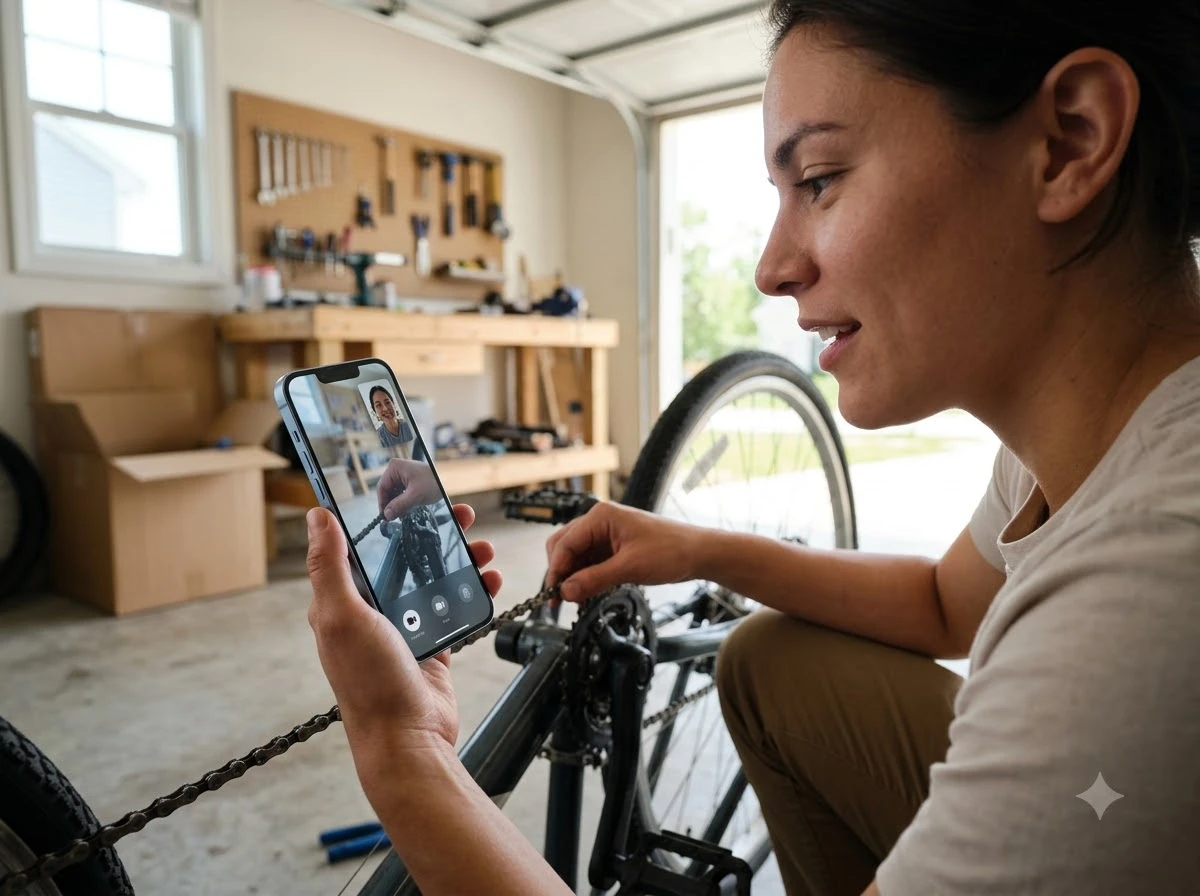
FaceTime’s headline addition, Dual Capture, fixes an annoyance anyone who has tried to show something during a video call already knows well. Normally, showing an object means flipping to the rear camera, losing your own face from the call, then flipping back and missing part of the conversation in the process.
On the iPhone 17, iPhone 17 Pro, iPhone 17 Pro Max and iPhone Air, Dual Capture skips that trade-off. Tapping the camera flip button during an active FaceTime call turns on both cameras at once, so the other person sees your face and whatever you’re pointing the phone at in the same frame. A second tap hides the front camera view, if only the rear feed is needed.
The capability is not new to Apple. Dual Capture already existed inside the Camera app for recording video on the iPhone 17 lineup, and iOS 27 simply extends it into live FaceTime calls. Sending a dual-camera feed requires one of those specific iPhone models, but receiving one does not. Anyone running iOS 27, regardless of which iPhone they own, can view a dual video stream sent from the other end of the call.
The Smaller Fixes Riding Along
FaceTime picked up a handful of smaller changes this year, each fixing one specific complaint rather than adding new functionality.
- Connection Quality – calls on a weak signal hold up noticeably better than they did before.
- Wi-Fi to cellular handoff – the switch between networks is smoother, cutting down on calls that drop when someone walks out of a building mid-conversation.
- Live Captions – now supports Traditional Chinese, widening the feature’s language coverage.
- Communication Safety – previously limited to blocking nudity, it now also screens out graphic violence and gore across FaceTime and Messages.
Apple folded that last change into child safety protections it previewed alongside iOS 27 in June, part of a broader push across its messaging platforms.
Which iPhone Decides What You Get?
Which iOS 27 features show up on a given iPhone depends on which model is in your hand. Call Context needs an iPhone 15 Pro or newer, or a call placed from a paired iPad or Mac. Sending a Dual Capture feed needs an iPhone 17, iPhone 17 Pro, iPhone 17 Pro Max or iPhone Air. Everyone else on iOS 27 can still receive one.
| Feature | Minimum Requirement | What It Does |
|---|---|---|
| Call Context | iPhone 15 Pro or newer (or a call from a paired iPad or Mac) | Surfaces matching Mail details, like a confirmation code, during a call |
| Dual Capture (sending) | iPhone 17, iPhone 17 Pro, iPhone 17 Pro Max or iPhone Air | Broadcasts front and rear camera feeds together on FaceTime |
| Dual Capture (receiving) | Any iPhone running iOS 27 | Views a dual-camera stream sent by someone else |
| Live Captions in Traditional Chinese | iOS 27 device with Live Captions enabled | Adds a new language option for live call captioning |
Getting onto the newest hardware has gotten a little easier through carrier promotions. T-Mobile’s free iPhone 17 promotion is one such deal, though it carries a 24-month commitment before the phone is actually free, a reminder that the newest features rarely arrive without a catch of their own.
The Two-Year Road to Siri AI
Call Context and Dual Capture arrived alongside a much longer story. Two years earlier, Apple had promised a far bigger overhaul to Siri itself, and that promise took a winding road to reach iOS 27.
- June 2024: Apple previews a more personalized Siri at WWDC, promising on-screen awareness and deep app actions as part of Apple Intelligence.
- March 2025: Apple confirms those Siri features are delayed past their planned iOS 18.4 window.
- June 2025: At WWDC, Craig Federighi says the rebuilt Siri still is not ready and points to 2026 instead.
- January 2026: Apple and Google announce a multi-year deal, reported at roughly a billion dollars a year, licensing a custom Gemini model to power Siri.
- June 2026: Apple unveils Siri AI at WWDC, its Gemini-powered rebuild, alongside iOS 27.
We were not able to achieve the reliability in the time we thought.
Craig Federighi, Apple’s senior vice president of software engineering, said that at WWDC in June 2025, explaining why the promised Siri overhaul still was not ready. Apple’s engineers had been building two versions of the new Siri architecture at once, he said, with the more ambitious one still short of the quality bar the company wanted. Seven months later, Apple stopped trying to finish the job alone.
Apple’s Two Bets, Shipping Side by Side
The result is one iOS release carrying two different strategies. Call Context is small, narrow and entirely Apple’s own work, proof its on-device Apple Intelligence approach can ship something people use daily without sending data anywhere else. Siri AI takes a different path: a full rebuild licensed from a rival, unveiled as the next generation of Apple Intelligence at WWDC in June, running through Apple’s Private Cloud Compute infrastructure instead of purely on the device.
Wall Street read the Gemini arrangement as pragmatic. Wedbush analyst Dan Ives called the deal “an incremental positive to both” companies and a “stepping stone” for Apple’s broader AI strategy heading into 2026 and beyond. Analyst Avi Greengart framed the licensing deal as Apple choosing where to build versus where to buy, using Gemini as a foundation layer under Apple’s own systems.
Analyst Ming-Chi Kuo pointed to a narrower consequence. A Gemini-powered Siri able to act on rich App Intents could reshape which apps get surfaced through Siri at all, creating, in his words, winners and losers inside the App Store itself. Siri AI’s Gemini-built foundation is already visible inside the iOS 27 public beta, running well ahead of its own wider rollout in the fall.
What Changes by September
iOS 27 is running in developer and public beta now, with Apple planning a wide release in September alongside this year’s new iPhone lineup. Call Context and Dual Capture will reach everyone on compatible hardware at that point, not just beta testers.
Siri AI carries more risk. A reported billion dollars a year buys Apple a capable model, not a finished product on its own, and the personalized Siri promise already showed how far a WWDC demo can drift from a shipped feature. Call Context and Dual Capture arrived close to on time, built narrow and on-device. Siri AI still has to prove it can do the same at full scale, in front of everyone, this fall.
Frequently Asked Questions
Does Call Context Listen In on My Phone Calls?
No. Call Context only matches the phone number being dialed against details already stored in the Mail app, and it does not process or record call audio. Apple Intelligence runs the matching entirely on-device, so nothing about the call itself leaves the iPhone.
Will Google’s Gemini See My Apple Intelligence Data?
Apple has said Gemini queries from Siri AI run inside its Private Cloud Compute system, in hardware-isolated servers, and that no user data is shared with Google. Call Context is a separate, on-device feature and does not touch Gemini or Siri AI at all.
Can I Use These Features Before iOS 27’s September Release?
Yes. iOS 27 has been running in developer and public beta since June 2026, and reached beta 4 by July 20, 2026, according to 9to5Mac, so testers already have access to Call Context and Dual Capture ahead of the wider rollout.
What Does an iPhone 14 Get in iOS 27?
An iPhone 14 can still install iOS 27 and pick up fixes like the smoother Wi-Fi to cellular handoff, the expanded Communication Safety filters and the new Live Captions language, plus it can view an incoming Dual Capture stream. It cannot run Call Context or send a Dual Capture feed, since both need newer hardware.
Does Call Context Work When I Call From an iPad or Mac?
Yes. Call Context also works when a call is placed from an iPhone-paired iPad or Mac, pulling the same Mail-based details even though the call did not originate on the iPhone itself.


Workers Still Trust Judgment Over the AI Tools They Use

DigitalOcean’s $894 Million Backlog Rewrites the Old Cloud

Companies Froze Job Design and Called AI a People Problem

AI Capex Looks Unique Because the Chips Wear Out

Samsung Medison’s HERA Z10 Aims at the Sonographer Shortage

GPT-6 Astra Ships as OpenAI’s First Critical Cyber Model

Palms Sells Clean Air Without Ending Casino Smoking

OnlyFans Promo Bots on X Now Pass the Humanity Tests

Datamaran Drops the ESG Label After Winning the Argument

Xiaomi’s Own Chip Lands While Apple Argues Over Color

Oracle Cuts 21,000 Jobs in a Year, Cites AI in 10-K Filing

Fable 5 and Mythos 5 Return as US Lifts Anthropic Export Controls

SpaceX’s Google Deal Turns a Rocket Company Into a Cloud Landlord

CD Projekt Red Co-CEO: Redemption Arc Isn’t Done, Witcher 4 in 2027

XPL Rallies 30% Ahead of Plasma One Card Tier Launch

Google Search Profiles Build a Follow Graph Inside Discover

DGO App Brings Rs 549 Mobile Pass for FIFA World Cup 2026 in Nepal

Moonshot AI Targets $30 Billion in China’s Fastest AI Funding Sprint

Oppo’s ColorOS 17 Eligibility List Leaves A-Series Buyers Behind

Microsoft Xbox Layoffs Start in July as Sharma Slams 3% Margin
-
 AI3 months ago
Oracle Cuts 21,000 Jobs in a Year, Cites AI in 10-K Filing
-
 AI2 months ago
Fable 5 and Mythos 5 Return as US Lifts Anthropic Export Controls
-
 AI3 months ago
SpaceX’s Google Deal Turns a Rocket Company Into a Cloud Landlord
-
 GAMING3 months ago
CD Projekt Red Co-CEO: Redemption Arc Isn’t Done, Witcher 4 in 2027
-
 CRYPTO3 months ago
XPL Rallies 30% Ahead of Plasma One Card Tier Launch
-
 NEWS3 months ago
Google Search Profiles Build a Follow Graph Inside Discover
-
 APPS3 months ago
DGO App Brings Rs 549 Mobile Pass for FIFA World Cup 2026 in Nepal
-
 AI3 months ago
Moonshot AI Targets $30 Billion in China’s Fastest AI Funding Sprint