
NEWS
Summer Heat Ages iPhone Batteries Long After Charging Stops
Apple already pauses a hot iPhone charge, yet UK summer heat plus a full battery still ages cells, cutting Maximum Capacity after the plug is idle.

Apple already stops an iPhone from charging when the phone gets too hot, a protection that ran through a UK summer with nine days above 35°C. Heat still shortens battery life because lithium-ion cells age at rest, especially when they are full and warm.
That is the part a July 11, 2026 charging warning could not finish. iOS can pause the plug. It cannot rewind chemistry that already happened in a hot car, on a MagSafe puck, or under a pillow.
iOS Puts Charging on Hold When iPhones Overheat
Apple says iPhone and iPad devices are designed for use between 0º and 35º C (32°F to 95°F). Store them between -20°C and 45°C (-4°F to 113°F), and do not leave one in a car, because a parked cabin can run past that band. Using an iPhone in very hot conditions can permanently shorten battery life.
The phone also has a built-in brake. If the interior temperature leaves the normal range, charging, including wireless charging, slows or stops. The display can dim. Radios can drop to a low-power state. Camera flash can switch off. Apps can run at lower frame rates. On navigation, the lock screen can read “Temperature: iPhone needs to cool down,” while spoken turns keep going.
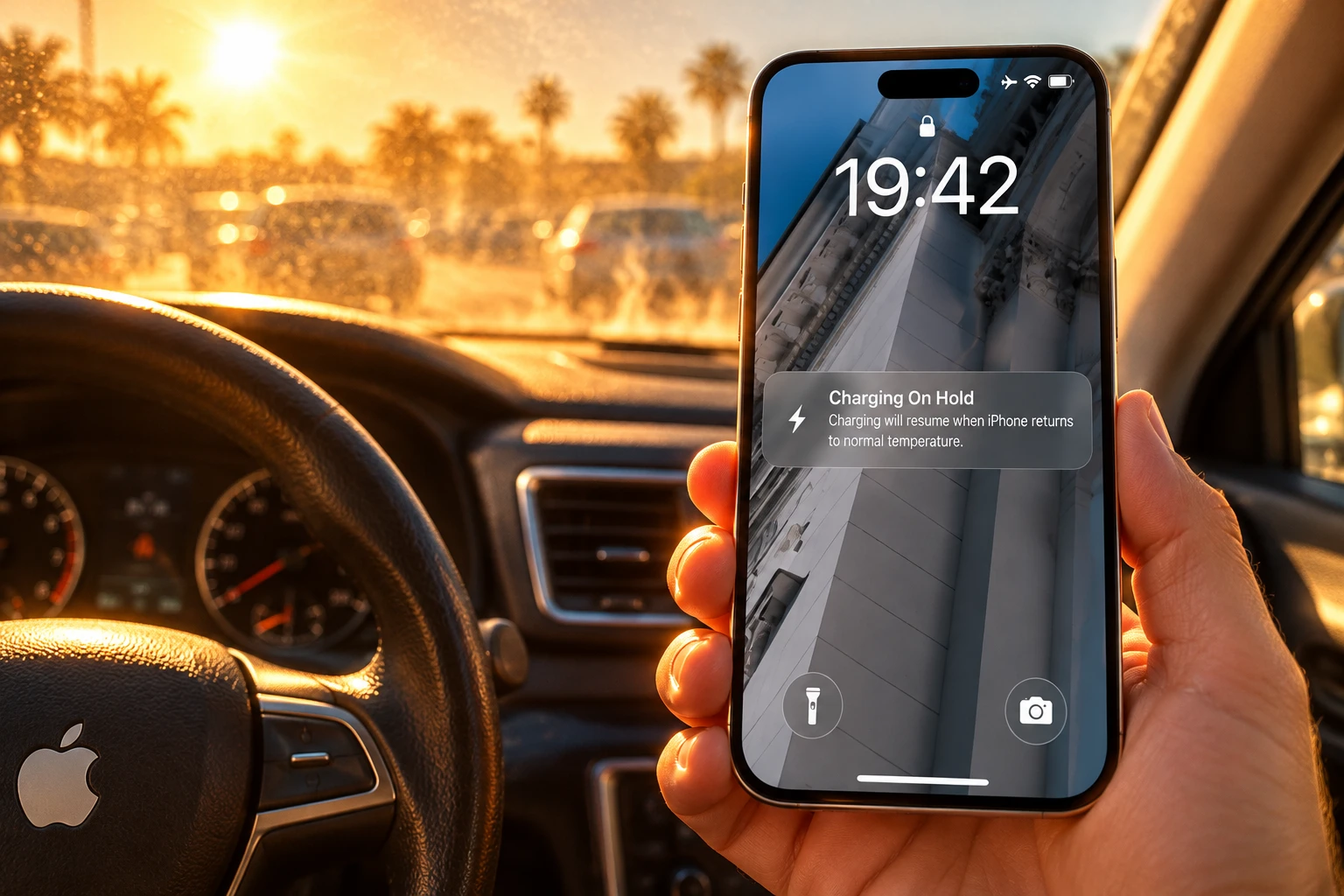
If the Lock Screen shows the message “Charging On Hold. Charging will resume when [device] returns to normal temperature,” the device is temporarily too hot or too cold to charge.
Apple Support, If your iPhone or iPad gets too hot or too cold
Apple’s iPhone User Guide for iOS 26 describes the same brake as thermally limited charging. The guide says it applies whether you use a cable, a MagSafe charger, or another wireless pad, and that the protection cannot be switched off. Optimized Battery Charging is a different 80% pause. It learns a routine, holds at 80% overnight, then finishes before you usually unplug. It may not run when you are travelling, which is often when a phone sits on a car mount in the sun.
Google draws the same ambient line on Pixel 10, Pixel 10 Pro and Pixel 10 Pro XL. The safety guide says do not charge above 35° C, and not below 0°C. If the phone is too hot, disconnect it, move it somewhere cooler, and wait. Do not leave it on a dashboard above 45°C (113°F).
Calendar Aging Hits Harder at a Full Charge
The pause protects the session. Most of a phone’s life is not a session. Lithium-ion cells lose capacity and gain resistance while they sit with no current, a process battery labs call calendar aging. Stanford and SLAC researchers tracked calendar aging across 232 commercial cells from eight types and five manufacturers for up to 13 years, at 24°C, 45°C, 60°C and 85°C, and at 50% and 100% state of charge.
They describe the main rest-time path as growth of the solid-electrolyte interphase on the graphite anode, a film that eats lithium the phone can no longer use. Temperature and state of charge both feed that film. A warm cell held near full is a worse rest condition than a cool cell held halfway.
A separate 2024 study of 27 commercial NRC18650B cells stored indoors, in shade, or in direct sun found the harshest case at full charge in glass under sunlight: a 6% drop in state of health and a 6.5% rise in internal resistance. That is not an iPhone pack. It is the same lithium-ion rule Apple is managing with a pause: heat plus a full charge still works on the cell after the current has stopped.
HOW HEAT CUTS A CELL
| Condition | What the cell does | Who measured it |
|---|---|---|
| Ambient above 35°C / 95°F | Permanent loss of capacity; charging in that heat can damage it further | Apple, maximizing performance guide |
| Battery hotter than Apple’s recommended band | Software may limit charging above 80% until the pack cools | Apple, maximizing performance guide |
| Wireless charging | The phone runs warmer; charge can slow or stop if internals overheat | Apple Support temperature page |
| Rest at 100% state of charge in sun (18650 lab cells) | 6% state of health drop and 6.5% higher resistance | 2024 calendar-aging study of 27 cells |
A floor iPhone 17 Pro Max photographed in an Apple Store in March 2026 already showed 95% Maximum Capacity while living on charge with the screen on. That unit never sat on a dashboard. It sat full, for hours, which is the rest-time path the lab papers describe.
The Heat Traps Sitting on Your Desk
Ed Stapleton, a tech expert at Clicks Geek, said the usual error is blaming only the charger. The room, the surface, the case, background apps and direct sun all add heat. Charging already warms the pack. Sun or trapped air on top of that puts the device under more stress than a cool indoor plug.
Apple has said for years that charging inside some cases generates excess heat that can affect capacity. The current maximizing-performance page is blunt: if the phone gets hot on charge, take it out of its case first. Apple also lists wireless charging among the ordinary reasons an iPhone feels warm, next to camera use, games, video streaming, setup, restore and a big software update.
THE HEAT TRAPS IN A NORMAL HOME
- Sunny windowsill: Stapleton said a phone left there for an hour can be hot to the touch, and video calls, social apps or the camera push it further.
- Car glass and dash: Apple warns against a hot car, long sun, and GPS navigation in that mix; Stapleton said people plug in because maps drain the pack, then cook the same pack on the windscreen.
- Bed, sofa, pillow: Fabric holds heat around the phone and the brick, and a warm bedroom at night makes that trap worse.
- Thick case on MagSafe: The case insulates the coil that is already dumping heat into the back glass, so iOS throttles sooner.
- Overnight wireless stand: StandBy turns the phone into a bedside clock, which keeps it on a warm puck near full for hours after you fall asleep.
The pause people see on a wired charge in an already-hot room is the same brake. You do not need a dashboard for Charging On Hold. A humid bedroom, a thick case and a puck are enough. Overnight MagSafe through a heatwave is closer to that store-floor life than to a short cable top-up on a desk.
July Pushed UK Days Past Apple’s 35°C Limit
The July 11, 2026 warning landed in a month the Met Office later called remarkable for prolonged heat. Summer 2026, June through August, was the warmest UK summer on record by average temperature. It was also the first year every summer month went above 35°C.
UK SUMMER 2026 IN NUMBERS
- Days at Apple’s cap: The Met Office counted nine days above 35°C in summer 2026, almost double the previous record set in 2020.
- Heatwave length: Some locations in England and Wales saw qualifying heatwave spells lasting up to 15 days.
- Season rank: Summer 2026 is the warmest UK summer on record in the Met Office series for June to August.
- The 35°C year: June, July and August each went above 35°C, a first in that record.
Apple’s ambient cap is a room figure, not a Stevenson-screen reading in a park. A 35°C afternoon still puts parked cars, west-facing sills and top-floor bedrooms over the line the battery was built for. Stapleton’s list (windowsill, garden table, dash, bedding) is where a national heat record becomes a local pack temperature.
What Maximum Capacity Measures on iPhone
Open Settings, then Battery, then Battery Health. Maximum Capacity compares the pack with the day it was new. Apple’s batteries page says iPhone 14 models and earlier are designed to retain 80% of original capacity at 500 complete charge cycles under ideal conditions. iPhone 15 models are designed to retain 80% at 1,000 complete charge cycles under ideal conditions. How you charge and how hot the phone runs still move that line.
AppleCare is the third 80% in this story, and it is not a charging pause. If Maximum Capacity drops below 80%, Apple says it will replace the battery for no extra charge while the plan is active. The one-year hardware warranty covers a defective battery. It does not treat ordinary chemical wear as a defect. Out-of-warranty battery service is a paid job whose price depends on the model.
Performance management on iPhone 8 and later can also throttle the chip when temperature, state of charge and battery resistance line up the wrong way, which is how an aged pack starts to feel slow as well as short-lived. Cold and a low charge can cause a temporary sag that lifts when the phone warms up. Heat damage to capacity does not lift.
If the lock screen ever showed Charging On Hold through July, that was iOS doing the job. The number to read in September is Maximum Capacity, not whether the phone felt fine after it cooled.
Charge on a Desk, Not a Windowsill
Apple’s comfort zone for the pack is tighter than the legal operating band. The maximizing-performance page names 16°C to 22°C (62°F to 72°F) as the ideal range, and says exposing the device to ambient temperatures higher than 35°C can permanently damage capacity, so a full charge will not last as long. Charging in that heat can damage it further. Even storage in a hot place can damage a battery in a way you cannot undo.
Stapleton’s practical list matches that page. Charge on a hard, shaded surface: a bedside table, a desk, a kitchen counter. Hard surfaces let heat leave. Soft furnishings and thick cases hold it. If the phone feels hot, unplug it, pull the case, and move it into shade. Do not put it in a fridge or freezer. A sudden swing can put water on the insides.
The worrying part is that battery damage is not always instant or obvious. Your phone might seem fine after cooling down, but repeated overheating can reduce how long it lasts on a full charge over time.
Ed Stapleton, tech expert at Clicks Geek
Leave Optimized Battery Charging on so overnight sessions pause at 80% when the phone knows your routine. If a heatwave bedroom has already made the phone warm, unplug at 80% anyway rather than waiting for the last fifth on a hot puck. For maps, shade the mount, skip a continuous charge if the chassis is already warm, and prefer a cable over a pad so you are not adding coil heat to sun load.
If Maximum Capacity has already crossed below 80% after a summer of dash mounts and bedside MagSafe, that is the AppleCare battery path, not another warning about Saturday’s plug.
Frequently Asked Questions
What temperature range is safe for charging an iPhone?
Charge in ambient air from 0°C to 35°C (32°F to 95°F), and treat 16°C to 22°C as the zone Apple calls ideal. Storage is a wider band, -20°C to 45°C, and a parked car can exceed even that, which is why Apple says not to leave the phone in one.
What does Charging on Hold mean on an iPhone?
The lock screen is telling you the pack is temporarily too hot or too cold to take current, and charging resumes when the phone returns to a normal temperature. A restore from iCloud can pause the same way, with a “Restore Paused” notice until the device cools, so the brake is not only for overnight plugs.
When does Apple replace an iPhone battery under AppleCare?
While AppleCare is active, Apple replaces the battery for no extra charge if Maximum Capacity is below 80%. The one-year hardware warranty covers a defective battery, not the slow chemical wear that heat and high charge produce, so a healthy-looking phone that simply faded through summer is an AppleCare question, not a warranty defect claim.
Can you cool a hot iPhone in the fridge?
No. A sudden drop can cause condensation inside the case. Apple’s cool-down is to turn the iPhone off, move it out of direct sun, and wait; a phone showing the temperature warning screen may still be able to place emergency calls, but you should not keep using it until it has cooled.
Owners who ran maps on the glass through July, or slept the phone on a puck in a warm room, can read Maximum Capacity now. If that figure has crossed below 80%, the replacement path is already on Apple’s books.

Instagram Plus Tests a Read-Only Mode That Cuts Stories

Altman Asks the Public to Accept Some AI Harm

Google Freezes OSS VRP Product Reports After AI Flood

AI Agents Make Payment Rails the Scarce Prize

Turkey’s Crypto Boom Now Runs Through Three Banks

Fable 5 Came Back Under a Commerce On-Off Switch

Google’s SpaceX GPU Lease Has a Sept. 30 Deadline

Plasma One’s XPL Locks Face a 1.81 Billion Cliff

DGO’s Rs 549 World Cup Pass Cost Fans Sleep and Data

Moonshot AI’s $30 Billion Ask Became a $35 Billion Close
-
 AI4 months ago
Fable 5 Came Back Under a Commerce On-Off Switch
-
 AI5 months ago
Google’s SpaceX GPU Lease Has a Sept. 30 Deadline
-
 CRYPTO5 months ago
Plasma One’s XPL Locks Face a 1.81 Billion Cliff
-
 APPS5 months ago
DGO’s Rs 549 World Cup Pass Cost Fans Sleep and Data
-
 AI5 months ago
Moonshot AI’s $30 Billion Ask Became a $35 Billion Close
-

 NEWS5 months ago
ColorOS 17 Device List Spans Oppo, OnePlus and Realme
-

 GAMING4 months ago
The RTX 4050 Under Rs 70,000 Hides a Wattage Gap
-

 AI4 months ago
Boris Cherny’s Loops Still Demand a Higher Production Bar