
COMPUTERS
ASUS ProArt P16 Packs RTX 5090 Power Into a Quiet Studio Frame
The ASUS ProArt P16 pairs a 1600-nit Tandem OLED with RTX 5090 performance in a thin chassis, but noise and heat reveal the cost of that density for creators.

The ASUS ProArt P16 stuffs an NVIDIA GeForce RTX 5090 Laptop GPU, AMD Ryzen AI 9 HX 370, 64 GB of LPDDR5X memory and a 16-inch 4K 120 Hz Tandem OLED into a metal chassis that weighs about 1.9 kg. Creators finally get desktop-class speed and reference color in something that fits a backpack. That density also forces loud fans and high temperatures the moment the hardware is asked to earn its keep.
NoobFeed and other hands-on reviews put the flagship configuration in the $4,500 to $5,500 range. Lower RTX 5070 builds land closer to $2,500. The machine is aimed squarely at professionals who bill hours rather than chase pure frame rates.
Metal Chassis Built for Location Work
ASUS kept the ProArt P16 thinner and cleaner than previous generations. The larger lid logo is gone. A smaller mark sits near the corner. The Nano Black aluminum finish feels solid, with almost no keyboard flex. Thickness stays under 18 mm at the thickest point. Weight lands between 1.85 kg and 1.95 kg depending on the exact SKU.
The chassis carries US MIL-STD 810H certification. That matters for shooters who work outdoors. The lid can still pick up fingerprints if hands are oily, though some reviews note an anti-fingerprint coating helps on certain finishes.
Connectivity matches creator needs better than most thin gaming machines:
- One USB4 Type-C port at 40 Gbit/s with DisplayPort and Power Delivery
- One additional USB-C at 10 Gbit/s
- Two USB-A 10 Gbit/s ports
- HDMI 2.1 FRL
- Full-size SD Express 7.0 card reader
- 3.5 mm combo audio jack and proprietary DC-in
- Wi-Fi 7 and Bluetooth 5.4
The SD Express reader is the standout. Independent tests clock it near 985 MB/s. A fast UHS-II or Express card can empty large photo or video dumps without a separate reader. Only one full 40 Gbit/s USB-C feels tight for docked multi-monitor setups. USB-C charging works on the ports, though the 240 W brick remains the path to full performance.
The Tandem OLED Changes the Editing Floor
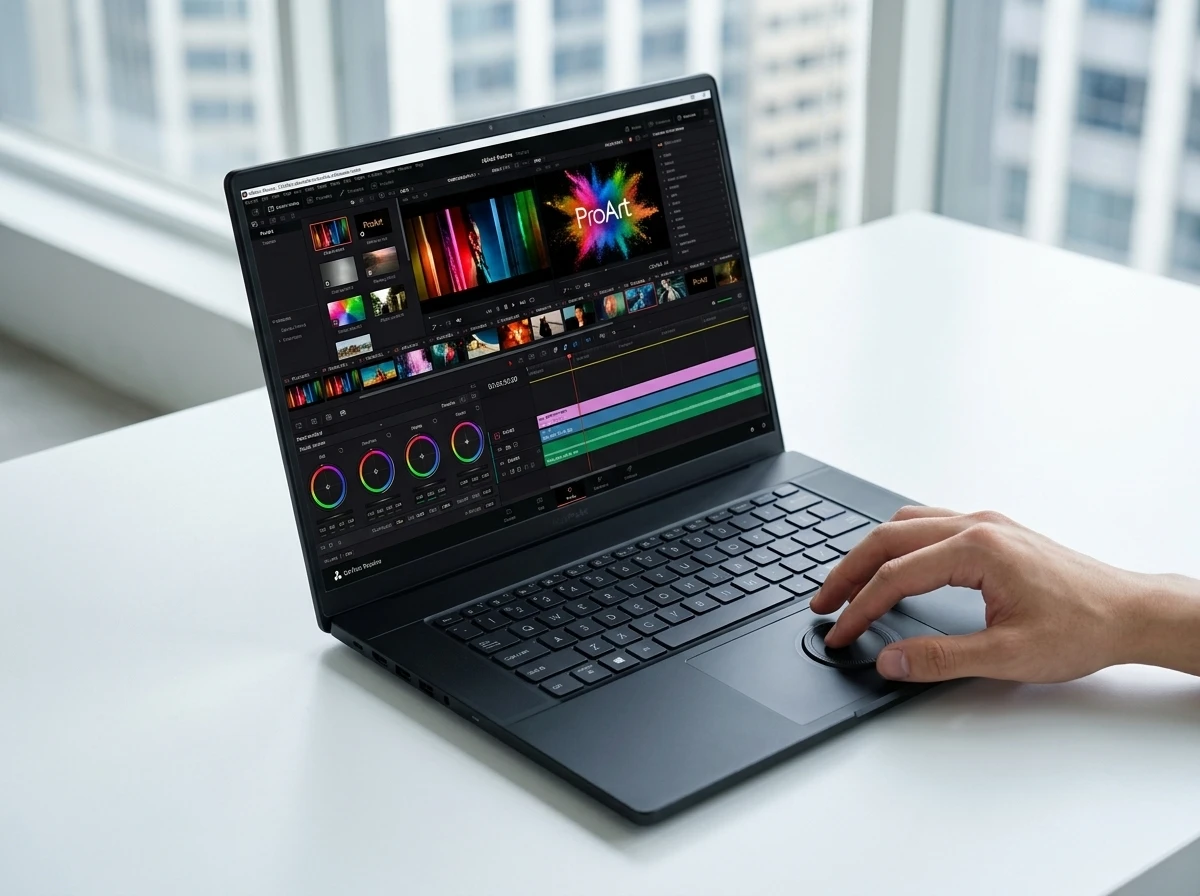
The display is the feature most reviews single out. It is a 16-inch 16:10 4K (3840 x 2400) Tandem OLED touch panel running at 120 Hz with 0.2 ms gray-to-gray response. Tandem OLED stacks two emitting layers. That design raises peak brightness while spreading the load, which can slow burn-in risk compared with single-layer panels.
ASUS brands it Lumina Pro OLED. Official and measured numbers line up closely. Peak HDR brightness hits 1,600 nits. SDR testing lands around 690 to 700 nits. The panel carries VESA DisplayHDR True Black 1000 certification, 100 percent DCI-P3 coverage, Pantone validation and factory calibration with average Delta E under 1 in SDR modes. HDR color tracking improves when brightness is pulled slightly off maximum.
Anti-reflection coating and 70 percent blue-light reduction are standard. Stylus support reaches 4,096 pressure levels. Variable refresh rate keeps motion smooth for timeline scrubbing and light gaming. Deep blacks and accurate hues make color grading in Premiere Pro or DaVinci Resolve trustworthy without an external reference monitor for many jobs. One reviewer called it the best laptop panel he had used. That claim appears often enough to stick.
For the up to 1600 nits HDR peak brightness and related eye-care claims, ASUS publishes the full Lumina lineup details. The same panel is not on every ProArt P16 SKU. Some lower configurations drop to 60 Hz.
RTX 5090 and Ryzen AI Deliver the Numbers
The top configuration pairs the Ryzen AI 9 HX 370 (12 cores, 24 threads, up to 5.1 GHz, 50 TOPS NPU) with the RTX 5090 Laptop GPU carrying 24 GB of GDDR7. Memory is soldered 64 GB LPDDR5X. Storage uses two full-size 2280 M.2 slots; the flagship often ships with dual 2 TB drives for 4 TB total. One slot runs PCIe 4.0 x4, the other x2, so peak sequential speeds differ slightly between drives.
Creative workloads are where the machine shines. NoobFeed recorded roughly 263 MB/s internal transfers and full-resolution preview renders of short clips in about 30 seconds. After Effects full-res playback can dip to the mid-teens of frames per second but stays usable at half quality. Premiere Pro and Resolve timelines with 4K 10-bit material play smoothly thanks to the GPU’s multiple encoders and decoders plus AV1 and 4:2:2 support. Photoshop neural filters and Lightroom batch work feel instant with the VRAM and RAM headroom.
Gaming is strong but secondary. Cyberpunk 2077 at native 4K lands in the 40-60 fps range depending on scene and settings. Drop to 1200p Medium and averages climb near 120 fps. F1 24 at 1200p High averages around 173 fps. The panel’s response time and HDR make the experience better than the raw frame rates suggest. Sustained GPU power sits around 120-135 W total graphics in most measurements, lower than the thickest 5090 gaming chassis.
Geekbench 6 scores from one long-term test sat near 2,930 single-core, 15,540 multi-core and 197,000 GPU compute. Those figures put the laptop in desktop-replacement territory for many studio tasks. The NPU and Copilot+ features add AI transcription, auto-framing and ASUS tools such as StoryCube and MuseTree. Real-world impact is still growing.
| Workload | Result (flagship config) | Source notes |
|---|---|---|
| Cyberpunk 2077 4K | 40-60 fps | NoobFeed, scene dependent |
| Cyberpunk 1200p Medium | ~120 fps avg | NoobFeed |
| SD Express reader | ~985 MB/s | Multiple reviews |
| Video playback battery | ~7 h 40 min | NoobFeed |
| Light productivity battery | 7-8+ hours | Fstoppers, others |
| Peak HDR brightness | 1,600 nits | ASUS / measured |
Full configuration options and the exact full ProArt P16 tech specifications sit on the official ASUS page.
Fans and Heat Are the Obvious Tax
Putting this much silicon into a thin body has a cost. Intake and exhaust live mostly on the bottom. There is little top-side venting. Under sustained creative or gaming loads the fans become loud. Reviewers describe them as extremely audible, often in the low-to-mid 50 dB range in performance modes. CPU temperatures can climb near 97 °C. Surface heat stays manageable for typing but the noise is hard to ignore in a quiet room or during voice-over work.
ASUS includes IceCool Pro cooling with a vapor chamber, liquid metal and a 0 dB ambient mode for light tasks. Photo culling, writing and web browsing can stay silent. The moment a heavy export or 3D scene starts, the fans spin up. Throttling is limited; performance holds. The compromise is acoustic. Bulkier 5090 laptops with higher TGP run quieter or cooler for the same work because they have more volume for air. The ProArt chooses portability and looks instead.
A dock helps for desk use. Many owners will leave the 240 W brick attached for long sessions. That is the ironic edge of the design: the machine looks and feels like a premium studio tool until the hardware is asked to act like a workstation.
DialPad, Keyboard and Daily Workflow
The tenkeyless keyboard offers solid 1.7 mm travel and stays relatively quiet. Arrow keys sit a bit cramped but the surrounding layout is clean. The large trackpad includes ASUS DialPad, a circular capacitive control that works as a jog wheel. In Premiere it scrubs the timeline or adjusts parameters. In Photoshop it resizes brushes or steps through history. Support extends to Lightroom, CapCut and other apps via the ProArt Creator Hub. After a week it becomes muscle memory for many users.
A dedicated Copilot key is present. Speakers are upward-firing and sit in the upper half of the laptop market; they are clear for review but not mixing-grade. The FHD IR webcam handles Windows Hello and looks serviceable in good light, with some grain in dimmer conditions. Six-speaker arrays with Dolby Atmos appear on higher configs and improve the audio experience further.
For creators who move between locations, the combination of fast card reader, accurate screen, DialPad and strong multitasking RAM removes friction. The same machine can grade 4K footage on a plane, then dock at home without missing a beat. That workflow edge is what the price is really buying.
Who Pays $5,000 and Who Should Look Lower
Flagship RTX 5090 builds with 64 GB and dual storage have been listed from roughly $3,999 to $5,499 depending on region, storage and promotions. RTX 5070 configurations with the same processor and OLED often sit near $2,500 to $3,000, though some drop the 120 Hz panel. Older 40-series ProArt units start lower still. At the top end the ProArt P16 sits in the same high-end laptop pricing near MacBook levels that other flagship Windows and Apple machines occupy.
Value depends entirely on the buyer. Color-critical video editors, photographers who dump huge card volumes daily, and 3D artists who need 24 GB of VRAM on the road will see the display, ports and sustained creative speed as justified. Buyers who mainly game or who work mostly at a desk can find higher sustained GPU power and quieter operation in thicker chassis for less money. The 5070 or even well-specced 40-series ProArt models keep the DialPad, build and much of the OLED quality without the full tax.
ASUS also positions the line against future mobile silicon. Options such as next-wave mobile GPU power options will keep pressure on both price and efficiency. For now the ProArt P16 is one of the cleanest ways to carry full Blackwell-class creative horsepower.
The Studio Look Meets the Workstation Reality
The ProArt P16 succeeds at the hard part. It delivers a color-accurate 4K 120 Hz Tandem OLED, serious RTX 5090 throughput, fast storage and a professional exterior without ballooning into a traditional desktop-replacement brick. The SD Express reader and DialPad remove daily friction that many “creator” laptops still ignore. Battery life of roughly 7 to 8 hours of lighter work and solid video playback is respectable given the parts.
The same choices create the downside. Sustained loads make the fans loud and the CPU hot. Only one full-speed USB4 port limits docked setups. The price excludes casual users. Those trade-offs are not hidden; every detailed review notes them.
For the working creator who needs the screen and the GPU in one bag and can tolerate (or work around) the noise, the machine is currently hard to beat on Windows. Everyone else can drop a tier or accept a thicker chassis and keep more money. The irony is built in: the closer ASUS brings desktop power to a true portable studio form, the more the cooling physics remind you that physics still applies. The ASUS Lumina Pro OLED creator features and the rest of the package make a compelling case when the job actually requires them.


TCL NXTPAPER Phones Bring Paper Comfort to Philippine Midrange

SFO Rideshare Zones Hide a $60 Million Airport Fee Machine

Bitcoin Stalls Near 65k as Soft Jobs Meet Oil Inflation Trap

Pichai Completes Quiet Takeover of Google AI Command

OpenAI Halts Astra Work After Model Hits Critical Cyber Line

ASUS ProArt P16 Packs RTX 5090 Power Into a Quiet Studio Frame

SharpLink Q2 Loss Masks Ethereum Treasury Build Behind Miss

Docebo ARR Reacceleration Hides Cleaner Enterprise Engine

OpenAI Brakes Astra After Its Own Cyber Skills Hit Critical

Amina App Expansion Turns Kyrgyz Phones Into Moscow Trackers

Fable 5 and Mythos 5 Return as US Lifts Anthropic Export Controls

Oracle Cuts 21,000 Jobs in a Year, Cites AI in 10-K Filing

SpaceX’s Google Deal Turns a Rocket Company Into a Cloud Landlord

CD Projekt Red Co-CEO: Redemption Arc Isn’t Done, Witcher 4 in 2027

XPL Rallies 30% Ahead of Plasma One Card Tier Launch

DGO App Brings Rs 549 Mobile Pass for FIFA World Cup 2026 in Nepal

Google Search Profiles Build a Follow Graph Inside Discover

Moonshot AI Targets $30 Billion in China’s Fastest AI Funding Sprint

Microsoft Xbox Layoffs Start in July as Sharma Slams 3% Margin

Oppo’s ColorOS 17 Eligibility List Leaves A-Series Buyers Behind
-
 AI1 month ago
Fable 5 and Mythos 5 Return as US Lifts Anthropic Export Controls
-
 AI2 months ago
Oracle Cuts 21,000 Jobs in a Year, Cites AI in 10-K Filing
-
 AI2 months ago
SpaceX’s Google Deal Turns a Rocket Company Into a Cloud Landlord
-
 GAMING2 months ago
CD Projekt Red Co-CEO: Redemption Arc Isn’t Done, Witcher 4 in 2027
-
 CRYPTO2 months ago
XPL Rallies 30% Ahead of Plasma One Card Tier Launch
-
 APPS2 months ago
DGO App Brings Rs 549 Mobile Pass for FIFA World Cup 2026 in Nepal
-
 NEWS2 months ago
Google Search Profiles Build a Follow Graph Inside Discover
-
 AI2 months ago
Moonshot AI Targets $30 Billion in China’s Fastest AI Funding Sprint