
GAMING
Genesis Zircon 880 Pro Packs 8K Specs That Latency Tests Ignore
The Genesis Zircon 880 Pro Black ships PAW3950, 8K wireless and 64 g closed shell from 71 euros, yet lab end-to-end latency stays flat across polling rates.

Igor’sLAB’s August 7 measurements put the Genesis Zircon 880 Pro Black at an average end-to-end latency of 18.4 to 19.2 ms across every tested mode. Raising the polling rate from 1,000 Hz to 8,000 Hz did not lower that figure. The mouse still ships a PixArt PAW3950, optical Kailh switches, a closed 64 g shell and an 8K dongle from 71.29 euros.
That gap between paper specs and the stopwatch is the story. Everything else about the package is unusually complete for the money.
What Arrives in the Box
The Zircon 880 Pro Black is a symmetrical wireless gaming mouse built around the current top-tier PixArt PAW3950 sensor. Official specs list 50-30,000 DPI, 750 IPS and 50 G. Six programmable buttons cover the main pair, two side buttons, scroll wheel and DPI button. Connections run USB-C wired, 2.4 GHz and Bluetooth 5.0.
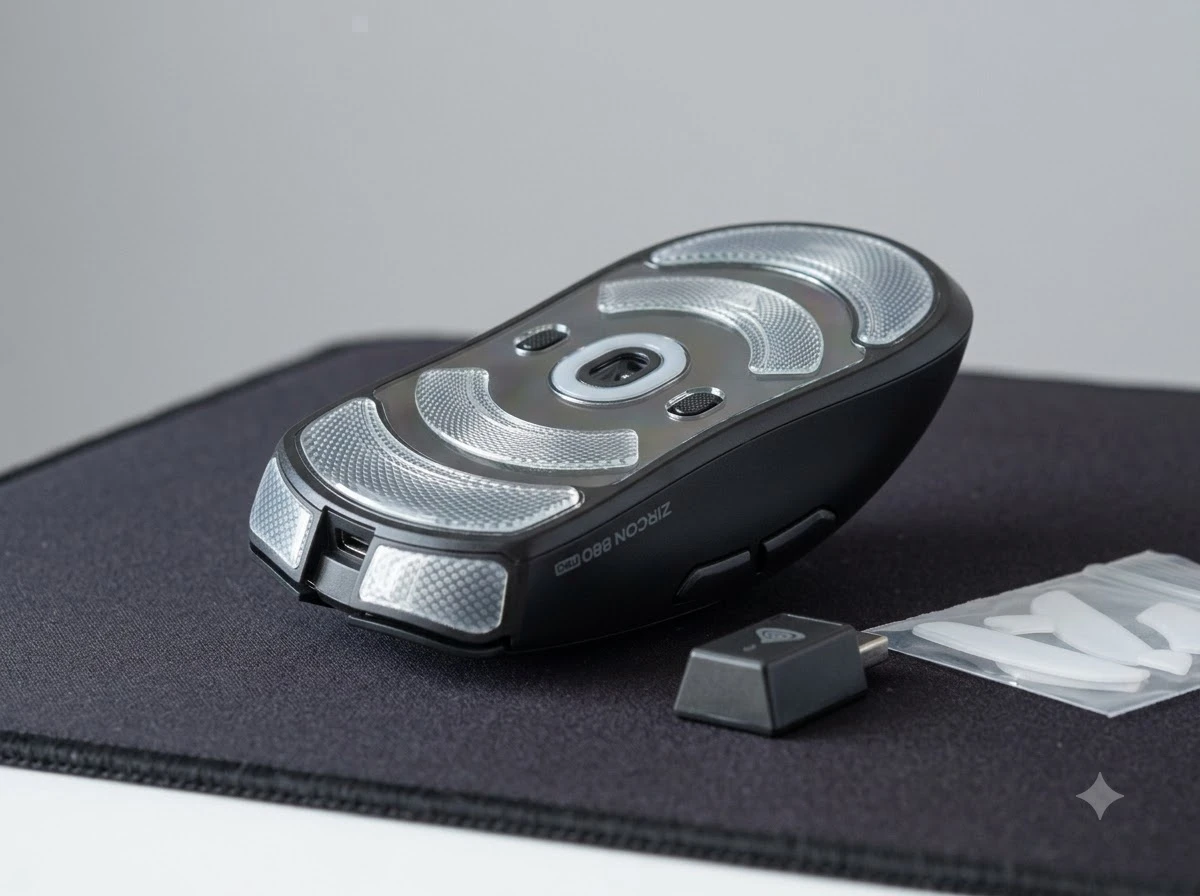
Genesis includes more than the usual cable. The kit holds an 8K RapidSpeed dongle, a 1.8 m USB-A-to-USB-C cable, thicker grip tapes and a spare set of PTFE skates to replace the installed glass ones. Dimensions are 125 × 65 × 42 mm. The manufacturer rates the optical Kailh main switches at up to 150 million clicks.
- Installed large glass skates with Genesis pattern plus spare PTFE set
- 8K wireless dongle and flexible charging/operating cable
- Grip tapes thicker than many aftermarket options
- Four performance modes selectable in software: Tournament 8K, Rapid 4K, Core and Eco
The two independent 32-bit chipsets for 8000 Hz are the technical claim that lets the mouse advertise full 8K in both wired and 2.4 GHz modes. One chipset is a PixArt 2862 MCU in wireless. That dual-chipset layout is what separates a sticker claim from a mode you can actually select in both cable and dongle paths.
For the price tier, the accessory list is dense. Glass skates already fitted, PTFE spares in the box, grip tapes ready to apply, and the 8K dongle all arrive together. Buyers do not need a second order to finish the setup.
Closed Shell Still Hits 64 Grams
Most sub-65 g mice rely on honeycomb or perforated shells. The Zircon keeps a solid matte housing and still lands at 64 g. The top surface is uniform and grippy without rubber side panels. Shape rises gently toward the rear. Side buttons sit within easy reach for medium to large hands; the tester found it less ideal for smaller hands.
Build feels stable. Main buttons have clean actuation points. The scroll wheel is rubberized and quiet. A small status LED under the DPI button shows profile or battery state. The underside is tidy: centered PAW3950, Bluetooth switch on the left, 2.4 GHz/off/Bluetooth slider on the right, and the two large glass skates.
In testing the glass skates glided so freely that sensitivity had to be lowered at first. The included PTFE set felt more controllable for everyday use. Grip tapes needed a short break-in but then locked the hand in place.
The closed shell choice matters for dust, palm feel and long sessions. Honeycomb shells shed grams by opening the structure; Genesis kept the surface continuous and still stayed inside the sub-65 g band. That combination is rarer than either trait alone.
The Latency Numbers That Stay Flat
Igor’sLAB ran end-to-end latency in four configurations: wired and 2.4 GHz, each at 1,000 Hz and 8,000 Hz. Twenty-five samples backed the wired 8K set. Results were consistent, with standard deviations around 2.1-2.5 ms and no wild outliers.
| Mode | Polling | Avg E2E latency | Range |
|---|---|---|---|
| Wired | 8,000 Hz | 19.2 ms | 14.5-23.7 ms |
| Wired | 1,000 Hz | 18.8 ms | 15.0-25.5 ms |
| 2.4 GHz | 8,000 Hz | 19.0 ms | 14.5-23.7 ms |
| 2.4 GHz | 1,000 Hz | 18.4 ms | 14.3-22.4 ms |
The 8K setting produced slightly higher averages than 1K in both connections. Click latency itself measured a clean 0.7 ms with no short false pulses. Scroll-wheel consistency hit 100 percent. Sensor micro-jitter sat at 2.85 pixels and was described as inconspicuous.
Browser-based reader measurements added an overall score of 72.4/100, sampling rate 238 Hz, line error 11.59 pixels, circle error 15.93 pixels and an Angle-Snap index of 34.6 percent. That last figure points to recognizable movement smoothing, though the reviewer noted no practical problems in games.
- 18.4-19.2 ms average end-to-end across all four configs
- 0.7 ms click latency, clean
- 34.6 % Angle-Snap index
- 72.4 / 100 reader measurement score
Theoretical polling improvement from 1,000 Hz to 8,000 Hz is a 0.875 milliseconds theoretical difference. In a full end-to-end chain that includes USB, OS, game engine and display, other delays can swamp the gain. The Zircon’s flat results match that reality. The feature is real on the data sheet; it simply did not move the measured needle here.
Software Modes and the 500 mAh Claim
Genesis software covers button remapping, DPI stages (up to six), polling rate, macros, lift-off distance (0.7 / 1.0 / 2.0 mm) and a glass-surface sensor mode. Performance modes trade speed for battery: Tournament 8K for maximum rate, Rapid 4K for balance, Core and Eco for longer runtime.
| Mode | Focus | Typical use |
|---|---|---|
| Tournament 8K | Maximum polling | Competitive sessions, short runtime |
| Rapid 4K | Balanced rate | Daily play with better endurance |
| Core | Extended runtime | Mixed work and casual games |
| Eco | Longest claim | Travel, office, Bluetooth days |
The internal battery is 500 mAh. Official figures claim up to 120 hours in Bluetooth and up to 20 hours in full 8K mode. Charging is capped at 5 V / 1 A. Those numbers sit above many 300 mAh rivals that advertise roughly 80 hours. Real-world drain will depend on polling, lighting (none here) and connection.
No RGB means less drain and a cleaner look. The mouse stays Plug & Play on Windows 7-11, Linux and Android. Software is described as the brand’s most advanced to date, though it remains PC-centric for full configuration.
Hand Size, Glide and Everyday Feel
Symmetrical shape suits claw, fingertip and palm for medium-to-large hands. The rear rise gives palm support without forcing a high grip. Right side is blank and smooth for ring and pinky. Matte finish resists fingerprints better than glossy shells.
Glass skates deliver near-zero friction; some users will prefer them for large low-sensitivity sweeps, others will swap to PTFE for more control on cloth pads. Sound is subdued. Side buttons are firm and well spaced. After a few sessions the thicker grip tapes stop feeling bulky.
Limitations are straightforward. Smaller hands may find the 125 mm length excessive. The Angle-Snap reading suggests some intentional or firmware-level smoothing; competitive players who want raw sensor output should verify in software. Manufacturer switch life remains untested in the review.
- Glass skates: freest glide, lower starting sensitivity may help
- PTFE spares: more controllable on cloth for everyday aim
- Grip tapes: short break-in, then a locked hand position
- 125 mm length: better for medium-to-large hands than small ones
Price Puts Pressure on Bigger Names
At the time of the Igor’sLAB test the black model started at 71.29 euros. That lands it among the cheaper true PAW3950 + 8K wireless options. Many similar-sensor mice from other brands sit higher once the dongle, spare skates and grip tapes are added. Battery capacity and dual-chipset implementation further differentiate it.
Genesis itself is a Polish brand established in 2011 that grew from mice and pads into full peripherals, chairs and esports sponsorships. The Zircon 880 Pro is positioned as a flagship step rather than another budget rebadge. Early Polish coverage asked the obvious question: where is the catch at under 300 zł? The hardware largely answers with solid construction and a complete accessory set; the catch, if any, is that the 8K badge does not buy lower measured system latency.
Buyers comparing pure tracking or weight can find lighter honeycomb PAW3950 mice. Buyers who want a closed shell, three connection modes, glass and PTFE choices, and an 8K dongle in one box will notice how few rivals match the kit at this price.
Where the End-to-End Chain Absorbs the Gain
The stopwatch result is easier to read once the full path is named. Polling rate only shortens the interval between reports from the mouse. Everything after that report still has to move through USB or the wireless stack, the operating system, the game engine and the display pipeline.
A theoretical 0.875 ms polling step is real on paper. It is also small beside the multi-millisecond spans already present in that longer chain. The four-mode table shows averages clustered between 18.4 ms and 19.2 ms, with 8K slightly higher than 1K in both wired and 2.4 GHz runs. Standard deviations stayed near 2.1-2.5 ms. No mode produced a clear step change.
Click latency of 0.7 ms and 100 percent scroll consistency still matter. Those figures confirm the input side is clean even when system latency stays flat. The dual 32-bit chipsets and 8K dongle deliver the advertised rates; the end-to-end measurement simply shows where the remaining delay lives.
Readers who expected the badge alone to cut frame-to-click delay will need to look at monitors, engines and system load next. The mouse already did its part without introducing wild outliers or false pulses.
How Battery Capacity Changes Daily Use
The 500 mAh cell sits above the 300 mAh packs common in lighter rivals. Official claims stretch to 120 hours on Bluetooth and 20 hours in full Tournament 8K. Core and Eco modes exist specifically to trade rate for hours when a long day matters more than peak polling.
No RGB lighting removes one constant draw. Charging stays modest at 5 V / 1 A, which suits shared USB ports and laptop bags. Plug & Play behavior on Windows 7-11, Linux and Android means the same body can move between a gaming rig and a work machine without a driver hunt for basic use.
For hybrid players the practical split is simple. Tournament or Rapid covers ranked sessions. Eco or Bluetooth covers travel and office days. The larger cell gives that split more room than a 300 mAh design that already advertises only about 80 hours at its best claim.
Who Leaves Happy With This Mouse
Ambitious FPS and high-refresh players who value the PAW3950’s tracking ceiling and want wireless freedom without stepping into 120-plus euro territory get the strongest case. The consistent latency, low click delay and 100 percent scroll consistency remove several common failure points. Office or hybrid use benefits from Bluetooth and the long Eco claim.
Pure esports minimalists chasing the absolute lowest weight or zero firmware smoothing may look elsewhere. Anyone with small hands should try before buying. The rest of the market now has a clear data point: flagship sensor, optical switches, 8K-capable dual chipsets and 64 g closed construction no longer require flagship money.
The Zircon 880 Pro Black does not rewrite the laws of end-to-end delay. It simply makes the current high-spec checklist affordable and complete.
Frequently Asked Questions
What sensor does the Genesis Zircon 880 Pro Black use?
It uses the PixArt PAW3950 optical sensor with a configurable range of 50 to 30,000 DPI, 750 IPS tracking speed and 50 G acceleration, plus a software glass-surface mode.
How much does the Zircon 880 Pro Black weigh?
The mouse weighs 64 grams with a fully closed, non-perforated housing measuring 125 × 65 × 42 mm.
Does it support 8,000 Hz wireless as well as wired?
Yes. Dual 32-bit chipsets enable up to 8,000 Hz polling both over the included 2.4 GHz dongle and via USB cable; Bluetooth is also available as a third mode.
What battery life does Genesis claim?
The 500 mAh cell is rated up to 120 hours in Bluetooth mode and up to 20 hours in full 8K Tournament mode, with Eco and Core settings extending runtime further.
Which skates and accessories are included?
Large patterned glass skates come installed; the box also supplies a full PTFE replacement set, thicker grip tapes, the 8K dongle and a 1.8 m USB-A-to-USB-C cable.


South Korea Retail Investors Face Reckoning After KOSPI AI Rally Collapses

Surrey AI Maps Three Heart Attack Paths and Their Molecular Roots

Germany Locks Neutral Apple ATT Prompts Across Most of Europe

Apple’s 5% EU Fee Quietly Rewrites Alternative App Store Math

Apple’s EU Fee Truce Cuts Complexity but Leaves Rivals Fuming

Pixel 11 Pro Fold Trades Thinness for Durability and Seven-Year Stay

Mayo AI Flags HCM Obstruction From Everyday Ultrasound Videos

Indian Brands Quietly Scale Landmark Screens and Home Tech

Navin Vatsa Turns Grief Into a Lifetime of Quiet Seeing

Google Bets Pixel 11 Agentic AI Will Redefine Phones

Oracle Cuts 21,000 Jobs in a Year, Cites AI in 10-K Filing

Fable 5 and Mythos 5 Return as US Lifts Anthropic Export Controls

SpaceX’s Google Deal Turns a Rocket Company Into a Cloud Landlord

CD Projekt Red Co-CEO: Redemption Arc Isn’t Done, Witcher 4 in 2027

XPL Rallies 30% Ahead of Plasma One Card Tier Launch

Google Search Profiles Build a Follow Graph Inside Discover

DGO App Brings Rs 549 Mobile Pass for FIFA World Cup 2026 in Nepal

Moonshot AI Targets $30 Billion in China’s Fastest AI Funding Sprint

Oppo’s ColorOS 17 Eligibility List Leaves A-Series Buyers Behind

Microsoft Xbox Layoffs Start in July as Sharma Slams 3% Margin
-
 AI2 months ago
Oracle Cuts 21,000 Jobs in a Year, Cites AI in 10-K Filing
-
 AI2 months ago
Fable 5 and Mythos 5 Return as US Lifts Anthropic Export Controls
-
 AI3 months ago
SpaceX’s Google Deal Turns a Rocket Company Into a Cloud Landlord
-
 GAMING2 months ago
CD Projekt Red Co-CEO: Redemption Arc Isn’t Done, Witcher 4 in 2027
-
 CRYPTO3 months ago
XPL Rallies 30% Ahead of Plasma One Card Tier Launch
-
 NEWS3 months ago
Google Search Profiles Build a Follow Graph Inside Discover
-
 APPS3 months ago
DGO App Brings Rs 549 Mobile Pass for FIFA World Cup 2026 in Nepal
-
 AI3 months ago
Moonshot AI Targets $30 Billion in China’s Fastest AI Funding Sprint