
NEWS
How to Free Up iPhone Storage Without Losing Your Photos
iOS 26.5 is out and iPhone storage still fills up. The fastest fix moves photos to iCloud, which only works if you pay for iCloud+ storage. Here are the four real levers.

Running out of iPhone storage rarely announces itself before the warning fires, and iOS 26.5, released May 11 for iPhone 11 and newer, added more features that need local space to run. Apple’s own menu for fixing the problem points users at one switch above all others: Optimize iPhone Storage, the toggle that pushes full-resolution photos to iCloud and keeps smaller copies on the device. The path works, but the setup screen it routes through doubles as a sales funnel for Apple’s iCloud+ plans, the tier that starts at $0.99 a month for 50GB.
A clean storage fix therefore costs more than a settings change. This guide walks through the four levers Apple documents for clearing space on iOS 26.5, what each one actually does to your photos, messages, and apps, and the trade-offs the Settings screens skip. Most readers can reclaim several gigabytes without paying a cent, but only if they know which tip quietly depends on a paid subscription. The settings work; the cost is just less hidden than the menu suggests.
Why iPhones Fill Up Faster Than You Think
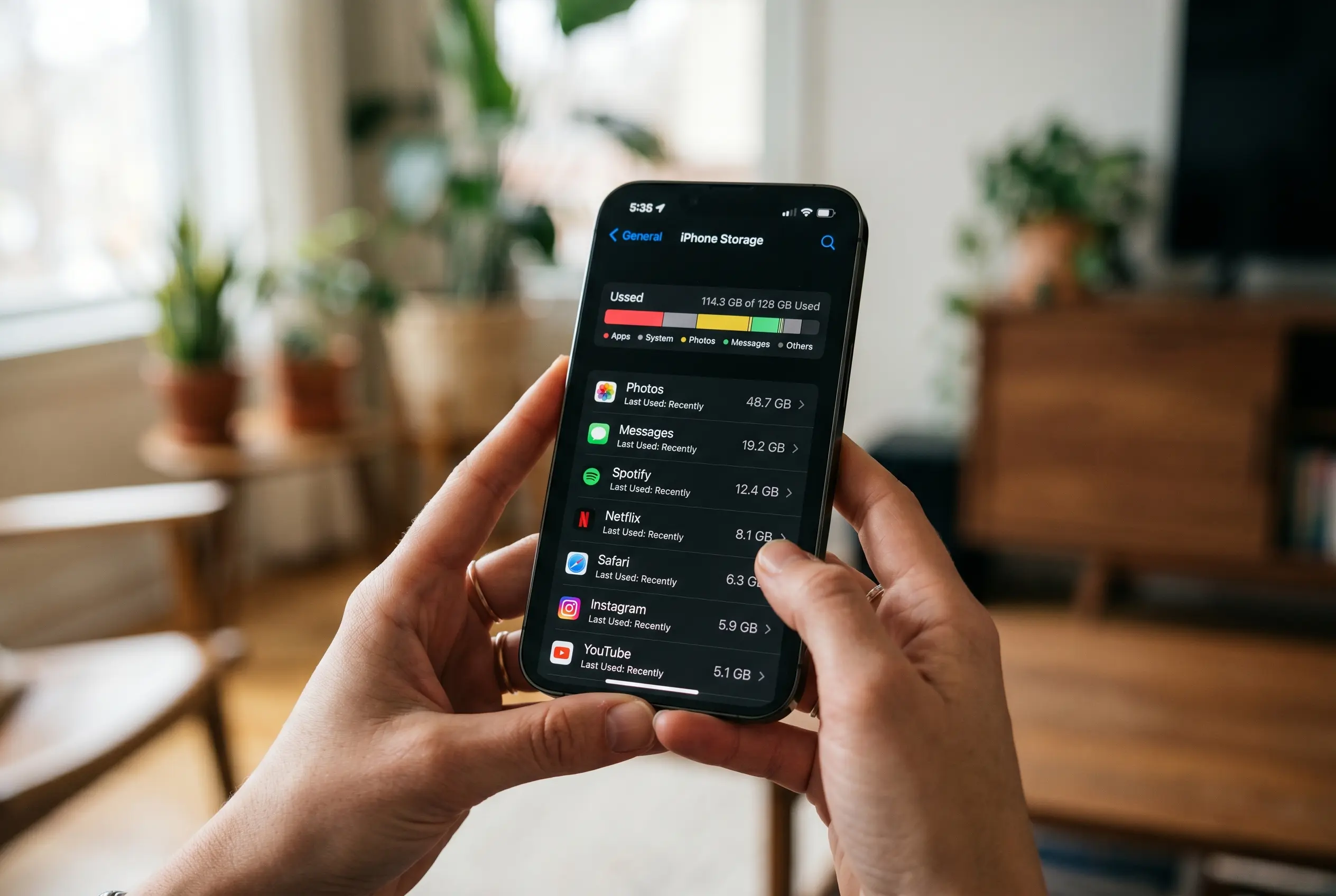
Apple breaks down iPhone storage in Settings > General > iPhone Storage, where a color-coded bar shows how the available space splits across apps, media, photos, and system data. The largest single category on most iPhones is Photos, especially for users who shoot in 4K.
A minute of video recorded at 4K and 60fps takes up approximately 400MB, CNET reports, so a 20-minute clip can absorb close to 8GB of local storage on its own. Streaming clients, social apps, and games come next, holding caches and downloads that quietly grow over time. System data, the catch-all category that includes caches, logs, and temporary files, can swell into the tens of gigabytes on older devices.
Apple’s iPhone Storage page surfaces a Recommendations section for the largest gains, and one of the most consistent entries is Review Large Attachments inside Messages. Emptying that folder routinely returns 1-2GB on phones used for work chats, though the exact figure depends on how long the conversation has been running. System data is the hardest bucket to size from the iPhone Storage page, since Apple shows a single number with no breakdown of caches versus logs versus temporary files. Users on older devices with 64GB or 128GB of total space hit the wall faster than users on 256GB and 512GB tiers, and the gap shows up in the time it takes to install a major iOS update. The page surfaces every lever Apple offers, and the next section walks through the one that does most of the work.
- May 11, 2026: iOS 26.5 public release date (Mashable)
- iPhone 11 and newer: minimum device for iOS 26.5 (Mashable)
- ~400MB: storage used by one minute of 4K video at 60fps (CNET)
- $0.99 / $2.99 / $10.99: monthly iCloud+ plans at 50GB, 200GB, 2TB (Apple Support)
- Photos + Messages: cannot be offloaded, per Apple Support and CNET
What Happens When You Toggle Optimize Photos
The headline tip from Apple’s own iPhone User Guide and from every iPhone storage guide published this year is the Optimize iPhone Storage toggle in Settings > Photos. With iCloud Photos turned on, the feature pushes full-resolution photos and videos to iCloud and keeps smaller, device-sized copies on the iPhone. CNET explains the swap this way: “All of your full-resolution photos and videos are then transferred over to your iCloud, while smaller, lower-resolution versions are kept on your device, to take up less space.” Open the Photos app and tap a thumbnail, and the device pulls the full file from iCloud on demand.
The catch sits one screen up. The Optimize toggle only runs if iCloud Photos has enough free space to hold every original.
Apple gives every account a free tier that fills in the first few months of use, and the setup screen, on encountering a full iCloud, does not stop to explain. It offers an upgrade to a paid plan instead. The 50GB iCloud+ plan costs $0.99 a month, the 200GB tier $2.99, and the 2TB tier $10.99 in the United States, per Apple’s current iCloud+ plans and pricing. For a fuller picture of what shipped with iOS 26.5 and the devices it supports, the iOS 26.5 release notes and supported devices list RCS encryption, Apple Maps ads, and the new Pride Luminance wallpaper, all of which need a working iCloud account to land cleanly.
For users who already pay for storage, the toggle is the single most effective free-up step in the system. Everyone else meets a paywall. Apple’s iPhone storage management guide through CNET puts the trade-off bluntly: “If you don’t have enough iCloud storage, it’s easier to upgrade your cloud than get a new phone.” One more wrinkle: the optimize process is not instant. On a library of 30,000 images, the iPhone keeps recent shots at full resolution and lets older ones thin out, which means space appears gradually over hours or days. The Photos app shows an “optimized” state in the corner of affected thumbnails, and tapping any image pulls the full file from iCloud on the next connection.
| Lever | Reversible? | Time to run | Needs iCloud+? |
|---|---|---|---|
| Optimize Photos | Yes (toggle off) | Hours to days | Yes (for full effect) |
| Offload Apps | Yes (reinstall) | Minutes | No |
| Review Large Attachments | No (deletes) | Minutes | No |
| Empty Recently Deleted | No (deletes) | Minutes | No |
The iCloud+ Trade-Off the Setup Skips
The Optimize toggle is the headline, but the storage plan it depends on is the binding decision. Apple includes a free iCloud tier with every Apple ID, enough for a few thousand photos and not much else. Beyond that, Apple sells iCloud+ in three consumer tiers in 2026: 50GB at $0.99, 200GB at $2.99, and 2TB at $10.99 per month, per Apple Support’s published US pricing.
The 50GB plan fits a user who keeps photos in iCloud and nothing else. The 200GB plan covers a family sharing photos across two or three devices, and the 2TB plan serves anyone with a large iPhone library or a Mac backup on the same account. iCloud+ adds iCloud Private Relay, Hide My Email, Custom Email Domain, and HomeKit Secure Video, four features that have nothing to do with storage, which is part of why the upgrade is a bundle rather than a per-gigabyte purchase. The 6TB and 12TB tiers ($32.99 and $64.99 a month) sit above the consumer line and are aimed at households running multiple Mac backups.
Offload the Apps You Rarely Open
The second lever lives in Settings > General > iPhone Storage, where each installed app shows two numbers: the App Size, which can be reclaimed, and Documents & Data, which cannot. Tapping an app and choosing Offload App removes the binary and home-screen icon but leaves the user’s documents and game saves behind, so reinstalling brings the user back to where they left off.
Apple’s iPhone User Guide describes the same feature for the App Store, where Offload Unused Apps runs automatically when storage runs low, the path being Settings > Apps > App Store. Apple does not let you offload Photos or Messages, and its stock apps stay protected in the same way. Offload is the right tool when a software update will not install: a major iOS update can require a little over 5GB free and a point update around 1GB, CNET notes, so offloading two or three large games is faster than deleting anything. The list of apps worth offloading first is short:
- Streaming apps with downloaded shows (Netflix, Disney+, Apple TV)
- Mobile games with large binaries and small save files
- Travel apps used once a year with offline maps
- Camera and editor apps with RAW or ProRes support files
The Quiet Storage Hogs You Don’t Think to Check
The third lever is buried inside Messages. Path: Settings > General > iPhone Storage > Review Large Attachments. The screen lists every photo, video, and file sent or received, sorted by size, and lets the user wipe years of memes with a few taps. This is the highest-yield single action on phones used for group chats, where the attachment pile can run into tens of gigabytes.
The second part of the cleanup is the Photos Recently Deleted album. iOS does not erase a photo the moment the user taps delete; it moves the file to Recently Deleted, where it stays for 30 days. That window is meant to be a safety net, but it also means deleting 50GB of photos only reclaims the space when the user opens Recently Deleted and taps Delete All. Apple shows the expiry date under each thumbnail in the folder, and the timer runs whether the user opens the album or not. Screenshots are the third silent hog: a user who takes five screenshots a day for two years carries more than 3,000 images, most of which are no longer needed, and the iPhone Storage page lists them under “Other” with no bulk-delete shortcut.
Skip the Panic Delete and the Cleaner Apps
The biggest mistake, by every guide published on the topic, is panic-deleting files without checking what is syncing and what is local.
Deleting a photo from the iPhone while iCloud Photos is syncing removes the original from the cloud, and deleting an offloaded app’s documents can wipe unsynced game saves. The safer order is: optimize first, then offload, then sweep large attachments, then empty Recently Deleted. Apple does not document this sequence; the iPhone User Guide only lists the options in the order they appear in Settings. Third-party “cleaner” apps, the second thing to avoid, offer a short list of upsides and a long list of costs. Apple’s own stance is that iOS already manages storage, and dedicated cleaner apps cannot access caches the way they do on Android. The better-known cleaner apps in 2026 charge a monthly subscription for a feature iOS already performs in the background, and Apple’s iPhone User Guide does not list a single one to install.
Frequently Asked Questions
Will Optimize iPhone Storage delete my photos?
No. Optimize pushes full-resolution photos and videos to iCloud and keeps smaller, device-sized copies on the iPhone. The originals remain in iCloud unless the user manually deletes them from Recently Deleted, where they sit for 30 days. Toggling Optimize off pulls the originals back to the device over the next few hours.
How much does iCloud+ cost in the US right now?
50GB is $0.99 a month, 200GB is $2.99, and 2TB is $10.99, per Apple Support’s published US pricing. Higher tiers run to 6TB at $32.99 and 12TB at $64.99 a month, aimed at multi-device households rather than single iPhone users.
Can I offload Photos or Messages?
No. Apple excludes Photos and Messages from the offload list, along with the other stock apps. For those, the only storage lever is to delete attachments, clear caches from inside each app’s settings, or empty Recently Deleted manually.
How long do photos stay in the Recently Deleted album?
30 days. iOS moves a deleted photo into the album and removes it permanently when the timer runs out. Open the album and tap Delete All to reclaim the space sooner.
Do third-party cleaner apps actually free up space?
Mostly no. iOS already manages caches and offloads unused apps in the background, and cleaner apps cannot access the system data they target. Apple’s iPhone User Guide does not list a single cleaner app to install, and the CNET guide steers users to the built-in tools instead.
What’s the fastest way to free up space for an iOS update?
Offload two or three large games in Settings > General > iPhone Storage, then run Review Large Attachments in Messages. Both actions take under five minutes and often return 5-10GB on a full phone, enough to install a major iOS update.
The storage menu has not changed in years, and the iCloud+ paywall behind the Optimize toggle is the same one users hit in 2019.


Sony’s 10 Percent Disc Drop Leaves the 2028 Cutoff Intact

Chip Allocation Sidelines the Base iPhone 18 This Fall

Miami-Dade Fights the Vice City Brand It Already Wears

IFA 2026 Awards Put Tecno Ahead of Flagship Phones

USB-C Gadgets Made the Junk Drawer Rechargeable

Pixel 11 Pro Asks $1,099 for a Light Google Locked

The iPhone Ultra Sells Two Retired Minis as One Foldable

Google Opens Gmail to Voice and Gates Docs Live

Lenovo Prices the IdeaPad Vibe Against Apple’s $699 Neo

Xbox Caps Game Pass Cloud Gaming at 15 Hours

Oracle Cuts 21,000 Jobs in a Year, Cites AI in 10-K Filing

Fable 5 and Mythos 5 Return as US Lifts Anthropic Export Controls

SpaceX’s Google Deal Turns a Rocket Company Into a Cloud Landlord

CD Projekt Red Co-CEO: Redemption Arc Isn’t Done, Witcher 4 in 2027

XPL Rallies 30% Ahead of Plasma One Card Tier Launch

Google Search Profiles Build a Follow Graph Inside Discover

DGO App Brings Rs 549 Mobile Pass for FIFA World Cup 2026 in Nepal

Moonshot AI Targets $30 Billion in China’s Fastest AI Funding Sprint

Oppo’s ColorOS 17 Eligibility List Leaves A-Series Buyers Behind

Microsoft Xbox Layoffs Start in July as Sharma Slams 3% Margin
-
 AI3 months ago
Oracle Cuts 21,000 Jobs in a Year, Cites AI in 10-K Filing
-
 AI2 months ago
Fable 5 and Mythos 5 Return as US Lifts Anthropic Export Controls
-
 AI3 months ago
SpaceX’s Google Deal Turns a Rocket Company Into a Cloud Landlord
-
 GAMING3 months ago
CD Projekt Red Co-CEO: Redemption Arc Isn’t Done, Witcher 4 in 2027
-
 CRYPTO3 months ago
XPL Rallies 30% Ahead of Plasma One Card Tier Launch
-
 NEWS3 months ago
Google Search Profiles Build a Follow Graph Inside Discover
-
 APPS3 months ago
DGO App Brings Rs 549 Mobile Pass for FIFA World Cup 2026 in Nepal
-
 AI3 months ago
Moonshot AI Targets $30 Billion in China’s Fastest AI Funding Sprint