
NEWS
iOS 27 Hands Its Quiet Features to Older iPhones
iOS 27 is available September 14 on iPhone 11 and newer. Speed, AirPods EQ, menopause tracking, and a Liquid Glass slider land without Apple Intelligence.

iOS 27 is available starting September 14 on every iPhone that ran iOS 26, back to the 2019 iPhone 11. Siri AI is the poster, and it still needs a newer chip.
The work that actually lands on older hardware is quieter: faster launches, a Liquid Glass slider, AirPods EQ, Cycle Tracking for perimenopause, Shared Albums that Android can join, and 4K HomeKit video. Apple Intelligence stays on iPhone 15 Pro, iPhone 15 Pro Max, and every iPhone 16 or newer, with Siri AI rolling out in English and usage limits that may apply.
The iPhone 11 Still Gets iOS 27
Apple kept the same cutoff as iOS 26. The list runs from iPhone 11, iPhone 11 Pro, and iPhone 11 Pro Max through iPhone 18 Pro and the iPhone Duo, plus iPhone SE (2nd generation and later). No model dropped off.
That is the split people on older phones are already drawing. The software update is wide. The assistant is not. Apple’s own release notes put Siri AI on all iPhone 16 models and later, plus iPhone 15 Pro and iPhone 15 Pro Max. An iPhone 15 or iPhone 15 Plus can install iOS 27 and still miss the headline. Check which features your iPhone gets by region and language, because some tools also vary by country.
WHO GETS THE QUIET FEATURES
| Feature | iPhone 11 through iPhone 14, plus iPhone 15 | iPhone 15 Pro, 15 Pro Max, iPhone 16 and newer |
|---|---|---|
| Install iOS 27 | Yes | Yes |
| Up to 30% faster app launches, 70% faster new photos, 80% faster AirDrop | Yes | Yes |
| Liquid Glass slider | Yes | Yes |
| AirPods Custom EQ (H2 buds) | Yes | Yes |
| Perimenopause alerts in Cycle Tracking | Yes | Yes |
| Shared Albums for Android and Windows | Yes | Yes |
| HomeKit Secure Video at 4K | Yes, with iCloud+ and a compatible camera | Yes, with iCloud+ and a compatible camera |
| Home app AI clip descriptions and search | No | Yes, on an eligible iCloud+ plan |
| Siri AI and Apple Intelligence photo tools | No | Yes |
| FaceTime Dual Capture (send both cameras) | No | Only iPhone 17, iPhone 17 Pro, iPhone 17 Pro Max, and iPhone Air |
FaceTime Dual Capture is the trap in that last row. It was sold as a missed WWDC extra, and it still needs last year’s iPhone 17 cameras to send both views. Older phones on iOS 27 can watch that stream. They cannot originate it. Extra-large widgets, including a full Home Screen page for Calendar, Photos, Music, and more apps, do not need the AI chip.
HOW IOS 27 GOT TO THE DOWNLOAD BUTTON
- June 8, 2026: Apple unveils iOS 27 at WWDC and ships the first developer beta the same day.
- July 2026: The public beta opens through the Apple Beta Software Program.
- September 9, 2026: The release candidate lands, and Apple publishes the full iOS 27 release notes.
- September 14, 2026: The public update goes live, with the usual morning Pacific rollout, from Settings, then General, then Software Update.
The RC notes already treated Custom EQ, Cycle Tracking, Shared Albums, the glass slider, and the speed work as shipping system improvements, not as a later Siri add-on. That is the product most phones will actually open.
App Launches Are Up to 30% Faster
Apple’s marketing page puts three figures next to each other, and they are the ones that apply on an iPhone 11. Experiences across iOS are faster, the company says, and then it names the examples.
APPLE’S SPEED CLAIMS IN IOS 27
- App launches: Up to 30% faster.
- New photos: New captures load in Photos up to 70% faster.
- AirDrop: Transfers of photos or files are up to 80% faster.
- Radios: Connectivity Assist picks Wi-Fi or cellular with fewer dropped handoffs, including mid-FaceTime.
The 80% AirDrop number assumes the other end is also on the new generation, iOS 27, iPadOS 27, or macOS 27. Search got a rebuild too. Spotlight, Photos, and Mail share a fuller index that updates through the day, and Mail can surface the top five most relevant messages for a query instead of a raw date sort.
None of that needs Siri AI. It is the opposite of the keynote: the 2019 hardware stays on the train, and Apple is spending cycles to make it feel less tired. Software updates can affect battery life as well as speed, which is the usual trade after a major install, while the phone reindexes.
Liquid Glass Now Has an Off Ramp
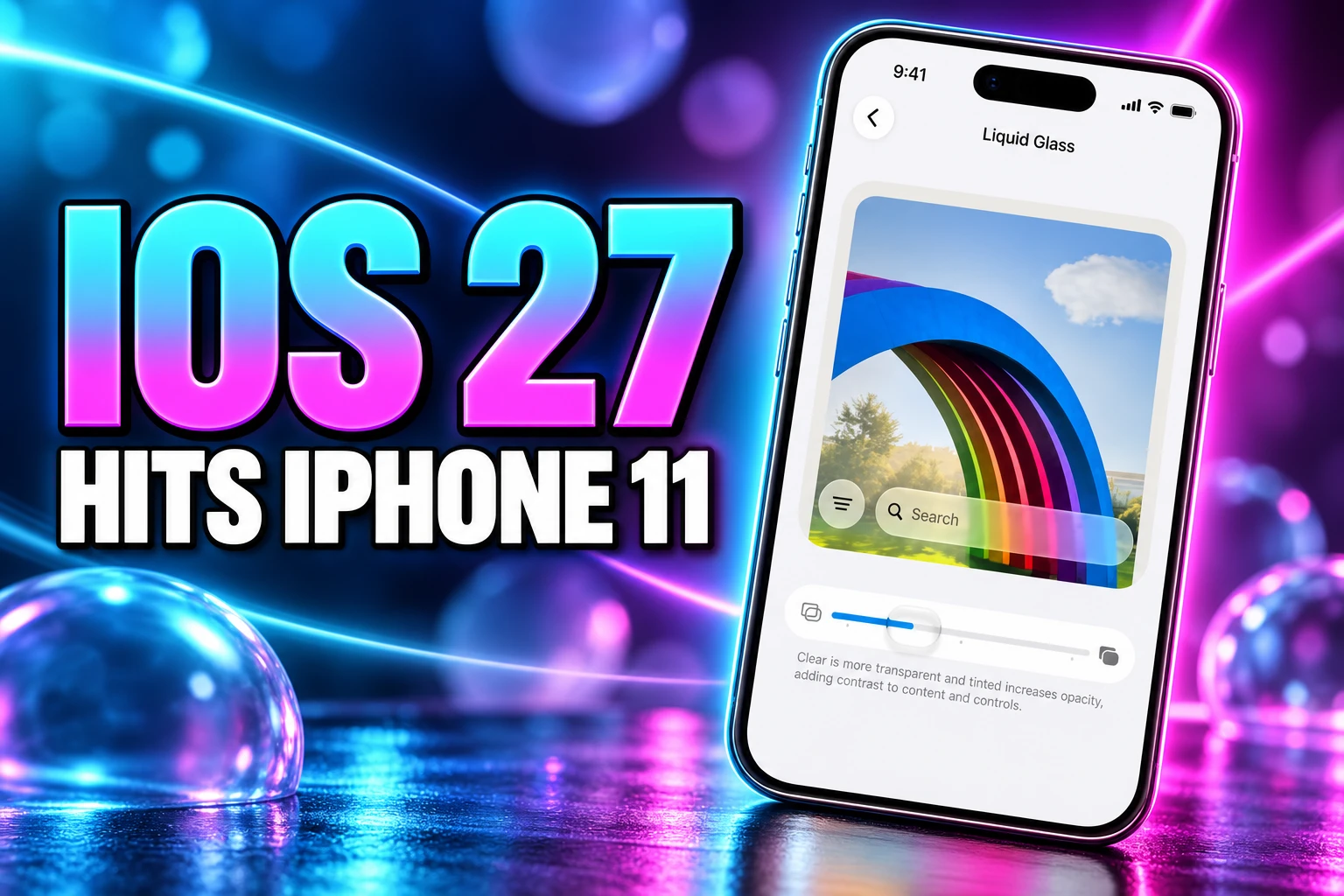
Liquid Glass arrived with iOS 26 as a see-through design language, then spent a year taking hits for type that sat on busy backgrounds. iOS 26.1 added a two-choice Clear or Tinted switch. iOS 27 replaces that toggle with a continuous slider.
Liquid Glass refinements improve overall readability, and a new slider in Settings lets you personalize its appearance from ultra-clear to fully tinted
Apple, iOS 27 release notes
The marketing page uses the same range, ultraclear to fully tinted, and says icons get sharper layers of refraction so they read as more 3D. Shubham Kedia, a director on the Human Interface team, said the company tuned the material so it “diffuses complex content behind it much more effectively, while also creating more depth and separation.”
That slider is the image people are saving this week, because last year’s look is now a control you drag. Developers still have to adopt Liquid Glass as a system material in their own views. On the phone you hold, the decision is simpler: leave the frost, or turn it down until the labels win.
Which AirPods Get Custom EQ?
AirPods finally get a three-band equalizer for lows, mids, and highs, and it applies to whatever you play, not only Apple Music. The Music app already had its own EQ. This one lives on the buds and follows them to iPad and Mac.
Apple’s line is that the default tuning is meant to represent music, shows, movies, and calls as recorded, and that Custom EQ is there if you want a different profile. Path on the phone is Settings, the AirPods name, Audio & Routing, Equalizer, then Custom. You need current AirPods firmware as well as iOS 27.
H2 CHIP REQUIRED
- Supported: AirPods Pro 2, AirPods Pro 3, AirPods 4, and AirPods Max 2.
- Left out: The original AirPods Max, including the USB-C refresh, plus first-generation AirPods Pro and earlier buds.
- The rule: If the case has no H2 chip, there is no Custom EQ.
The three bands will annoy anyone who wanted a 10-band graphic EQ. They still beat a locked curve. The leftover grievance is the original Max, a flagship that still does Adaptive Audio and Spatial Audio and still cannot move a bass slider.
Perimenopause Alerts Land in Cycle Tracking
Cycle Tracking in the Health app can now flag logged patterns that look like perimenopause, and it can log related symptoms with short guides on what those changes often involve. Apple Watch on watchOS 27 can take part in that same log. Stacey Ford, vice president of OS Product Management, said the point is so you can “understand more about what’s going on with your body and be better prepared to talk to your doctor.”
The fine print is stricter than the WWDC applause. Cycle deviation notifications, including perimenopause, are for ages 40 and above. Apple says they are not meant to replace diagnosis, monitoring, or treatment. The system reads a history you already typed in, so a blank tracker will not wake up with an alert on day one. Cycle Tracking itself has been on iPhone and Apple Watch since iOS 13 and watchOS 6.
Symptoms you can store include hot flashes, sleep changes, mood changes, and irregular periods. Fitness+ also adds workouts aimed at this stage. That is not gated on Apple Intelligence. An iPhone 11 running Health is enough, which is the whole point of putting it in Cycle Tracking instead of in Siri.
Shared Albums Open to Android and Windows
iCloud Shared Albums used to be an Apple-to-Apple dump with compressed files. iOS 27 lets you upgrade an album so friends on Android or Windows can view it and add their own shots through iCloud on the web, at full resolution. You can also set an album to expire after 30 days, save a frame out of a video as a still, star-rate photos, add keywords, build a slideshow you can save as a video, and filter a “Captured by Me” set that is only shots from the Camera app, including older iPhones.
The catch sits in storage. Upgraded albums can count against iCloud space, where the old compressed albums did not. Each album still tops out around 5,000 photos and videos. For a wedding thread where half the group is on Pixel phones, the web door matters more than a new Siri voice.
Apple Intelligence photo tools are a different pile. Spatial Reframing in Photos, plus Extend and a stronger Clean Up, stay on the 15 Pro class and up. The album work, the keywords, and the one-tap save do not.
4K HomeKit Video Does Not Need a 15 Pro
HomeKit Secure Video can now stream and record in 4K on supported cameras, up from 1080p. That bump is a camera and iCloud+ feature. It does not wait on Siri. A compatible home hub still sits in the middle of Secure Video, as it did before.
The AI layer is the part that needs a newer iPhone. Apple Intelligence can write descriptions of clips, search footage in plain language (“package at the door”), stitch related clips, and roll several alerts into one. Apple says users can “quickly understand what happened across a sequence of video clips, even without watching them.” Those descriptions run on eligible iCloud+ plans, on phones that already clear the Intelligence bar.
So the Home app splits the same way the rest of iOS 27 does. 4K is for anyone with the right camera and a paid iCloud tier. “Dog in yard” instead of “animal detected” is for the Intelligence club. Ring and Nest already sold that sentence. Apple is late, and it is late with a privacy pitch: on-device work plus Private Cloud Compute, still inside HomeKit.
The download itself is the ordinary one. Open Settings, tap General, tap Software Update, and take iOS 27 when it appears. The assistant on the keynote stage is a separate product, sitting behind Siri AI hardware gates that an iPhone 11 will never pass. The slider, the EQ, the Health log, and the faster AirDrop are what that phone actually gets.
Frequently Asked Questions
Which iPhones Can Install iOS 27?
Every iPhone that ran iOS 26 can install iOS 27, including iPhone 11, iPhone 11 Pro, iPhone 11 Pro Max, and iPhone SE (2nd generation and later), up through iPhone 18 Pro and the iPhone Duo. Apple did not cut a model this year. Installing the OS is not the same as getting Siri AI, which still needs iPhone 15 Pro, iPhone 15 Pro Max, or any iPhone 16 or newer.
Does the Regular iPhone 15 Get Siri AI?
No. Among the iPhone 15 line, only iPhone 15 Pro and iPhone 15 Pro Max are on the Siri AI list in Apple’s release notes. iPhone 15 and iPhone 15 Plus install iOS 27 and receive the speed work, the glass slider, Cycle Tracking, and AirPods EQ, but they sit with the iPhone 14 class for Apple Intelligence.
Can Original AirPods Max Use the New EQ?
No. Custom EQ needs Apple’s H2 chip, so it stops at AirPods Pro 2, AirPods Pro 3, AirPods 4, and AirPods Max 2. The original AirPods Max, including the later USB-C refresh, keeps Adaptive Audio and Spatial Audio and does not get the three-band slider.
Is Menopause Tracking in Health a Medical Diagnosis?
No. Apple’s own note says cycle deviation notifications, including perimenopause, are for ages 40 and above and are not intended to replace diagnosis, monitoring, or treatment. The alerts need a logged cycle history, and Fitness+ adds related workouts as a separate exercise program, not as a clinical result.
Disclaimer: This article is news reporting on Apple’s iOS 27 software and Health app changes, and it is for information only. It is not medical advice, a diagnosis, or a substitute for care from a clinician, and it is not a recommendation to change treatment, skip a doctor visit, or rely on Cycle Tracking alerts as a clinical test. Talk with a qualified physician, gynecologist, or other licensed clinician before acting on any symptom log or notification. Feature availability, hardware cutoffs, and Health wording follow Apple’s public pages and release notes as of September 14, 2026, and those details can change in later point releases.

Instagram Plus Tests a Read-Only Mode That Cuts Stories

Altman Asks the Public to Accept Some AI Harm

Google Freezes OSS VRP Product Reports After AI Flood

AI Agents Make Payment Rails the Scarce Prize

Turkey’s Crypto Boom Now Runs Through Three Banks

Fable 5 Came Back Under a Commerce On-Off Switch

Google’s SpaceX GPU Lease Has a Sept. 30 Deadline

Plasma One’s XPL Locks Face a 1.81 Billion Cliff

DGO’s Rs 549 World Cup Pass Cost Fans Sleep and Data

Moonshot AI’s $30 Billion Ask Became a $35 Billion Close
-
 AI3 months ago
Fable 5 Came Back Under a Commerce On-Off Switch
-
 AI4 months ago
Google’s SpaceX GPU Lease Has a Sept. 30 Deadline
-
 CRYPTO4 months ago
Plasma One’s XPL Locks Face a 1.81 Billion Cliff
-
 APPS4 months ago
DGO’s Rs 549 World Cup Pass Cost Fans Sleep and Data
-
 AI4 months ago
Moonshot AI’s $30 Billion Ask Became a $35 Billion Close
-

 NEWS4 months ago
ColorOS 17 Device List Spans Oppo, OnePlus and Realme
-

 GAMING4 months ago
Xbox Cuts 3,200 Jobs After Five Years of Thin Returns
-

 GAMING4 months ago
The RTX 4050 Under Rs 70,000 Hides a Wattage Gap