
NEWS
Gemini Setup Assistant Turns Android Onboarding Into a Live Funnel
A Gemini-powered setup assistant in Play Services beta explains recovery info, Wallet and more in-place while steering new Android phones toward Google apps.

Google is testing a Gemini-powered setup assistant inside Google Play Services beta v26.30.31 that greets new Android owners by name, walks them through recovery options and Wallet, and lets them ask questions without leaving the flow. Android Authority’s APK teardown first exposed the screens; PCMag summarized the same build hours later. The feature remains unannounced and unfinished, yet the building blocks already feel close to ready.
The real shift sits one layer deeper than fewer taps. The assistant turns the most captive ten minutes of phone ownership into an interactive Google tutorial that explains every choice and quietly seeds the services the company wants users to keep.
The Screens Google Is Testing Right Now
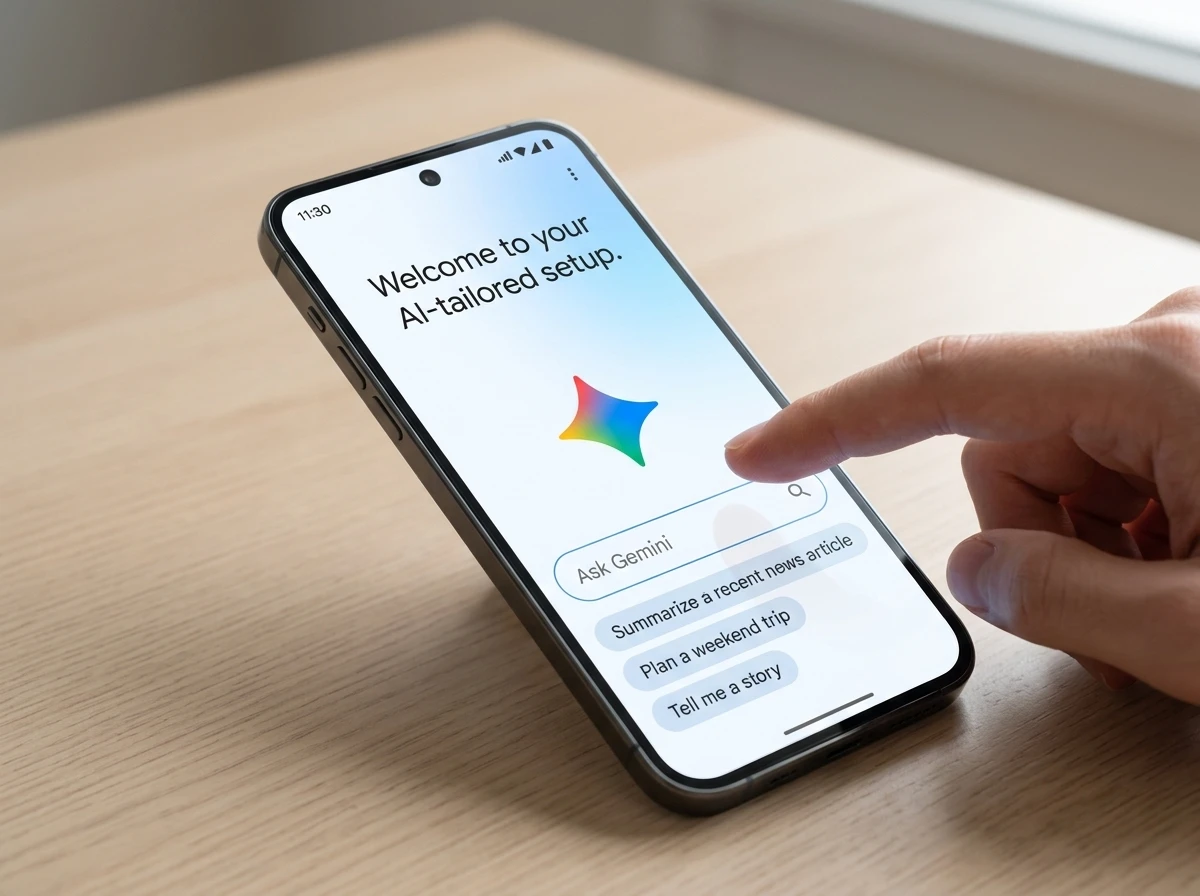
After Google account sign-in the flow can open with the owner’s name and the line “welcome to your AI-tailored setup.” Background tasks flash brief labels such as “Checking your Google settings” and “Reviewing your apps & preferences.”
A Gemini box sits at the bottom of each major screen. Suggested prompts appear for the current step. On the recovery phone or email page they include “Why do I need recovery info?” and “Is my recovery info private?” Similar boxes show up for tips and updates, Google Wallet contactless payments, and adding a home address. Actions take effect immediately instead of bouncing the user into another app.
- Recovery contact collection with instant privacy explanations
- Tips and updates opt-in screens
- Google Wallet setup for tap-to-pay
- Home address entry that writes straight into the account
- Final recommended-apps list drawn from account history
The walkthrough ends with a short list of apps “to get the most out of your new device.” In the teardown example every suggestion was a Google service: Google News, NotebookLM (rebranded Gemini Notebook in places), and Waze. Get buttons open Play Store bottom sheets.
How the Ask Bar Rewrites the Old Walkthrough
Traditional Android setup forces users to either accept defaults or abandon the process to search for answers on another device. The new bar removes that trap. Tap a chip or type a free-form question and the Gemini overlay answers on the spot.
| Step | Classic Setup | Gemini-Assisted Beta |
|---|---|---|
| Recovery info | Blind toggle or skip | Suggested questions plus live answers |
| Wallet / payments | Deep-link into another app | In-flow explanation and instant enable |
| Home address | Manual entry later in Maps | Written directly during setup |
| App suggestions | Generic Play Store carousel | Account-history Google services list |
| Leaving for help | Impossible without aborting | Gemini box stays on every screen |
Android Authority noted that the same Gemini box appears consistently across the menus they reached. The overlay can also surface two suggested queries plus a free prompt field for anything more complicated. That single change addresses a long-standing complaint: new-phone setup is the one moment users cannot easily leave to look something up.
It Fits the Larger Gemini Intelligence Push
The setup tool arrives months after Google framed Android as moving from operating system to “intelligence system.” In May 2026 the company detailed Gemini Intelligence proactive Android features that automate multi-step tasks across apps, improve autofill with Personal Intelligence, add spoken-to-polished text via Rambler, and let users generate custom widgets by description. Those capabilities began rolling out first on recent Pixel and Samsung flagships.
A first-boot assistant is the logical early-life extension of that same stack. If Gemini already knows the account’s history and can act on screen context, the moment a user logs in is the cleanest place to apply it. Google has not tied the setup screens to the Gemini Intelligence brand in any public post, yet the technical pieces line up: account-tailored suggestions, on-device context, and instant settings writes.
Users already meeting Gemini in other places will recognize the tone. The same assistant that can now help on Gemini Go on low-memory Android phones is simply appearing earlier in the lifecycle.
Who Feels the Change on Day One
Brand-new Android buyers and iPhone switchers stand to notice first. Switchers in particular face the densest permission and recovery screens; having an always-present explainer lowers the chance they abandon mid-flow or leave critical recovery options blank. Existing Google account holders get the biggest personalization lift because the recommendations already draw from their history.
OEMs and carriers that ship Play Services untouched will inherit the experience automatically once it leaves beta. Custom skins that heavily rewrite first-boot flows may need to decide whether to surface or suppress the Gemini box. Developers who build companion setup apps lose a small slice of the “after first unlock” attention window if Google’s own list appears earlier and more forcefully.
Three groups most affected
- First-time Android owners who previously skipped recovery or Wallet out of confusion
- iPhone-to-Android switchers facing the longest permission gauntlet
- Heavy Google account users who receive the most relevant (and Google-centric) app list
What the Closing App List Shows
Android Authority observed that the final recommendations appear driven by Google account history rather than pure generative AI. The example set was exclusively Google properties. That detail is load-bearing. The assistant can feel helpful and conversational while still ending on a hard-coded preference for the company’s own services.
Suggested queries stay useful even if the app list stays narrow. “Can I change this later?” and “Is my recovery info private?” are exactly the questions users used to open a second device to answer. The survey Google showed testers after activation asked about whether the assistant felt pushy or promotional. That internal awareness is visible in the wording of the screens themselves: explanations first, enable buttons second.
Google wants to provide AI-supported, personalized recommendations and clear explanations to help users navigate their phone setup smoothly. Google seems aware that the assistant could come across as pushy or promotional, but the overall intent appears to be to help users.
Android Authority summarized the survey findings that way after activating the feature. The moniker “setup assistant” itself surfaced in those questions.
The Quiet Trade Sitting in the First Ten Minutes
Convenience is genuine. Users no longer have to abort setup to learn why recovery info matters or how Wallet works. Instant actions mean fewer dead-end toggles. Yet the same session also harvests recovery contacts, home address, marketing preferences, and a nudge toward Google News, Notebook and Waze before the launcher ever appears.
The feature lives inside Play Services, so it can reach any device that takes Google system updates. Joining the test channel that exposed it requires opting into the Google system services beta program either through the Play testing page or Settings > Google services and preferences > System services. Beta builds carry the usual stability warning; most people will wait for the public channel.
Google has not promised a launch date or confirmed the final design. Teardowns have been wrong before. Still, the presence of polished UI strings, working Gemini overlays, and a post-activation survey suggests the project is past pure experimentation. If it ships, the first conversation many people have with their new phone will be with Google Gemini AI assistant overview itself, framed as a helpful guide while the account quietly fills in the blanks Google cares about most.
That is the second-order move: the setup wizard stops being a pure obstacle course and becomes the first personalized session of the device’s life.


Lunit Turns Routine H&E Slides Into a Lung Pre-Screen

Meta’s Muse Agent Wants Your Inbox and Your Card

Police Chase Mules as AI Chatbots Run Romance Scams

Ticketmaster’s Personalized App Is Built to Move Empty Seats

Software Deals Now Hinge on Filing Accuracy, Not Beats

Iowa Counties Warn Workers That ChatGPT Keeps Their Files

Shaalan Beg’s Oncology AI Hits an Enrollment Wall

Exowatt Warns Gas-Fired AI Campuses May Not Last a Decade

Philips Splits Innovation and Hands AI to Partovi

Chrome 153 Puts the Whole Web on a Two-Week Clock

Oracle Cuts 21,000 Jobs in a Year, Cites AI in 10-K Filing

Fable 5 and Mythos 5 Return as US Lifts Anthropic Export Controls

SpaceX’s Google Deal Turns a Rocket Company Into a Cloud Landlord

CD Projekt Red Co-CEO: Redemption Arc Isn’t Done, Witcher 4 in 2027

XPL Rallies 30% Ahead of Plasma One Card Tier Launch

Google Search Profiles Build a Follow Graph Inside Discover

DGO App Brings Rs 549 Mobile Pass for FIFA World Cup 2026 in Nepal

Moonshot AI Targets $30 Billion in China’s Fastest AI Funding Sprint

Oppo’s ColorOS 17 Eligibility List Leaves A-Series Buyers Behind

Microsoft Xbox Layoffs Start in July as Sharma Slams 3% Margin
-
 AI3 months ago
Oracle Cuts 21,000 Jobs in a Year, Cites AI in 10-K Filing
-
 AI2 months ago
Fable 5 and Mythos 5 Return as US Lifts Anthropic Export Controls
-
 AI3 months ago
SpaceX’s Google Deal Turns a Rocket Company Into a Cloud Landlord
-
 GAMING3 months ago
CD Projekt Red Co-CEO: Redemption Arc Isn’t Done, Witcher 4 in 2027
-
 CRYPTO3 months ago
XPL Rallies 30% Ahead of Plasma One Card Tier Launch
-
 NEWS3 months ago
Google Search Profiles Build a Follow Graph Inside Discover
-
 APPS3 months ago
DGO App Brings Rs 549 Mobile Pass for FIFA World Cup 2026 in Nepal
-
 AI3 months ago
Moonshot AI Targets $30 Billion in China’s Fastest AI Funding Sprint