
NEWS
Windows 11 Splits Desktop Camera and Mic Permissions
Experimental Windows 11 builds add per-app camera, mic, and location switches for desktop programs, while Microsoft’s own pages still warn Win32 can ignore them.

Windows 11 Build 26340.9212 lets you block camera, microphone, and location access for individual desktop apps such as Chrome and Steam. The switches showed up in the Experimental Channel on August 17, 2026, with no line about them in Microsoft’s flight notes.
Testers then saw Edge and Brave leave the old shared desktop bucket and sit on the same list as Store apps. Microsoft later described that split on a newer flight. Its public camera pages still teach the old all-or-nothing rule, and they still warn that Win32 programs can ignore the setting.
Chrome and Steam Finally Get Separate Mic Switches
Microsoft Store apps have had their own camera and microphone switches for years. Classic Win32 programs did not. Allowing Discord on the mic meant leaving every other desktop program on that same tap.
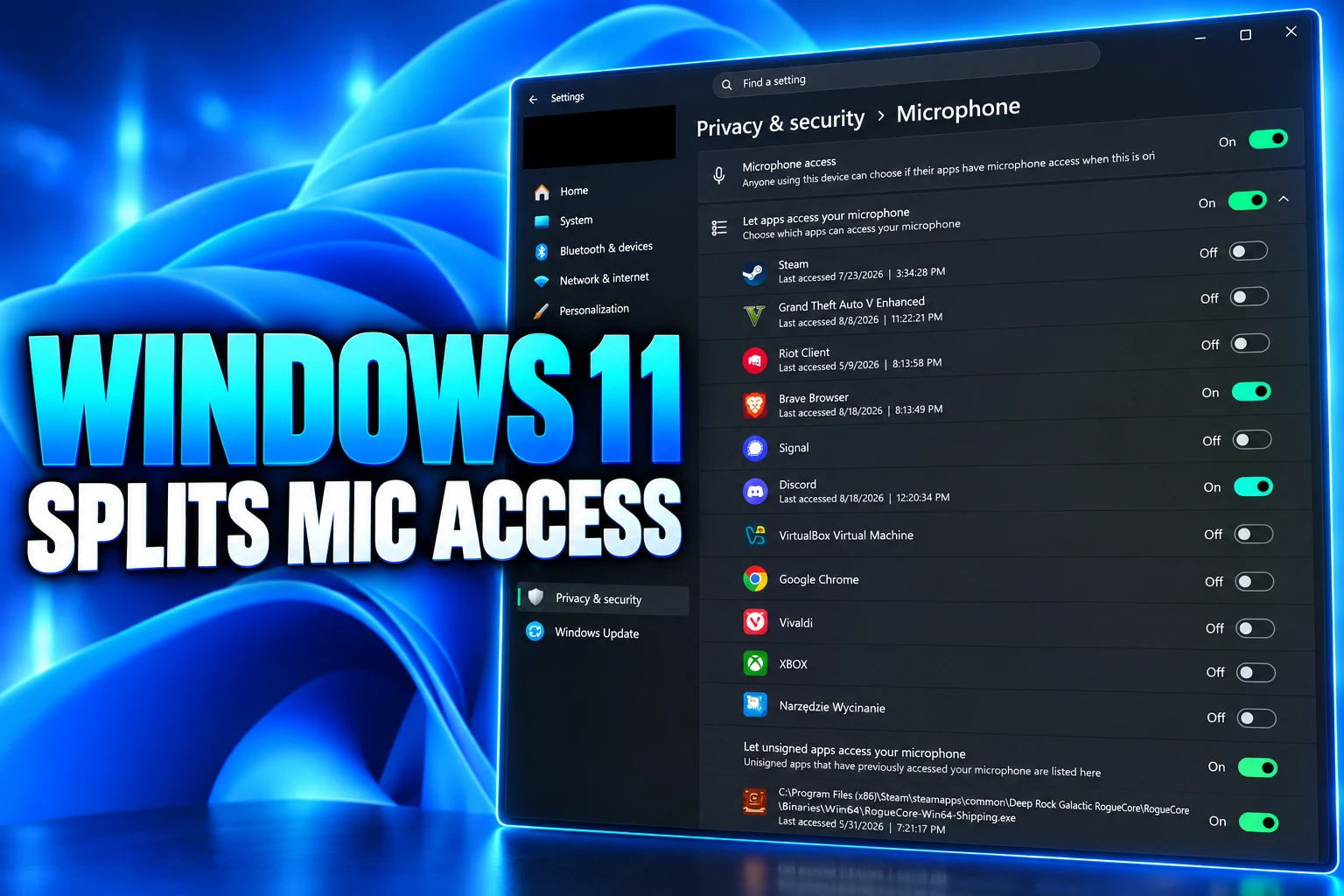
On an Experimental PC running 26340.9212, that shared row went away. Edge and Brave appeared as their own microphone entries at the top of the list Store apps already use. Camera access did the same: Edge sat under “Let apps access your camera” next to the Camera app, Teams, and Xbox, instead of inside a collective desktop bucket. Location followed, with Edge and Brave listed beside Weather, Microsoft 365 Copilot, and Teams.
A tester named Jakub posted the first screenshots from that build and wrote that you can now “revoke access to the camera & microphone for specific Win32 apps.” A follow-up from the same account showed a centered system dialog when a desktop program asked for the mic, something Win32 software did not trigger on its own before.
THE OLD MODEL VERSUS THIS TEST
| Control | Microsoft Store apps | Desktop apps before this test | Experimental 26H2 on these flights |
|---|---|---|---|
| Per-app switch in Settings | Yes | No; one shared desktop switch | Yes, each listed program gets its own toggle |
| First-use prompt | Yes | No system dialog for Win32 | Centered dialog on first camera or mic request |
| Where the choice is stored | ConsentStore per package | ConsentStore NonPackaged bucket for the whole class | Still ConsentStore, now with per-app rows for signed desktop programs |
| What Microsoft’s public camera pages still say | Toggle each Store app | One switch for all desktop apps | Those pages have not been rewritten for this test |
The useful case is simple. You can keep a calling app on the microphone and turn the same sensor off for a browser, without killing every Win32 program at once.
What Build 26340.9233 Put in Writing
Microsoft’s notes for the August 17 flight talked about a redesigned File Explorer context menu, Emoji 17.0, Camera Roll backup links, WinRE Wi-Fi, and the removal of WMIC. They did not mention camera, microphone, or location at the app level. The same week, Microsoft said it was investigating empty Feature Flags pages in the Experimental channel, which helps explain why some PCs showed the new list and others did not.
Four days later, Build 26340.9233 shipped, and Microsoft described the privacy change in Insider material for that flight. The copy says Windows Insiders can manage camera, microphone, and location permissions for individual desktop apps, after years of a single device-wide setting. It also says existing permission decisions are left in place, so a program that already had access keeps it until someone flips the new switch.
Windows Insiders can now manage camera, microphone, and location permissions for individual desktop apps. Previously, access for traditional desktop applications was managed through a single device-wide setting. With this update, you can review and control access on an app-by-app basis, giving you greater visibility into which apps are requesting access to sensitive resources and more control over your privacy choices.
Microsoft, Insider notes for Experimental Build 26340.9233
THE FLIGHT PATH
- Windows 10 version 1903: Settings gains a list of desktop programs that have touched the camera or microphone, with one switch that turns the whole list on or off.
- June 2026: Microsoft’s notes say an update “improves disk space usage for the CapabilityAccessManager.db-wal file,” the write-ahead log behind those permission checks.
- August 17, 2026: Build 26340.9212 reaches the Experimental Channel as a 26H2 enablement package. Per-app desktop switches appear for some Insiders and stay out of the published changelog.
- August 18, 2026: Jakub posts the Settings screenshots and the new permission dialog.
- August 21, 2026: Build 26340.9233 lands. Microsoft describes per-app desktop camera, microphone, and location controls, and it says the empty Feature Flags list is fixed.
- September 8, 2026: Build 26340.9354 ships an improved Privacy and security page that groups Camera, Microphone, and Location and pulls usage information onto that page. The notes still do not spell out the Win32 split.
Those flights use Controlled Feature Rollout, so two PCs on the same build can disagree. Microsoft also repeats the usual Insider warning: features in these builds might change, get pulled, or never ship beyond the channel.
The Feature Flag That Names Each Win32 App
Windows watcher phantomofearth saw the new list on 26340.9212 only after turning on a flag called Win32SignatureIdentity (60730253). Jakub did not have to flip it. That mismatch is the rollout, not a second feature.
The flag’s name is the mechanism. Store apps already carry a package identity, which is why Settings could always show one switch per app. Classic installers often do not. Giving a signed Win32 program a signature identity is how the same ConsentStore can file Chrome next to the Camera app instead of dumping every unpackaged binary into one NonPackaged bucket.
The choices still live in the current user’s registry hive, under Capability Access Manager’s ConsentStore. For the camera, the packed apps sit under the webcam key, and the old class-wide desktop rule sat under webcam\NonPackaged, with a Value of Allow or Deny. Rafael Rivera, a Windows researcher, noted that desktop programs have been listed under that shared switch since Windows 10 version 1903. The new part is that each signed entry can be flipped on its own, rather than only viewed.
Rivera also questioned how much a Settings switch is worth if the permission check still runs in-process and the result is stored in that user hive. That is the gap a UI cannot close. A program that talks to the camera through its own driver, or through a helper that never asks Capability Access Manager, was already outside the 1903 list. Microsoft has said as much for years.
Microsoft’s Camera Pages Still Describe the Old Rule
Open Microsoft’s public camera help today and the 1903 model is still the one on the page. The company says that starting with Windows 10 version 1903, Settings shows desktop programs that used supported methods, and that turning the desktop switch “will impact all apps listed under this setting.” It also says, in plain language, that desktop apps cannot be individually toggled.
The manage-permissions page is blunter. “Camera privacy settings for desktop apps can’t be changed at an individual desktop app level,” it says, grouping Edge and Teams with anything installed from the web or a USB drive. Then comes the line that should sit next to every screenshot of the new list:
Desktop apps might not appear in the list of apps available on the Camera settings page. They might still be able to access the camera or microphone even when these settings are turned off.
Microsoft Support, Manage app permissions for a camera in Windows
Windows Hello is called out as a separate path. Face sign-in can still use the camera when the app-level camera setting is off. Indirect use is messy too: talk to a voice feature and Settings may show “Speech Runtime Executable” instead of the program you launched.
CAMERA AND MIC HOLES THAT REMAIN
- Hardware paths: A desktop program that talks to the sensor through its own driver can miss the Settings list entirely, which is why Microsoft still says some apps may still access the camera when off.
- Shared components: Browser-hosted or helper-hosted tools can show up under a different name than the product on your Start menu.
- Prior grants: Microsoft says older allow and deny choices are preserved, so the new list does not lock down software that already used the mic.
- Docs lag: The Insider flights describe per-app desktop control; the public camera pages still describe one desktop switch for everyone.
The Settings app on a 26340 PC and the support article a search engine still ranks are describing two different operating systems. Until those pages move, a lot of people will keep looking for a master desktop toggle that the test build has already removed.
Why Some Desktop Apps Show Up as Unsigned
Microsoft’s 9233 text draws a line inside the new list. Most desktop programs show a clear name. Some that rely on shared system components, browser-hosted experiences, or similar plumbing may appear under a name you do not expect. And some show up as Unsigned when Windows cannot verify publisher information.
“Only grant access to apps you recognize and trust,” the notes say. That is a trust prompt, not a sandbox. An unsigned binary still runs as Win32. The new UI can hide its camera switch behind a warning; it does not wrap the process the way a Store package is wrapped.
WHAT MICROSOFT SAYS IS CHANGING
- New control: Allow or deny camera, microphone, and location for each desktop app from Settings > Privacy & security.
- Kept as-is: Older allow and deny choices stay put, and no settings are reset on upgrade.
- Enterprise: Existing policies keep working; Microsoft says it is exploring extra management tools.
- Unsigned row: Programs Windows cannot attribute may appear as Unsigned and should be treated as untrusted until you know the file.
New prompt: Apps that have not yet used a sensor ask the first time they try.
On 26340.9233, the old “Let desktop apps access your camera” master switch is the thing that goes away for Insiders who have the feature. The replacement is a longer list, including that Unsigned bucket, not a second hidden global kill.
The 500GB File Behind These Toggles
The service doing this work is Capability Access Manager, the same component that records which app used the camera and whether the user said yes. In June 2026, Microsoft’s notes said it was improving disk use for CapabilityAccessManager.db-wal, the write-ahead log that sits beside that database.
On a healthy PC that file should be a few megabytes. On broken ones it kept growing because permission events were logged and never compacted back into the main database. Some machines saw the file reach about 500GB, buried under System and reserved, which is why a full SSD did not always show an obvious culprit in the normal Storage view.
THE PERMISSION LOG FILE
- Healthy size: A few megabytes for CapabilityAccessManager.db-wal.
- Broken size: About 500GB on some PCs before the June 2026 disk-use fix.
- What it stores: Access requests and consent for camera, microphone, location, and similar capabilities.
- Where the user choice lives: ConsentStore values in the current user’s hive, including the webcam NonPackaged key for classic desktop programs.
The August privacy UI is not a new engine. It is a finer set of knobs on the same store that had just been patched for eating disks. If camsvc loops again, the log behind your new Chrome camera switch is the file that grows.
The New Dialog Still Trusts the App Process
The centered prompt is the part that feels like a phone. A desktop app asks for the microphone, Windows puts a system dialog in the middle of the screen, and a No is supposed to stick. That is a real change from the silent Win32 path, where the first hint was often a taskbar mic icon or a camera light.
It is still a consent record, not AppContainer. Rivera’s in-process point stands: the program that wants the sensor is often the process that learns it was denied. Unsigned installers, renamed helpers, and anything that never calls the supported API remain the cases Microsoft already carves out on its camera pages. Physically covering a lens or disabling a device in Device Manager is still the hard stop those pages have pointed people toward when Settings is not enough.
Build 26340.9354 makes Camera, Microphone, and Location easier to find on the Privacy and security page, and it surfaces usage that used to sit one click deeper. That layout work can ship even if the per-app Win32 split stays gated. Microsoft has not said the individual desktop switches will reach every Windows 11 PC, and the Experimental notes still warn that a previewed idea can disappear.
On a 26340 machine, Edge can sit next to the Camera app with its own microphone switch. On Microsoft’s public camera pages, desktop programs still share one tap, and they might still listen after you turn that tap off.

Instagram Plus Tests a Read-Only Mode That Cuts Stories

Altman Asks the Public to Accept Some AI Harm

Google Freezes OSS VRP Product Reports After AI Flood

AI Agents Make Payment Rails the Scarce Prize

Turkey’s Crypto Boom Now Runs Through Three Banks

Fable 5 Came Back Under a Commerce On-Off Switch

Google’s SpaceX GPU Lease Has a Sept. 30 Deadline

Plasma One’s XPL Locks Face a 1.81 Billion Cliff

DGO’s Rs 549 World Cup Pass Cost Fans Sleep and Data

Moonshot AI’s $30 Billion Ask Became a $35 Billion Close
-
 AI4 months ago
Fable 5 Came Back Under a Commerce On-Off Switch
-
 AI4 months ago
Google’s SpaceX GPU Lease Has a Sept. 30 Deadline
-
 CRYPTO4 months ago
Plasma One’s XPL Locks Face a 1.81 Billion Cliff
-
 APPS4 months ago
DGO’s Rs 549 World Cup Pass Cost Fans Sleep and Data
-
 AI4 months ago
Moonshot AI’s $30 Billion Ask Became a $35 Billion Close
-

 NEWS4 months ago
ColorOS 17 Device List Spans Oppo, OnePlus and Realme
-

 GAMING4 months ago
Xbox Cuts 3,200 Jobs After Five Years of Thin Returns
-

 GAMING4 months ago
The RTX 4050 Under Rs 70,000 Hides a Wattage Gap