
NEWS
Microsoft Teams Shipped 7 Features and Paused One in June
Microsoft rolled out seven Microsoft Teams updates through June 2026, then paused its long-awaited minimized meeting rollout on July 7 without explanation.

Microsoft shipped seven Microsoft Teams updates through late June 2026, then on July 7 the company quietly paused an eighth, a long-promised change that would let users raise a hand and send a reaction in a minimized meeting window. The pause appeared in a terse Microsoft 365 Message Center update that offered no reason and no revised date. The seven updates that did ship are mostly quiet quality-of-life improvements, and most are nearing general availability now.
The list runs from apps in Private Channels at last becoming generally available, to a Speaker focused layout for Teams events, to cloud file search in the attach picker, to Quick Share for images, to a friendlier file download manager, to a search box in the keyboard shortcuts dialog, to faster Office file previews. The update that did not ship is the minimized meeting experience Microsoft had been testing in two variants. Microsoft says general availability will resume when the team is ready, with no public timeline attached. Several of these features were on the same Message Center revision cycle and shifted from late June to late July 2026 as part of a single cluster of edits.
The One Feature Microsoft Paused
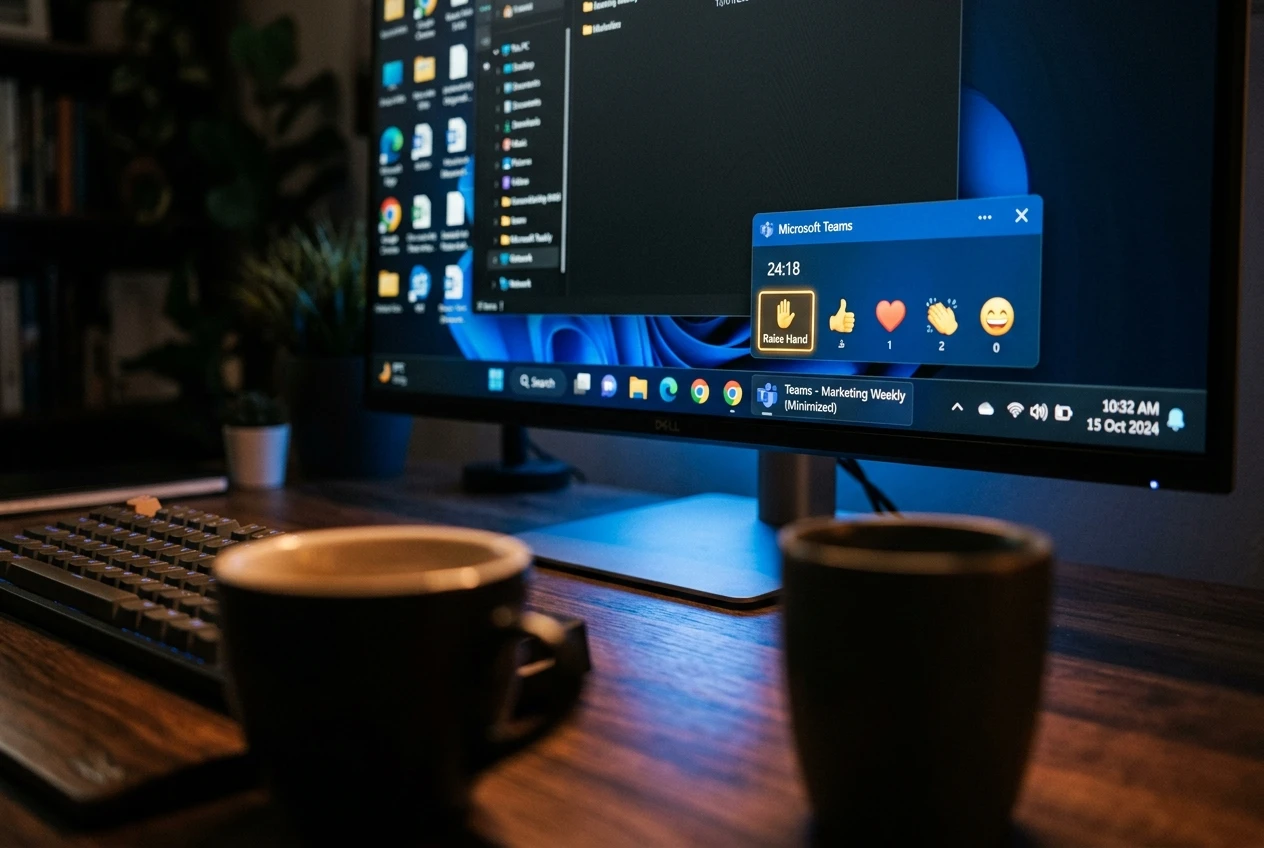
On July 7, 2026, Microsoft updated the Microsoft 365 Message Center notice for the “minimized meeting experience” in Teams with a single, clear line: “We have paused release to GA at this time.” The change was meant to let users raise their hand and send reactions without restoring the full meeting window, a small fix widely requested by anyone who keeps Teams meetings minimized while working in another app.
The feature had two variants: Expanded view, which would display up to four participant videos; and Compact view, which would skip the video and focus on quick actions and settings. Both variants were in Targeted Release testing, with general availability originally scheduled to follow once Microsoft was ready. The two views were designed for different kinds of multitasking, with Expanded view for users who still want visual cues and Compact view for users who want the smallest possible meeting surface.
Microsoft’s revised notice left out the reason for the pause and offered no revised date. The Merill.net message archive carries the paused notice as Microsoft’s Message Center notice pausing the minimized meeting rollout, part of a cluster of revised notices that hit the same day. The wording leaves the door open for the feature to return unchanged, redesigned, or never at all. Microsoft’s only commitment is to communicate through the same Message Center when the team decides to proceed.
We have paused release to GA at this time. We will communicate via Message center when we are ready to proceed. Thank you for your patience.
| View | Meeting content shown | Control emphasis |
|---|---|---|
| Expanded view | Up to four participant videos | Quick action shortcuts plus visible participants |
| Compact view | No participant video | Focused on quick actions and settings |
The Seven Updates That Did Ship
The seven Teams updates that Microsoft did push through June 2026 share a theme: smoothing everyday friction rather than adding headline features. Several address long-running complaints about how Teams handles apps, files, and previews. None of them is a flagship change, and that is exactly why several are likely to ship without anyone noticing.
Each update is tracked across a separate Microsoft 365 Message Center notice, and most of those notices were revised on the same July 7 day. The list below pairs each shipped feature with what changed and which Message Center notice it lives in.
- Apps in Private Channels. Bots, tabs, and message extensions can now be added directly to Private Channels, not just Shared ones. The change was made generally available in late June 2026 and is on by default. A channel owner can also control who is allowed to add apps through a new channel setting.
- Speaker focused layout for Teams events. Organizers using the “Manage what attendees see” experience now see a new Speaker focused option alongside “Content focused” and “Content only.” Microsoft says it prioritizes presenter video alongside shared content for greater visibility. The change is enabled by default and runs on Teams for Windows desktop and Mac desktop, per Microsoft’s notice on the new event layout.
- Cloud file search in the attach picker. Users can now search for OneDrive and SharePoint files directly inside the file picker when attaching to a chat or channel, rather than browsing folder trees. The search is permission-trimmed, so users only see files they already have access to. General availability completion was pushed from late June to late July 2026, per Microsoft’s notice on the new file search experience.
- Quick Share for images. A Quick Share option now appears on hover actions, right-click menus, overflow menus, and shared tabs. Users can share images or copy image links, with existing Teams and Microsoft 365 sharing permissions intact. General availability completion was pushed from late June to late July 2026, per Microsoft’s notice adding Quick Share for images.
- File download manager. New download notifications in Teams auto-dismiss after roughly four seconds, and downloaded files can be located through an updated download manager. The change is on by default and does not alter where files are stored or how permissions are set.
- Keyboard shortcuts dialog with search. The keyboard shortcut panel in Teams now has a search box that accepts either action names like “Mute” or key combinations like “Ctrl+Shift+M.” The change applies to the Windows desktop app, Mac desktop app, and the web client.
- Standardized Office file previews. Word, Excel, and PowerPoint previews in Teams load faster and more reliably. Mobile users on iOS and Android can preview PowerPoint and Excel files inside Teams, with Word preview on Android coming later. General availability completion was pushed from late June to late July 2026, per Microsoft’s notice on the standardized Office previews.
These updates sit alongside a quieter set of Teams changes already in flight this summer, including how Teams now routes external bots to the meeting lobby and Brand Impersonation Protection that arrived in Teams Calling in mid-May 2026. Each change lands inside one of the largest daily-use business apps on Earth. None of them repackages Teams into something new.
Some of these updates are aimed at operations teams: a new channel setting lets Private Channel owners control who can add apps. Some are aimed at everyday users: the keyboard shortcut dialog now searches by action name or key combination, taking a stubborn pain point out of customization. Some are aimed at meeting organizers: the new Speaker focused layout prioritizes the presenter video alongside shared content for greater visibility during Teams events. Each fix is small in isolation, but they add up to a pattern of Teams moving toward predictable, low-drama iteration in 2026.
Why a Small Window Matters in a Big Platform
The pause is more than a shipping delay. The minimized meeting experience was the rare Teams change that aimed to make the product lighter, with a smaller surface for multitasking and fewer manual gymnastics when a meeting window disappears from view. Rolling it back is a reminder that Teams is now too central for even small interface experiments to be treated as harmless decoration. Microsoft’s Message Center update also leaves the cause unclear, which creates its own narrative inside any organization that standardized on Teams. Users assume the feature broke something, admins assume there was a governance issue, and IT management hears both stories from the helpdesk.
The expanded view and compact view might have hit a quality issue, conflicted with another meeting-interface change, or needed more polish than the schedule allowed. That is what a routine product pause looks like in any large software product. The unusual part is the lack of any explanation attached to a change that Microsoft had already tested for months and that had been widely expected to ship. The original timeline had Targeted Release starting in mid-May 2026 and completing by late May, with general availability to follow.
The Pattern Behind the July 7 Cluster
Of the seven updates that shipped and the one that did not, six Message Center notices carry the same July 7, 2026 revision line: “We have updated the timeline. Thank you for your patience.” The cluster suggests Microsoft is rewriting schedules across the board, often pushing general availability from late June into late July 2026. Several rollouts now share late July 2026 as their revised completion date.
Quick Share for images, cloud file search in the attach picker, the keyboard shortcut search, and the standardized Office preview all list late July 2026 as their revised completion date for general availability. Apps in Private Channels landed ahead of that window and is already generally available. Speaker focused layout runs on a longer clock, with general availability on the Worldwide cloud in mid-to-late August 2026. The DoD, GCC, and GCC High clouds are stretched into late September 2026 for the Speaker focused rollout.
That puts most of these changes in users’ hands before August 2026, and it lets Microsoft keep the rollout narrative moving even as one of the more visible features has gone quiet. The Message Center pattern matters because it is the primary public feedback loop for changes that touch a product millions of people use every day. It puts both the schedule and the only public explanation in a single window.
What the cluster does not reveal is whether the paused minimized meeting feature would have shared the late July 2026 cadence had it shipped. Microsoft’s silence on the feature leaves that question open. Admins who treat the Message Center as a low-priority inbox will get caught out: four of the seven notices that moved that day shifted their timelines, all in the same direction. End users have no clean place to read the explanation, only the notices themselves, which is a structural weakness in how Microsoft communicates Teams changes.
What This Means for Teams Users
For Teams users, the practical reading is straightforward. By the end of July 2026, apps in Private Channels, Quick Share for images, cloud file search in the attach picker, the keyboard shortcuts dialog, and the standardized Office preview experience should be on for most tenants. Speaker focused layout will arrive on Windows and Mac desktops through August 2026, with the DoD, GCC, and GCC High clouds picking it up from late August into late September 2026.
The minimized meeting experience remains in limbo. It is paused, not canceled, and Microsoft has only committed to communicate through Message Center when the team is ready to proceed. For anyone whose workflow depends on keeping a meeting minimized while raising a hand without restoring the window, the safer assumption is that the feature is no longer imminent. Anyone planning to manage helpdesk expectations around the change should hold the message from the Microsoft 365 admin center, since there is no public timeline attached.
The practical answer for IT admins is to treat Message Center as a daily read for the rest of July 2026. Six of the seven Teams notices under discussion here were revised on a single day, which is the kind of cluster that usually signals more changes coming. Customers who standardize training and helpdesk copy on any one notice now should plan to revise it again before late August. End users have no clean place to read the explanation beyond the Message Center text itself. The Microsoft 365 admin center is the only public channel for updates on which features are paused and which timelines are slipping.
Frequently Asked Questions
What is the Microsoft Teams minimized meeting feature?
It is a Microsoft-built change that, when a Teams meeting window is minimized, lets users raise their hand or send a reaction without restoring the main window. Microsoft has been testing two variants: Expanded view, which shows up to four participant videos, and Compact view, which hides video and focuses on quick actions and settings. General availability for the feature has been paused as of July 7, 2026.
Why did Microsoft pause the minimized meeting rollout in Teams?
Microsoft’s July 7, 2026 Message Center update said only that the team “paused release to GA at this time” and would “communicate via Message center when we are ready to proceed.” No specific reason, no bug, no accessibility concern, and no revised date have been published.
Which Microsoft Teams features shipped in June 2026?
Seven updates: apps in Private Channels, a Speaker focused layout for Teams events, cloud file search in the attach picker, Quick Share for images, a new file download manager with auto-dismissing notifications, a keyboard shortcuts dialog with a search box, and a standardized Office file preview experience.
When will the new Microsoft Teams features reach my tenant?
Apps in Private Channels is already generally available. Quick Share for images, cloud file search in the attach picker, keyboard shortcuts search, and standardized Office previews target general availability completion by late July 2026. Speaker focused layout runs on a longer clock, with general availability in mid-to-late August 2026 on the Worldwide cloud and stretched into late September 2026 for DoD.
Will Microsoft resume the paused Teams minimized meeting rollout?
Microsoft has not committed to a date or to a redesign. The public Message Center language leaves the door open for the feature to return in its current form, in a revised form, or not at all. Any further communication will arrive through the Microsoft 365 Message Center.


South Korea Retail Investors Face Reckoning After KOSPI AI Rally Collapses

Surrey AI Maps Three Heart Attack Paths and Their Molecular Roots

Germany Locks Neutral Apple ATT Prompts Across Most of Europe

Apple’s 5% EU Fee Quietly Rewrites Alternative App Store Math

Apple’s EU Fee Truce Cuts Complexity but Leaves Rivals Fuming

Pixel 11 Pro Fold Trades Thinness for Durability and Seven-Year Stay

Mayo AI Flags HCM Obstruction From Everyday Ultrasound Videos

Indian Brands Quietly Scale Landmark Screens and Home Tech

Navin Vatsa Turns Grief Into a Lifetime of Quiet Seeing

Google Bets Pixel 11 Agentic AI Will Redefine Phones

Oracle Cuts 21,000 Jobs in a Year, Cites AI in 10-K Filing

Fable 5 and Mythos 5 Return as US Lifts Anthropic Export Controls

SpaceX’s Google Deal Turns a Rocket Company Into a Cloud Landlord

CD Projekt Red Co-CEO: Redemption Arc Isn’t Done, Witcher 4 in 2027

XPL Rallies 30% Ahead of Plasma One Card Tier Launch

Google Search Profiles Build a Follow Graph Inside Discover

DGO App Brings Rs 549 Mobile Pass for FIFA World Cup 2026 in Nepal

Moonshot AI Targets $30 Billion in China’s Fastest AI Funding Sprint

Oppo’s ColorOS 17 Eligibility List Leaves A-Series Buyers Behind

Microsoft Xbox Layoffs Start in July as Sharma Slams 3% Margin
-
 AI2 months ago
Oracle Cuts 21,000 Jobs in a Year, Cites AI in 10-K Filing
-
 AI2 months ago
Fable 5 and Mythos 5 Return as US Lifts Anthropic Export Controls
-
 AI3 months ago
SpaceX’s Google Deal Turns a Rocket Company Into a Cloud Landlord
-
 GAMING2 months ago
CD Projekt Red Co-CEO: Redemption Arc Isn’t Done, Witcher 4 in 2027
-
 CRYPTO2 months ago
XPL Rallies 30% Ahead of Plasma One Card Tier Launch
-
 NEWS3 months ago
Google Search Profiles Build a Follow Graph Inside Discover
-
 APPS2 months ago
DGO App Brings Rs 549 Mobile Pass for FIFA World Cup 2026 in Nepal
-
 AI3 months ago
Moonshot AI Targets $30 Billion in China’s Fastest AI Funding Sprint