
GAMING
KTC’s H27E6 Pairs 300Hz Refresh and HDR400 on a 27-Inch Pivot Panel
KTC’s H27E6 pairs 300Hz native (320Hz OC), 144% sRGB color coverage, HDR400, and a tilting, swiveling, pivoting stand in one 27-inch Fast IPS panel.

KTC has launched the H27E6, a 27-inch WQHD Fast IPS monitor with a native 300Hz refresh rate that overclocks to 320Hz. KTC positions the panel against Dell and LG in the high-refresh 27-inch category, pairing those speed claims with 144% sRGB and 98% DCI-P3 color coverage, HDR400 certification, and a stand that pivots 90 degrees for vertical orientation. The company’s July 2 announcement on Yahoo Finance calls the H27E6 an all-round panel for esports, streamers, creators, developers, and office users.
What KTC Built Into the H27E6
KTC built the H27E6 around three headline specs: a native 300Hz refresh rate with overclocking to 320Hz, a 1ms GTG response time, and a 2560-by-1440 WQHD panel on a Fast IPS substrate. Those numbers put the H27E6 in the high-refresh esports tier rather than the creative-pro tier. KTC calls it a multi-role panel rather than a single-purpose esports display.
The panel reaches 450 nits typical brightness and carries VESA DisplayHDR 400 certification. Color reproduction is rated at 144% sRGB and 98% DCI-P3, with a stated Delta E below 2 for accuracy. KTC lists a 1000:1 static contrast ratio and a 178-degree viewing angle, so the picture holds from off-center seats. Adaptive anti-tearing support rounds out the gaming-side feature set.
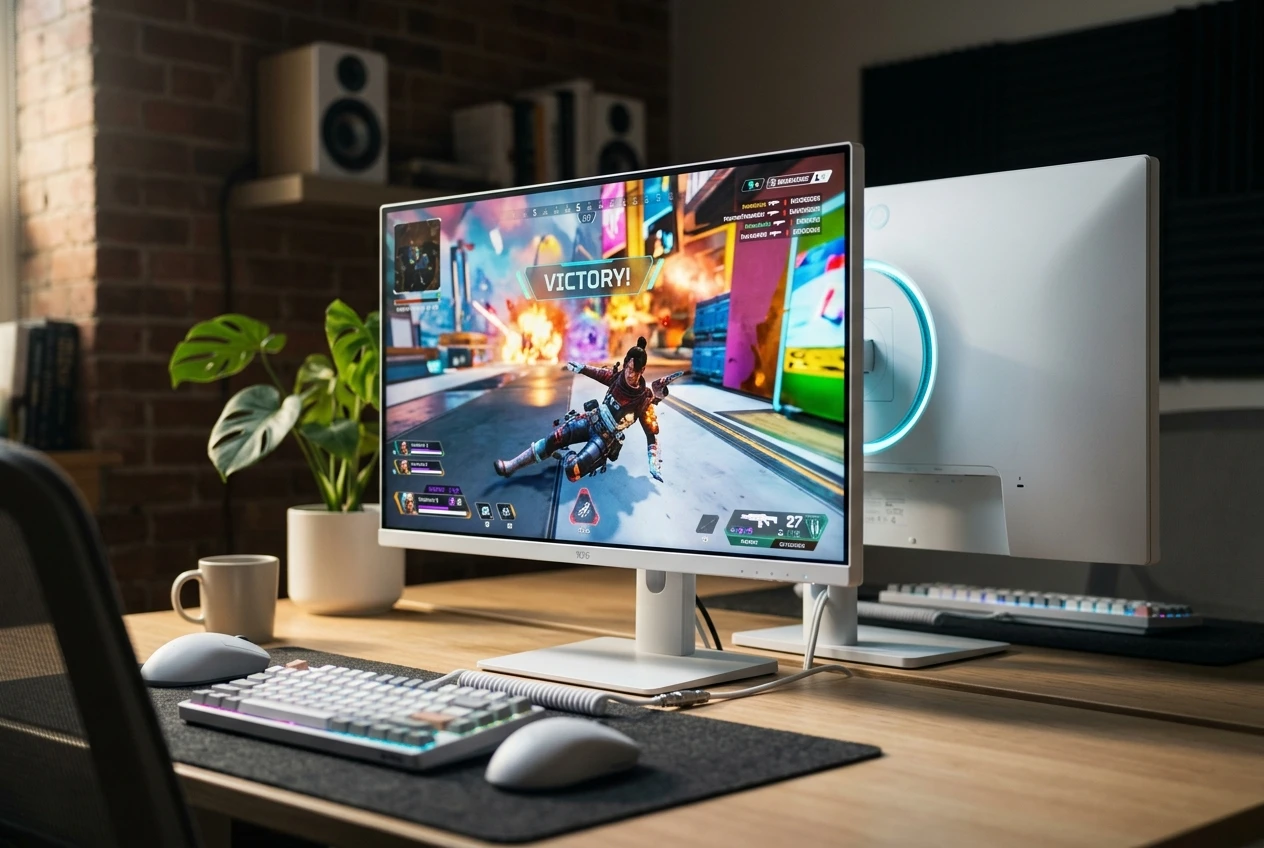
The chassis is matte white with a curved back shell and what KTC describes as an ice-blue ambient logo light on the back panel. The included stand supports height, tilt, swivel, and a full 90-degree pivot into portrait mode. Hardware-level blue light filtering and flicker-free DC dimming are built in, with the goal of cutting blue light without the desaturation that aggressive software filters cause. The full ergonomic range means the H27E6 does not need a third-party arm to fit either landscape or portrait workflows. The 178-degree viewing angle falls in the same neighborhood as most 27-inch IPS panels, so it is a baseline expectation rather than a standout.
Where KTC Takes the Fight to Dell and LG
The H27E6’s most direct fight is with the LG 27GP850 and Dell’s 27-inch vertical office monitor. KTC’s release compares its 300Hz (320Hz OC) refresh against what it calls the LG panel’s 180Hz native rate and Dell’s 144Hz ceiling, framing the H27E6 as a clear speed lead on both.
On color, KTC lists 144% sRGB and 98% DCI-P3 against the 135% sRGB the release attributes to the LG 27GP850. Both percentages are volume figures rather than accuracy claims, so the headline gap is narrow. KTC’s stated Delta E below 2 is the comparison’s center of gravity for color-critical buyers.
The Dell comparison shifts the contest into office territory. KTC names Dell’s 27-inch vertical office monitor as its foil, citing a 144Hz ceiling and no HDR400 or 1ms claim. The H27E6 doubles the Dell refresh ceiling, adds wider color gamut coverage, and bundles the full ergonomic stand into one SKU. The trade-off lands in brand and retail trust, not in the spec table.
The comparison is KTC’s own framing. No independent head-to-head review of the H27E6 against the LG 27GP850 or the Dell office panel has been published at the time of writing. The comparison numbers in this section come from KTC, not from third-party testing.
| Spec | KTC H27E6 | LG 27GP850 (per KTC’s release) | Dell 27-inch vertical office monitor (per KTC’s release) |
|---|---|---|---|
| Native refresh rate | 300Hz (320Hz overclock) | “180Hz native” | Up to 144Hz |
| sRGB coverage | 144% | 135% | – |
| Stated response time | 1ms GTG | Not specified | Not specified |
| HDR certification | VESA DisplayHDR 400 | Not specified | Not specified |
The Three Buyers KTC Pitched
KTC’s release organizes the H27E6’s pitch around three buyer groups, each with a separate use case for the same panel. None of the three is exclusive. The pivot on the stand lets a single panel serve multiple jobs across a workday, which is the structural argument for the all-round framing.
Esports players are the first group: 300Hz native, 1ms GTG, adaptive anti-tearing support, and HDR400 contrast for the smooth frame transitions competitive FPS and battle-royale play depend on. Twitch streamers are the second, leaning on the same speed but using the color accuracy for capture and grading. The vertical pivot is rotated 90 degrees to host full-screen live chat without blocking gameplay. Developers and office workers are the third group, running the panel flat for browsers and apps and pivoting it to read code, logs, or long documents without constant scrolling.
Ports, Stand, and Eye-Care Trade-Offs
The H27E6 ships with a port set aimed at the broadest possible buyer pool. Two HDMI 2.1 ports, two DisplayPort 1.4 sockets, a USB 2.0 expansion port, and a 3.5mm audio jack cover the input matrix for desktop PCs, gaming laptops, and current-generation consoles.
Both HDMI 2.1 ports can carry the WQHD signal at 300Hz without compression, which matters for PS5 and Xbox Series X owners who want full refresh at the panel’s native resolution. The dual DisplayPort 1.4 layout means a desktop and a laptop can stay hot-swappable without cable changes. KTC’s release does not list a USB-C input or built-in KVM, so users running two machines on one keyboard will need an external switch.
The stand does the heaviest lifting for non-gaming buyers. It supports full 90-degree pivot, height, tilt, and swivel, with stability locked in both landscape and portrait modes. That pivot is the single feature that lets the same panel double as an esports screen and a code-scrolling monitor without any hardware changes.
Eye-care sits in the panel design rather than the on-screen menu. Hardware-level blue light filtering is the headline, cutting blue light without the desaturation aggressive software filters introduce. Flicker-free DC dimming sits next to it. KTC does not list a TÜV or Eyesafe certification in the release, so the eye-care claim rests on the hardware design rather than a third-party stamp.
The chassis itself is matte white with the curved back shell and ice-blue ambient logo light KTC describes as the aesthetic anchor. The 178-degree viewing angle keeps the picture even when the panel sits on a swing arm or shares a second viewer. None of these ergonomic or aesthetic details are unusual for the 27-inch QHD class. The full set lands in the H27E6’s release as a single package rather than a tiered option list. KTC has not published panel weight, VESA mount pattern, or chassis dimensions in the launch release, which is one of the practical details a buyer setting up an arm will need before checkout.
The Factory-Direct Trust Question
KTC is not on most US shoppers’ mental shortlist of monitor brands. The brand’s US-direct retail operation runs through ktcplay.com, and the company lists a 3-year warranty, a 30-day return policy, and a 30-day risk-free trial on its product pages. Support contact runs through support@ktcplay.com, with order tracking and a help center on the retail site. For US shoppers, the posted shipping window is 1 to 4 business days, a baseline that signals direct-from-warehouse fulfillment rather than a vague import estimate. The terms come from KTC’s own 2026 brand trust guide, so this is KTC’s framing of itself, not a third-party audit.
That matters because the H27E6 ships factory-direct to buyers who never see a Best Buy shelf. KTC’s trust guide walks through these terms as the recovery path if the panel arrives wrong or fails early. Premium-brand rivals tend to bundle a more polished retail and app-style support experience; KTC’s stated trade is lower entry cost per spec.
Resale value is also weaker on a less-recognized brand name; this is a point KTC’s own guide acknowledges. The panel-and-port transparency argument cuts the other way: KTC publishes detailed specs on each model page, which makes direct model-to-model comparison easier than on retailers that bury specs in marketing copy. None of that overrides the headline: the H27E6 ships with a real warranty and a 30-day return window.
| 3-year warranty | Posted on KTC’s US retail product pages |
| 30-day returns | Posted return window on KTC’s US retail site |
| 30-day risk-free trial | Posted trial term on KTC’s US retail site |
| 1-4 business days | Posted US shipping window on KTC product pages |
| support@ktcplay.com | Posted direct support contact on KTC’s site |
KTC’s ownership terms, per the brand’s own US retail guide.
Where the H27E6 Sits in a Crowded 27-Inch Field
The H27E6 lands in a 27-inch high-refresh category that is unusually crowded in mid-2026, with Philips, ASUS, and LG all pushing new models in the same window. KTC enters that field with its 300Hz native refresh and HDR400 bundled into one panel.
For an esports-first buyer, the H27E6’s draw is the refresh KTC cites against Dell and LG, with the rotating stand as a bonus. Against an ASUS ROG Strix QHD 320Hz deal at $249, the comparison narrows to the extras: HDR400, the wider color coverage, and the bundled ergonomic stand. KTC’s value case depends on those extras carrying their weight at whatever price point the panel lands.
Triple-mode monitors like the Philips Evnia M4 triple-mode QHD-to-HD switch answer a different question, trading raw refresh at one resolution for resolution flexibility across QHD, FHD, and HD. The H27E6 sits closer to the single-resolution 300Hz tier, which is what competitive FPS and battle-royale players tend to favor over multi-mode flexibility. LG’s 32-inch OLED at $684.50 lives in a different category entirely, leaning on panel technology rather than refresh ceiling. Each of those products targets a slightly different priority, and the H27E6 lands firmly in the speed-first group.
KTC’s release is dated July 2, 2026, and confirms the spec sheet and the comparison framing without a US dollar price. Until KTC posts an MSRP or first retail price, the H27E6’s dollar value against the ROG Strix $249 Prime Day deal or the LG OLED at $684.50 will stay unsettled. That gap is the buyer’s factory-direct wait: the spec comparison is ready, the price is not.
Final spec snapshot, sourced from the press release:
- 300Hz native (320Hz OC), 1ms GTG
- 144% sRGB / 98% DCI-P3
- HDR400, 450 nits typical
- 2x HDMI 2.1, 2x DisplayPort 1.4
- 3-year warranty, 30-day returns
Frequently Asked Questions
What is the KTC H27E6’s native refresh rate?
KTC’s release lists a native 300Hz refresh rate on the 27-inch WQHD Fast IPS panel, with overclocking support to 320Hz. Response time is rated at 1ms GTG.
Does the KTC H27E6 support HDMI 2.1?
The H27E6 ships with two HDMI 2.1 ports and two DisplayPort 1.4 ports. KTC states both HDMI 2.1 ports can carry the WQHD signal at 300Hz without compression, which matches what current-generation consoles need at the panel’s native resolution.
What color coverage does the KTC H27E6 offer?
KTC lists 144% sRGB and 98% DCI-P3 coverage, with a stated Delta E below 2 color accuracy. Brightness tops out at 450 nits typical under VESA DisplayHDR 400 certification.
How does the KTC H27E6 compare to the LG 27GP850?
KTC’s release compares the H27E6’s 300Hz native refresh and 144% sRGB coverage against what it calls the LG 27GP850’s 180Hz native rate and 135% sRGB coverage. The comparison comes from KTC; no independent head-to-head review of the H27E6 has been published at the time of writing.
Is KTC a reliable monitor brand?
KTC’s US retail site posts a 3-year warranty, a 30-day return window, a 30-day risk-free trial, and a support email at support@ktcplay.com. The brand’s own 2026 trust guide acknowledges that factory-direct ownership feels more manual than premium-brand retail flows.


South Korea Retail Investors Face Reckoning After KOSPI AI Rally Collapses

Surrey AI Maps Three Heart Attack Paths and Their Molecular Roots

Germany Locks Neutral Apple ATT Prompts Across Most of Europe

Apple’s 5% EU Fee Quietly Rewrites Alternative App Store Math

Apple’s EU Fee Truce Cuts Complexity but Leaves Rivals Fuming

Pixel 11 Pro Fold Trades Thinness for Durability and Seven-Year Stay

Mayo AI Flags HCM Obstruction From Everyday Ultrasound Videos

Indian Brands Quietly Scale Landmark Screens and Home Tech

Navin Vatsa Turns Grief Into a Lifetime of Quiet Seeing

Google Bets Pixel 11 Agentic AI Will Redefine Phones

Oracle Cuts 21,000 Jobs in a Year, Cites AI in 10-K Filing

Fable 5 and Mythos 5 Return as US Lifts Anthropic Export Controls

SpaceX’s Google Deal Turns a Rocket Company Into a Cloud Landlord

CD Projekt Red Co-CEO: Redemption Arc Isn’t Done, Witcher 4 in 2027

XPL Rallies 30% Ahead of Plasma One Card Tier Launch

Google Search Profiles Build a Follow Graph Inside Discover

DGO App Brings Rs 549 Mobile Pass for FIFA World Cup 2026 in Nepal

Moonshot AI Targets $30 Billion in China’s Fastest AI Funding Sprint

Oppo’s ColorOS 17 Eligibility List Leaves A-Series Buyers Behind

Microsoft Xbox Layoffs Start in July as Sharma Slams 3% Margin
-
 AI2 months ago
Oracle Cuts 21,000 Jobs in a Year, Cites AI in 10-K Filing
-
 AI2 months ago
Fable 5 and Mythos 5 Return as US Lifts Anthropic Export Controls
-
 AI3 months ago
SpaceX’s Google Deal Turns a Rocket Company Into a Cloud Landlord
-
 GAMING2 months ago
CD Projekt Red Co-CEO: Redemption Arc Isn’t Done, Witcher 4 in 2027
-
 CRYPTO2 months ago
XPL Rallies 30% Ahead of Plasma One Card Tier Launch
-
 NEWS3 months ago
Google Search Profiles Build a Follow Graph Inside Discover
-
 APPS2 months ago
DGO App Brings Rs 549 Mobile Pass for FIFA World Cup 2026 in Nepal
-
 AI3 months ago
Moonshot AI Targets $30 Billion in China’s Fastest AI Funding Sprint