
GADGETS
AirPods Custom EQ and Adaptive Audio Slider Arrive in iOS 27 (9A5314b)
Apple pushed AirPods firmware 9A5314b to developers July 7, 2026. It unlocks iOS 27’s Custom EQ, an Adaptive Audio slider, and a redesigned settings menu.

Apple pushed Build 9A5314b, the third AirPods firmware 9 beta, to developers on July 7, 2026. The firmware activates iOS 27’s custom three-band equalizer, a relocated Adaptive Audio slider and a redesigned AirPods settings menu. The build is restricted to developer accounts and runs against iOS 27, iPadOS 27 or macOS Golden Gate companion betas.
For non-developers, the build is a preview of how iOS 27 will behave on AirPods when it ships publicly later this year. Each of the new additions lands only on AirPods running firmware 9; older AirPods stay on Apple’s older 6.x and 7.x firmware tracks.
What’s in Build 9A5314b
Build 9A5314b is the third AirPods firmware 9 beta, MacRumors reported on July 7, following earlier build 9A5292e (June 9) and 9A5304b (June 24). All three have shipped against the iOS 27 developer beta cycle and have been developer-only.
The new build supports AirPods Pro 2, AirPods Pro 3, AirPods 4 in both standard and Active Noise Cancellation variants, and AirPods Max 2. AirPods Max 2 only joined the firmware 9 program with iOS 27 beta 2 after launching March 16, 2026 with an H2 chip.
AirPods Pro 1, AirPods 3, AirPods 2, AirPods 1 and the original AirPods Max all stay on Apple’s older firmware lines. AirPods Pro 1 sits on 6F21, AirPods 3 on 6F21, AirPods 2 on 6F21 and AirPods 1 on 6.8.8. AirPods Max 1 in the USB-C variant is on 7E108, while the Lightning version is on 6F25.
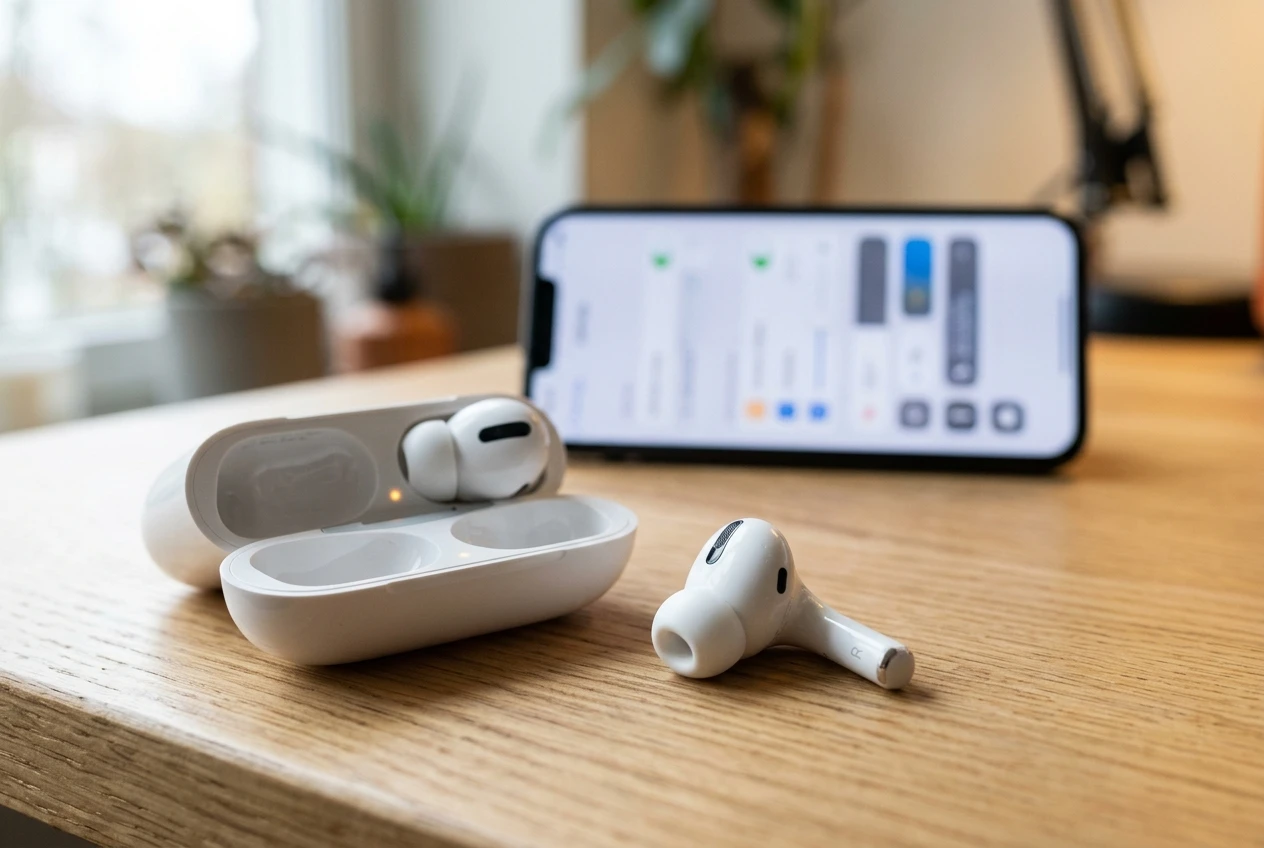
A Custom EQ Comes to AirPods at Last
For most of AirPods’ history, the AirPods settings held no audio tuning options beyond on/off sliders and a fixed set of listening modes. A basic equalizer lived in the Music app, but it was minimal and did not reach the AirPods output from the Settings app itself. With iOS 27 and the firmware running on Build 9A5314b, that finally changes. Apple activates a Custom EQ inside the AirPods settings, the first user-controllable equalizer to ship with the AirPods lineup.
The interface lives three layers deep at Settings > AirPods > Audio & Routing > Equalizer. Inside the Custom option, Apple plays a preview of a recently played song and exposes a waveform the user drags up or down to tune the bands. Apple restricts the Custom EQ to AirPods running firmware 9 with an H2 chip, and iOS 27 on a paired iPhone is the software prerequisite.
What 9A5314b does not include is more than three bands or any parametric controls. Apple has shipped the new EQ at the minimum end of user-controllable audio: three bands, a preview and a drag-to-tune waveform.
For most AirPods users moving from the preset menu, three bands are a real upgrade. The waveform interface lowers the bar to trying the new EQ for the first time. Dragging the on-screen bars happens from inside the AirPods settings menu, where the controls were previously fixed behind Apple’s own preset list. The change sits among a few underrated iOS 27 features that slipped past Apple’s WWDC 2026 hype.
| Feature | Where it lives in iOS 27 | What it does |
|---|---|---|
| Custom EQ | AirPods > Audio & Routing > Equalizer | Tunes Low, Mid and High via a draggable waveform |
| Adaptive Audio slider | AirPods > Listening Mode | Moves the ambient noise mix between Transparency and Noise Cancellation |
| Redesigned settings menu | AirPods | Visual AirPods preview and grouped sections by topic |
| Name Recognition | AirPods > Hearing Health | Identifies when someone says the user’s name; supported in over 50 countries |
| Precision Finding via Apple Watch | Find My on watchOS 27 | Locates an AirPods Pro 3 case using Ultra Wideband |
An Adaptive Audio Slider That Isn’t Buried
The official Adaptive Audio feature guide describes the feature as a blend of Active Noise Cancellation and Transparency, with the mix adjusting automatically to match environmental noise. Until iOS 27, the only path to fine-tune how much ambient sound Adaptive let through was to dig into Settings > Bluetooth, tap the AirPods info button, then move a slider under Adaptive Audio. Lifehacker’s walkthrough of the current settings describes the option as buried and easy to miss. Apple’s own path through Settings kept the control out of sight for most users.
iOS 27 moves the same slider into the Listening Mode menu, where it sits alongside the controls for Active Noise Cancellation, Transparency and Adaptive Audio. With Build 9A5314b installed on the AirPods and iOS 27 on the iPhone, dragging the slider left or right smoothly biases the AirPods toward quieter or more transparent sound. The screen is the one users already use to switch between listening modes, so the slider appears next to its targets.
The slider takes effect while the AirPods are being worn, Apple’s setup pages specify. That framing makes the control a real-time adjustment, not a one-time preference stored when the AirPods are off-ear.
The Settings Menu Apple Finally Split Up
The AirPods section of the Settings app has historically been a long scroll. Noise cancellation toggles sat next to microphone mode next to firmware version next to Find My. Some controls were redundant with the Bluetooth screen, others were hidden three menus deep.
iOS 27 reorganizes the AirPods settings into grouped sections, Lifehacker’s preview walkthrough shows. When an iPhone on iOS 27 connects to AirPods running 9A5314b, Settings > AirPods opens with a visual preview of the earbuds and a battery readout for the case. Below the preview, the controls split into sections Apple has named: Audio & Routing, Hearing Health and Controls & Gestures. Each section groups related features in its own labeled area of the menu. The visual preview sits at the top of the screen rather than buried behind a tab.
- Audio & Routing hosts the Custom EQ, Listening Mode and Personalised Volume controls
- Hearing Health now includes Name Recognition, which identifies when someone says the user’s name in over 50 countries
- Controls & Gestures groups stem presses, force sensor remaps and Siri access
Which AirPods Get the Update and How to Install
Build 9A5314b is rated for four product lines: AirPods Pro 2, AirPods Pro 3, AirPods 4 in both standard and Active Noise Cancellation variants, and AirPods Max 2. AirPods Max 2 launched March 16, 2026 at $549 with an H2 chip, and the headphones only joined the firmware 9 line at iOS 27 beta 2.
Older AirPods sit on Apple’s older firmware lines and do not run firmware 9. AirPods Pro 1, AirPods 3, AirPods 2 and AirPods 1 sit on firmware versions in the 6F21 and 6.8.8 range. AirPods Max 1 in the USB-C variant runs 7E108 and the Lightning version runs 6F25. None of these models reach the new EQ or the relocated Adaptive Audio slider because the H2 chip is what carries those features.
For the developer beta, the install path requires more deliberate setup than a standard AirPods firmware update, starting from an iPhone, iPad or Mac on the iOS 27, iPadOS 27 or macOS Golden Gate developer beta. Forbes’ David Phelan walked through the procedure for the earlier 9A5304b build, and the same steps apply to 9A5314b. After the paired device updates, the AirPods sit in their case on power, per Apple’s documented AirPods firmware install steps.
- Install the iOS 27, iPadOS 27 or macOS Golden Gate developer beta on the iPhone, iPad or Mac that pairs with the AirPods.
- Connect the AirPods to that device.
- Open Settings and tap the AirPods section near the top of the screen.
- Scroll down to the bottom of the AirPods page and turn on AirPods Beta Updates. The same toggle lives under Settings > Bluetooth after tapping the i next to the connected AirPods.
- Place the AirPods in their charging case within Bluetooth range of the paired device. AirPods Max 2 goes into its Smart Case with a charging cable plugged in.
The installation gives no progress bar; the firmware updates silently in the background over minutes to hours, MacDailyNews reports. A developer who pairs AirPods and walks away from the desk should check the firmware version the next morning to confirm 9A5314b has taken hold before testing any feature.
What’s Still Unresolved
Build 9A5314b is developer-only and Apple has not opened a public beta for the firmware itself. MacDailyNews reported on July 8 that a public beta may follow the developer cycle, but Apple’s standard release note language for the AirPods firmware 9 line has stayed at “bug fixes and other improvements” without an itemized list of what’s fixed across the 9A5292e, 9A5304b and 9A5314b builds. Whether the firmware clears lingering volume and connection quirks iOS 26-era AirPods users have flagged is not addressed in any release note Apple has posted.
For most AirPods owners, the practical move is to wait. The Custom EQ, Adaptive Audio slider and redesigned settings menu will reach every supported AirPods model when Apple ships iOS 27 in September, paired with the matching stable AirPods firmware on the four supported product lines.
Frequently Asked Questions
When will 9A5314b leave beta?
Apple has not announced a public beta date for the firmware build. MacDailyNews reported on July 8 that a public beta may follow the developer cycle, and Apple expects iOS 27 to ship in September with the matching stable AirPods firmware.
Which AirPods models support the new firmware?
Build 9A5314b supports AirPods Pro 2, AirPods Pro 3, AirPods 4 in standard and Active Noise Cancellation variants, and AirPods Max 2. Older AirPods, including AirPods Pro 1, AirPods 3, AirPods 2, AirPods 1, and AirPods Max 1 in both USB-C and Lightning variants, stay on Apple’s older firmware lines. None of those older models can run firmware 9.
Does the new Custom EQ work on AirPods without an H2 chip?
No. iOS 27’s Custom EQ is restricted to AirPods running firmware 9 with an H2 chip. AirPods Pro 1 and AirPods Max 1 use older chips and do not support the new EQ even when paired to an iPhone on iOS 27.
Where do I find the Adaptive Audio slider in iOS 27?
iOS 27 moves the slider into the Listening Mode menu, where it sits alongside the controls that switch between Active Noise Cancellation, Transparency and Adaptive. Dragging the slider left or right biases the AirPods toward quieter or more transparent sound. The adjustment takes effect while the AirPods are being worn, Apple’s setup pages specify.
Can I install 9A5314b without the developer beta?
Not directly, since 9A5314b is a developer-only build. The Custom EQ, Adaptive Audio slider and redesigned settings menu will reach regular AirPods users when Apple ships iOS 27 publicly, expected in September, paired with the matching stable AirPods firmware.


South Korea Retail Investors Face Reckoning After KOSPI AI Rally Collapses

Surrey AI Maps Three Heart Attack Paths and Their Molecular Roots

Germany Locks Neutral Apple ATT Prompts Across Most of Europe

Apple’s 5% EU Fee Quietly Rewrites Alternative App Store Math

Apple’s EU Fee Truce Cuts Complexity but Leaves Rivals Fuming

Pixel 11 Pro Fold Trades Thinness for Durability and Seven-Year Stay

Mayo AI Flags HCM Obstruction From Everyday Ultrasound Videos

Indian Brands Quietly Scale Landmark Screens and Home Tech

Navin Vatsa Turns Grief Into a Lifetime of Quiet Seeing

Google Bets Pixel 11 Agentic AI Will Redefine Phones

Oracle Cuts 21,000 Jobs in a Year, Cites AI in 10-K Filing

Fable 5 and Mythos 5 Return as US Lifts Anthropic Export Controls

SpaceX’s Google Deal Turns a Rocket Company Into a Cloud Landlord

CD Projekt Red Co-CEO: Redemption Arc Isn’t Done, Witcher 4 in 2027

XPL Rallies 30% Ahead of Plasma One Card Tier Launch

Google Search Profiles Build a Follow Graph Inside Discover

DGO App Brings Rs 549 Mobile Pass for FIFA World Cup 2026 in Nepal

Moonshot AI Targets $30 Billion in China’s Fastest AI Funding Sprint

Oppo’s ColorOS 17 Eligibility List Leaves A-Series Buyers Behind

Microsoft Xbox Layoffs Start in July as Sharma Slams 3% Margin
-
 AI2 months ago
Oracle Cuts 21,000 Jobs in a Year, Cites AI in 10-K Filing
-
 AI2 months ago
Fable 5 and Mythos 5 Return as US Lifts Anthropic Export Controls
-
 AI3 months ago
SpaceX’s Google Deal Turns a Rocket Company Into a Cloud Landlord
-
 GAMING2 months ago
CD Projekt Red Co-CEO: Redemption Arc Isn’t Done, Witcher 4 in 2027
-
 CRYPTO2 months ago
XPL Rallies 30% Ahead of Plasma One Card Tier Launch
-
 NEWS3 months ago
Google Search Profiles Build a Follow Graph Inside Discover
-
 APPS2 months ago
DGO App Brings Rs 549 Mobile Pass for FIFA World Cup 2026 in Nepal
-
 AI3 months ago
Moonshot AI Targets $30 Billion in China’s Fastest AI Funding Sprint